You can set up policies to automatically archive or delete documents (either soft or hard deletes) based on their age, profile information, dates, or index values.
You can create policies for the following actions:
•Archive - moves documents to the Archive section.
•Delete to Recycle Bin - moves documents to the Recycle Bin.
•Delete Permanently (Purge) - permanently deletes documents.
•Delete from Recycle Bin - permanently deletes documents that are already in the Recycle Bin.
Methods of Archiving and Deleting
Docsvault provides two ways to archive documents:
•Automatic Archiving and Deletion: Create policies to automatically process documents based on defined criteria.
•Manual Archiving: Archive individual documents when required. See Archiving Documents. for more information.
•Policy Configuration: Only members of the Administrators group can create or modify archive and delete policies. •Manual Archiving: Users with New Version/Check out rights on a document can manually archive it. •Document Recovery: Only administrators can unarchive or restore deleted documents. •Archive Section: Archived documents are moved to the Archive section. The Archive section cannot be deleted. By default, only members of the Administrators group can access it. You can provide access to other users or groups through the Archive Access security template. •Access to documents in the Archive section continues to be controlled by the permissions originally assigned to those documents. |

Set Up an Automatic Archive and Delete Policy
You can create an archive or delete policy from Docsvault Server Manager or from Administration in the Desktop Client.
•Open Archive and Delete Policy.
•Click New..
•In Create Archive and Delete Policy, enter a Policy Name.
•Select the Policy Type:
oArchive
oDelete
•If you selected Delete, select the required Delete Option:
oDelete to Recycle Bin
oDelete Permanently (Purge)
oDelete from Recycle Bin
•Configure the criteria for the policy.
Archive Policy
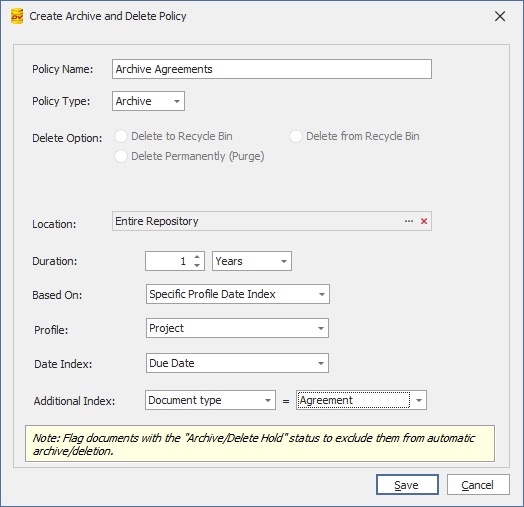
Select Archive as the Policy Type to move documents that meet the policy criteria to the Archive section.
 |
Example:
To archive agreements that have not been updated for one year:
•Policy Name: Archive Closed Agreement
•Policy Type: Archive
•Location: Entire Repository
•Duration: 1 Year
•Based On: Specific Profile Date Index
•Profile: Client Files
•Date Index: Document Date
•Additional Index: DocType = Agreement
When the policy runs, documents that meet these criteria are moved to the Archive section.
Delete to Recycle Bin
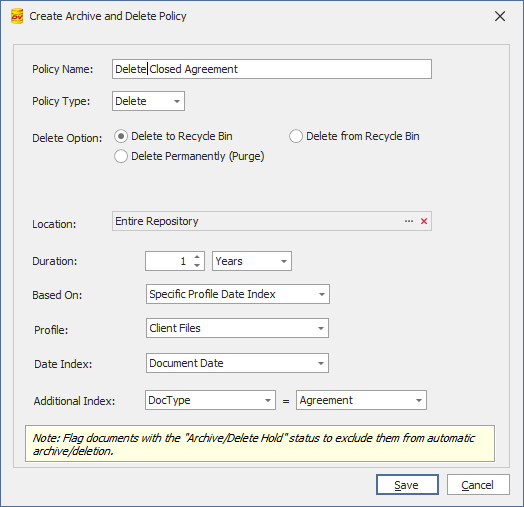
Select Delete > Delete to Recycle Bin to move documents that meet the policy criteria to the Recycle Bin.
Documents moved to the Recycle Bin can be restored later according to your Recycle Bin permissions and procedures.
Example
To move closed agreements older than one year to the Recycle Bin:
•Policy Name: Delete Closed Agreement
•Policy Type: Delete
•Delete Option: Delete to Recycle Bin
•Location: Entire Repository
•Duration: 1 Year
•Based On: Specific Profile Date Index
•Profile: Client Files
•Date Index: Document Date
•Additional Index: DocType = Agreement
When the policy runs, documents that meet these criteria are moved to the Archive section.
Delete Permanently (Purge)
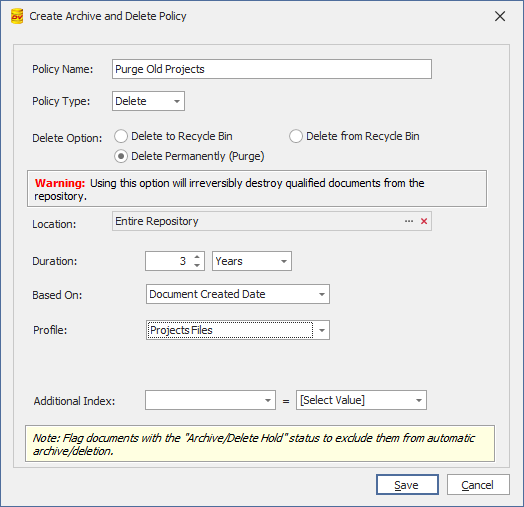
Select Delete > Delete Permanently (Purge) to permanently delete documents that meet the policy criteria without sending them to the Recycle Bin.
This option permanently removes the qualified documents from the repository.
Warning: Documents deleted using Delete Permanently (Purge) cannot be recovered.
Example
To permanently delete project documents that are more than three years old:
•Policy Name: Purge Old Projects
•Policy Type: Delete
•Delete Option: Delete Permanently (Purge)
•Location: Entire Repository
•Duration: 3 Years
•Based On: Created Date
•Profile: Project Files
Delete from Recycle Bin
Select Delete > Delete from Recycle Bin to permanently remove documents that are already in the Recycle Bin.
This option provides additional criteria to identify which Recycle Bin items should be permanently deleted.
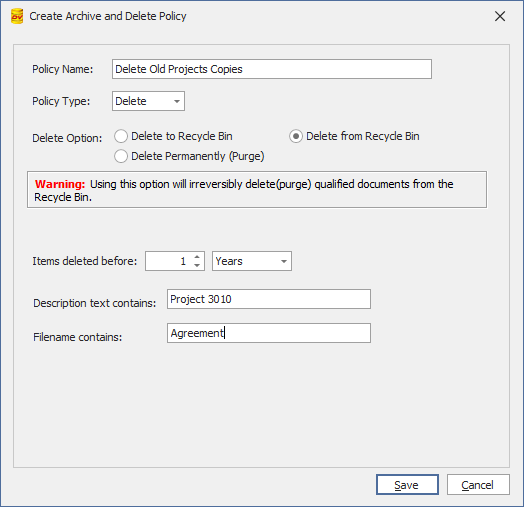
Configure the following options:
•Items deleted before - specify how long an item must have been in the Recycle Bin before it qualifies for deletion.
•Description text contains - enter text that must appear in the document description.
•Filename contains - enter text that must appear in the document filename.
Example
To permanently delete Recycle Bin items that have been there for more than one year and relate to Project 3010:
•Policy Name: Delete Old Project Copies
•Policy Type: Delete
•Delete Option: Delete from Recycle Bin
•Items deleted before: 1 Year
•Description text contains: Project 3010
•Filename contains: Agreement
Only Recycle Bin items matching the configured criteria are permanently deleted.
Warning: Documents deleted using Delete from Recycle Bin are permanently removed and cannot be restored.
Set the Policy Location
Use Location to restrict the policy to a specific cabinet or folder.
To apply the policy to the entire repository, select Entire Repository.
Set the Duration
For Archive, Delete to Recycle Bin, and Delete Permanently (Purge) policies, use Duration to specify when a document qualifies for processing.
You can specify the duration in:
•Days
•Months
•Years
Select the Date Criteria
Use Based On to determine which date Docsvault uses when evaluating the policy.
Available options include:
•Created Date - uses the document's creation date.
•Modified Date - uses the document's last modified date.
•Specific Profile Date Index - uses a date stored in a profile index.
Example
•If you select Modified Date and set the duration to 1 Year, documents that have not been modified for one year can qualify for the policy.
•If you select Specific Profile Date Index, select the required Profile and Date Index.
Additional Index
You can further restrict an Archive or Delete policy by specifying an index value.
For example:
•Profile: Client Files
•Date Index: Document Date
•Additional Index: DocType = Agreement
In this example, the policy applies only to documents in the Client Files profile where DocType is Agreement.
Save the Policy
After configuring the policy, click Save.
The policy is added to the list of Archive and Delete policies and runs according to the policy schedule.
Policy Job Schedule
Multiple Archive and Delete policies can be configured for different documents and locations.
The policy jobs run daily at 4:00 AM based on the server system time.
Review your policy criteria carefully before enabling a policy, particularly policies that permanently delete documents.