Docsvault can use Litera Compare, if available, as the default document comparison application.
Configure Litera Compare
•Select Options > Integrations.
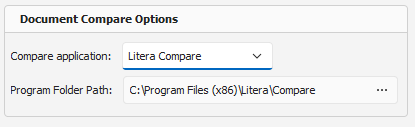
•Under Document Compare Options, select Litera Compare from the Compare application list.
•In Executable path, enter the path to the Litera Compare executable, or click Browse and select the executable.
•Click OK.
 Literra |
Once configured, Compare from the document context menu opens supported Word or Excel documents using Litera Compare.
For instructions on comparing documents, see Working with Documents > Compare Documents.