❖ Database Server Requirements when using your own MSSQL Server
Database Server Requirements
Docsvault needs either an empty database or a database with Docsvault data in it. Databases that have some other data in them cannot be used.
Your SQL Server must meet the following requirements for Docsvault:
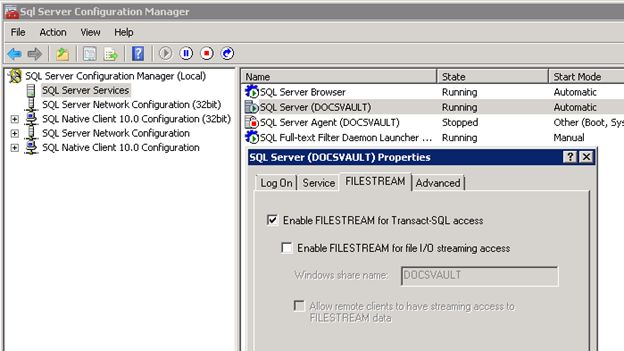
•FILESTREAM must be enabled •Full-Text Search must be enabled. •Required iFilters must be installed and enabled for supported document formats. 1.Ensure FILESTREAM is enabled: •Open SQL Server Configuration Manager (Start > Programs > Microsoft SQL Server 2022 > Configuration Tools > SQL Server Configuration Manager)
•Navigate to the SQL Server Services node and from the right pane open the properties dialog for the SQL Server service from its right click menu. •Click the FILESTREAM tab and select the checkbox to enable FILESTREAM for Transact-SQL access.
2.Ensure Full-Text Search feature is installed and enabled: 3.Ensure proper search iFilter are installed Full-text (content) search in Docsvault requires an iFilter to be installed on the server hosting the Docsvault SQL Server database. They are not required on client/workstation machines.
Windows includes iFilters for some formats out of the box; others must be installed separately.
•.doc, .docx, .xls, .xlsx, .ppt, .pptx - Supported when Microsoft Office is installed on the SQL Server machine. If Office is not installed, you can install the Microsoft Office 2010 Filter Pack (free, no Office license required).
•.pdf - Modern Windows operating systems include support for PDF indexing. If PDF files are not being indexed, install and register a supported PDF iFilter. •.msg - The Microsoft Office 2010 Filter Pack support for Outlook (.msg) files. If .msg files are not indexed, install Microsoft Outlook 2010 or later, which registers the required MSG iFilter. •.eml - Supported using the built-in Windows MIME iFilter; no additional installation is required. •Additional File Types: Install the appropriate iFilter for the required file type from IFilter.org or IFiltershop.com.
For SQL Server 2025, external iFilters are managed using the Version 2 Full-Text Search component system and version_overrides.json. Refer How to Enable External iFilters in SQL Server 2025 for installation and configuration instructions. |