Use Change Profile to bulk transfer/move profiles of multiple documents and map their existing source index values to the indexes in the destination profile.
When profiles use a strict structure, changing the profile can also move documents to the location defined by the destination profile's filing settings.
•Change Profile is available for profiles with a strict structure.
|

Change the Profile of a Document
•Select the document.
•Right-click the document.
•Select Edit > Change Profile.
•In the Change Profile window, select the destination profile.
•Review the source and destination index mapping.
•Select the destination index for each source index where required.
•Click OK.
Docsvault changes the document to the selected profile and applies the mapped index values.
Change the Profile of Multiple Documents
You can change the profile of multiple documents at the same time.
•Select the documents you want to change.
•Right-click the selected documents.
•Select Edit > Change Profile.
•Select the destination profile.
•Review the index mapping.
•Click OK.
Docsvault applies the selected destination profile and index mapping to all selected documents.
Map Source and Destination Indexes
The Change Profile window displays the indexes from the source profile and allows you to map them to the corresponding indexes in the destination profile.
For example, an Active Client Matter profile may contain
•Client
•Matter
•Document Type
•Date
•Attorney
When changing the profile to Closed Client Matter, you can map the corresponding indexes as below:
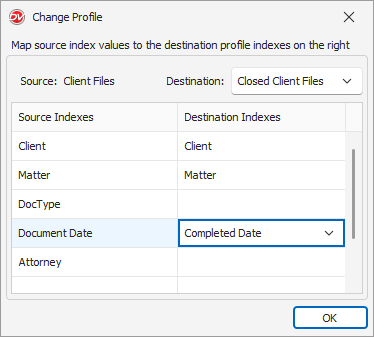 |
Index Type
The source and destination indexes must have the same index type.
For example:
•Date → Date
•Static List → Static List
•Text → Text
•Numeric → Numeric
Only compatible destination indexes are available for selection.
•If a source static list value does not exist in the destination static list, Docsvault will create the value in the destination static list when the profile is changed.
|
•Make sure all required source indexes are mapped to destination indexes. Any source index that is not mapped will not be transferred and its value will be lost permanently when you change the profile.
|

Change Location
Changing the profile can also move the document to a different location. The destination location depends on the Profile Filing Template configured for the destination profile.
For example, when changing a document from Active Client Matter to Closed Client Matter, Docsvault can move the document to the location defined by the filing settings of the Closed Client Matter profile.
Note: Whether the document location changes or not depends on the filing settings configured for the destination profile.