Duplicate Document Handling
Docsvault checks for duplicate documents during import. The check is performed in two ways: Duplicate Content and Duplicate Filename.
Duplicate Content
If the same exact file already exists anywhere in the Docsvault repository, Docsvault detects it as a duplicate even when the existing copy has a different filename or is stored in another location.
Docsvault displays information about the existing document, including its path, filename, saved date, and saved by details.
You can choose:
•Save Duplicate - saves the imported file as a separate document.
•Skip - does not import the file.
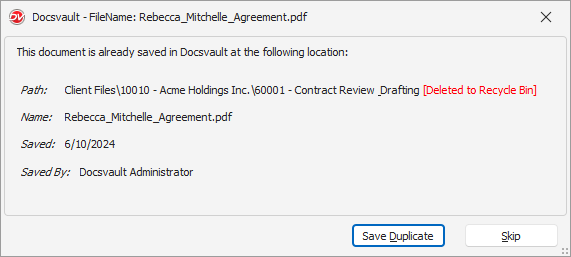 Duplicate File Handling |
Note: Duplicate detection is based on exact copy of the file, not the name. The existing document may be stored anywhere in the Docsvault repository, including the Recycle Bin.
Duplicate Filename
If a document with the same name already exists in the destination folder, Docsvault provides these options:
•Overwrite - replaces the existing document with the imported file.
•New Version - adds the imported file as a new version of the existing document.
•Keep Both - saves the imported document as a separate document by adding a number to its filename.
For example, if Contract.docx already exists, selecting Keep Both saves the imported document with a name such as Contract_1.docx.
Note: Duplicate Filename checks only the destination folder. It is different from Duplicate Content, which checks for the same file content (copy) anywhere in the repository.