
Legal Document Management
Secure On-Premise Legal Document Management Software for Modern Law Firms
A powerful, compliant, and user-friendly legal document management system for law firms designed to help legal professionals securely manage, organize, and govern documents across matters, cases, and clients.
Since 2003
5000+ Orgs
Trusted Worldwide
Built for Law Firms
Trusted by Law Firms Worldwide
Join law firms and legal departments who rely on Docsvault to manage sensitive documents securely, every day.





Built for Legal Teams. Trusted Across Industries.
Built for legal professionals, with the same document control and security other regulated industries need.
Law Firms
Manage pleadings, discovery, court-filed PDFs, and case correspondence with built-in Bates numbering (PDF), redaction, and automated footer stamping (Word).
Corporate Legal Dept.
Centralize contracts, board resolutions, compliance documents, and cross-department communication with complete audit trails and control.
Small Practices
Simple to deploy and cost-effective, with structured, matter-based organization—no dedicated IT resources required.
Multi-Office Firms
Enable secure, role-based access across offices so every user sees only what they need, with document comparison and version control.
Why Law Firms Choose Docsvault for Document Management
From matter-centric organization to enterprise-grade security, see what sets Docsvault apart for legal teams.
Key Features of a Legal Document Management System
Powerful tools to streamline legal workflows, enhance security, and improve collaboration across law firms — part of a complete document management platform built for regulated industries.
Case & Client File Management
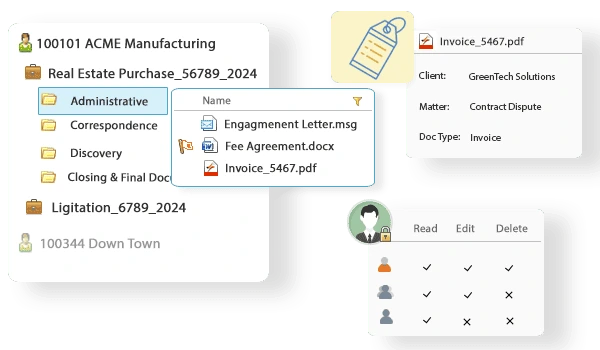
- Organize case files into matter-centric folders for quick and intuitive retrieval.
- Apply document profiles, metadata indexing, and tags to streamline categorization and tracking within your legal document management system.
- Maintain a clear record of document ownership and access history to enhance compliance and transparency.
| Why It Matters |
Legal professionals manage multiple cases and clients—structured, matter-centric document organization is critical for efficiency and defensibility.

Email & Microsoft Office Integration
- Save inbound and outbound emails and attachments directly into your document management software for law firms, while automatically detecting duplicates.
- Work directly within Microsoft Word, and Excel, enabling seamless document comparison, collaboration and version control without leaving your familiar tools.
- Enable full-text indexing of emails and attachments for fast retrieval during audits, discovery, or case preparation.
| Why It Matters |
Emails and office documents are central to legal communications—seamless integration saves time.
Intelligent Document Search & OCR Technology
- Perform full-text searches across all legal documents using keyword or phrase queries.
- Use filters based on metadata, document type, or matter for precise results.
- OCR technology extracts and indexes text from scanned documents to make them searchable.
| Why It Matters |
Fast and precise search capabilities reduce time wasted looking for crucial legal documents, letting lawyers work smarter and faster.

All-in-One Legal PDF Management
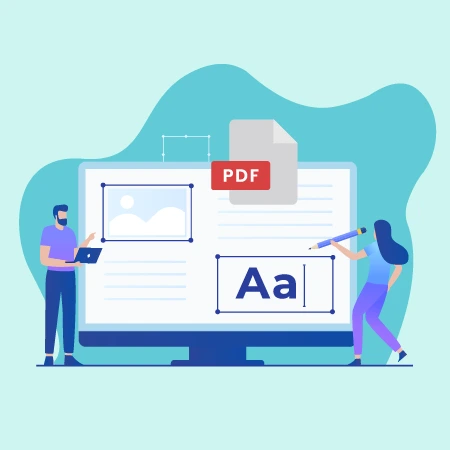
- Create, edit, merge, and organize PDFs directly within the legal document management system without relying on external PDF tools.
- Apply Bates numbering, watermarks, headers, footers, and redactions to ensure legal document integrity.
- Securely sign and route PDF forms with built-in e-signature and approval workflows for law firms.
| Why It Matters |
Centralized PDF management meets legal workflow needs while ensuring document security and compliance.
Sharing & Collaboration
- Create, edit, and manage case files across devices using a secure legal document management platform.
- Maintain version control to track changes and ensure teams always work on the latest file.
- Securely share and collect legal documents with external parties using secured shared links.
| Why It Matters |
Secure collaboration improves turnaround times while protecting sensitive legal information.


Compliance, Audit Trails & Document Retention
- Maintain detailed audit trails for every document, tracking access, edits, and version history.
- Automate retention policies to archive or delete records in compliance with legal regulations.
- Generate audit reports for inspections, litigation, or regulatory reviews.
| Why It Matters |
Robust compliance and audit capabilities reduce legal risk and build trust with clients and regulators.
Secure Storage & Access Control
- Centralize sensitive legal documents with secure legal document storage and management for law firms.
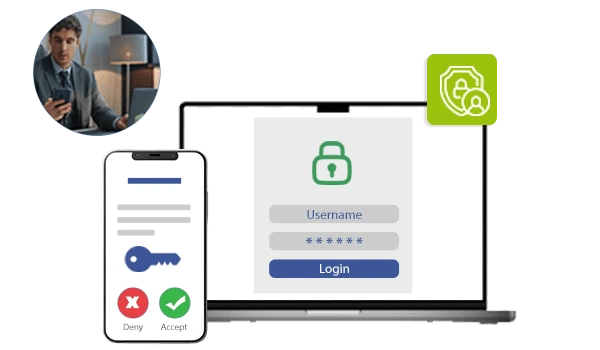
- Apply role-based access controls, granular permissions, and two-factor authentication (2FA).
- Enable secure remote access for attorneys and staff while maintaining complete control over legal documents within your on-premise infrastructure. Read On-Premise vs Cloud Document Management for Law Firms
| Why It Matters |
Legal professionals handle highly confidential information that demands top-tier security and controlled access.

Workflow Automation & E-Signatures
- Automate document approvals and routing with predefined workflows, reducing manual intervention.
- Enable real-time notifications for approvals, document changes, and approaching deadlines.
- Send, receive, and track electronic signatures without leaving the document management system, ensuring faster processing.
| Why It Matters |
Automation reduces delays, improves consistency, and increases legal team productivity.
Document Scanning & Digitalization
- Digitize paper-based legal records and historical case files.
- Apply OCR to scanned files to unlock text for indexing and search.
- Convert physical records into organized, searchable digital assets.
| Why It Matters |
Digital access to legacy documents improves efficiency and supports modern legal operations.

Comparing Docsvault to Your Current System?
See why law firms are moving off legacy platforms to a more modern, on‑premise‑friendly legal DMS.
See how a law firm improved document control in our Worldox Migration for a law firm case study →
Docsvault also powers document management for:
Legal Document Management Software FAQ
Legal document management is the process of securely storing, organizing, retrieving, and sharing legal documents in a way that supports compliance, improves workflow efficiency, and enables seamless collaboration among legal professionals.
Law firms handle large volumes of sensitive legal documents. A DMS helps streamline document organization, improves searchability, ensures security and compliance, and enables efficient collaboration within teams.
In the context of legal document management and effective document management for law firms, a legal DMS strengthens security and compliance by enforcing role-based access controls, applying retention policies, and maintaining detailed audit trails. This helps law firms comply with regulations such as GDPR, HIPAA, and SOC 2 while reducing legal risk during audits and eDiscovery.
As part of modern legal document management and document management for law firms, a legal DMS centralizes and organizes documents and electronically stored information (ESI), making it easier to identify, collect, and review data during eDiscovery. Advanced search, secure access controls, and audit-ready records help law firms meet legal and regulatory requirements more efficiently.
Docsvault is designed for law firms that need secure, organized, and compliant document management. It offers meta-driven filing and retrieval, AI-powered data capture, document comparison for Word, and Excel, and tight Microsoft Office and Outlook integration — helping firms maintain control over confidential information while improving productivity.
When evaluating document management software, law firms should look for features such as:
- matter-centric document organization
- advanced document search and indexing capabilities
- email management
- version control and document history
- built-in PDF editing tools
- retention management and compliance controls
- security and role-based access control
- digital signatures
For a deeper explanation of these capabilities and how they support legal workflows, see Legal Document Management Software Explained.
