Backup and Restore: How to Protect Your Document Repository
Documents are among an organization’s most important business assets. Contracts, customer records, financial documents, employee files, project records, and other business information may all be stored in a document management repository.
But managing documents in a centralized repository is only part of protecting that information.
Organizations also need a reliable way to create copies of repository data and recover it when necessary. A well-planned document backup and restore strategy helps protect against data loss and supports recovery when the primary repository is affected.
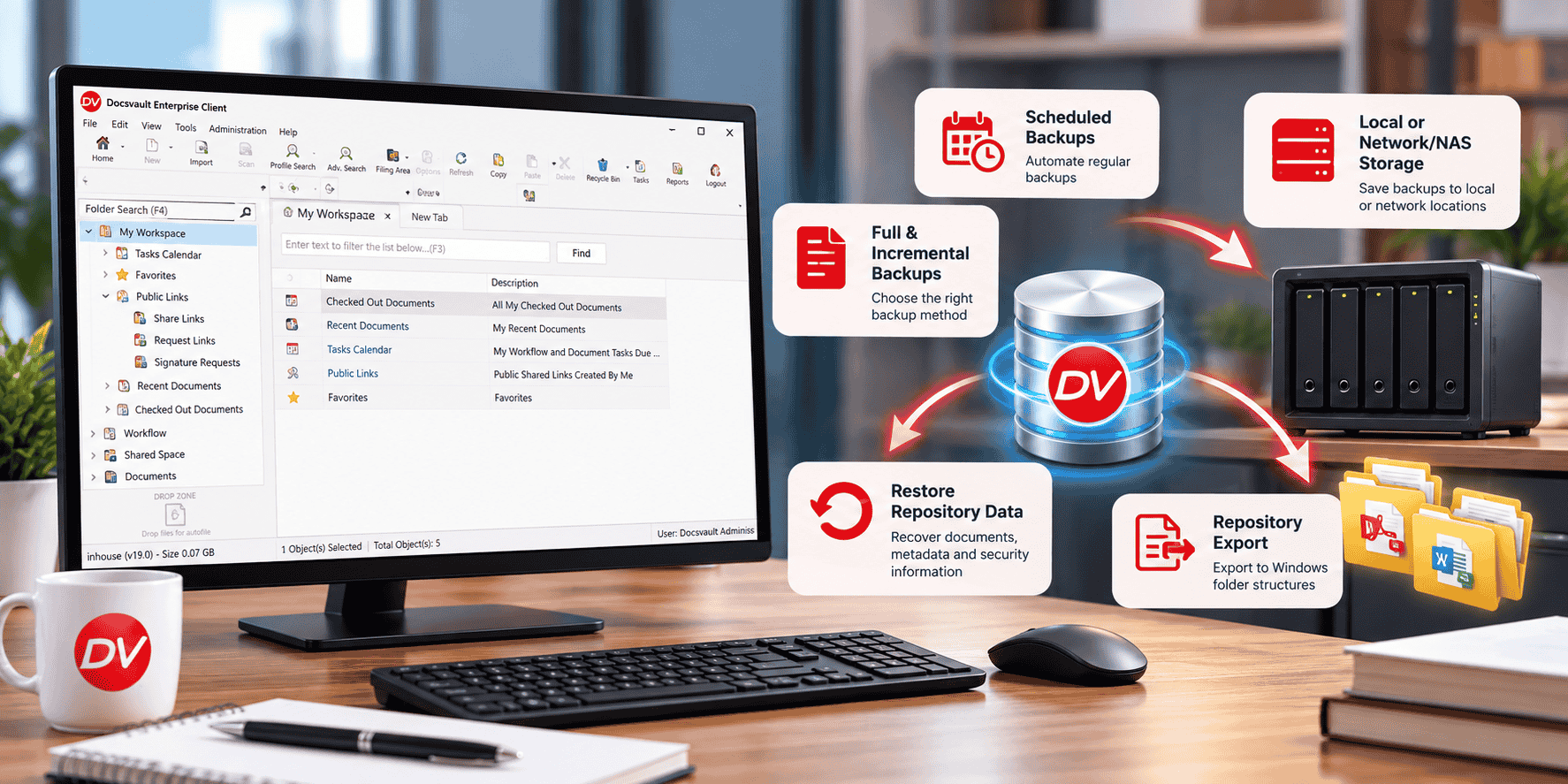
Docsvault provides manual and scheduled backups, full and incremental backup options, backup retention, network and NAS destinations, backup failure alerts, restore capabilities, and repository export.
Why Is Backup Important for a Document Management System?
A document management system can contain years of business information. If that repository becomes unavailable or data is lost, the impact can extend well beyond individual documents.
Potential causes of data loss or unavailability include:
- Hardware or storage failure
- Accidental deletion
- Data corruption
- Infrastructure problems
- System failures
- Disasters affecting the primary environment
A backup provides another copy of repository data that can be used for recovery.
However, effective backup is not simply a matter of creating a copy once. Organizations need to decide what to back up, how often to back it up, where copies should be stored, how long they should be retained, and how recovery will be handled.
What Should a Document Management Backup Strategy Include?
A practical backup strategy should address the complete backup lifecycle.
- Regular Backup
Backups should run frequently enough to reflect how often important information changes.The appropriate frequency depends on the organization’s document activity and recovery requirements. A repository that changes frequently may require more frequent backups than one with relatively little day-to-day activity.
- Full and Incremental Backups
A full backup creates a complete backup of the applicable repository data.An incremental backup captures changes since the relevant previous backup, reducing the amount of data that needs to be backed up during subsequent operations.Using the appropriate combination of full and incremental backups can help organizations balance recovery requirements, backup time, and storage usage.
- Scheduled Backups
Scheduled backups reduce reliance on someone remembering to perform a backup manually.A recurring schedule makes backup a repeatable administrative process rather than an occasional task.
- Backup Storage
Backup copies should be stored in an appropriate location and considered as part of the organization’s overall infrastructure strategy.Depending on the environment, this may include local storage or a network-based destination such as a NAS device.
- Backup Retention
Organizations should determine how long backup sets need to remain available.Keeping every backup indefinitely can consume significant storage, while deleting backups too quickly can reduce the number of recovery points available.A defined retention policy helps balance these requirements.
- Backup Monitoring
A scheduled backup should not be treated as successful simply because it was scheduled.Administrators should have a way to identify failed backup operations so that problems can be addressed before a backup is needed for recovery.
- Recovery Planning
Backup planning should also account for what happens when data needs to be recovered.
Organizations should know:
- Where backup sets are stored.
- Which backup sets are available.
- Who is responsible for recovery.
- What recovery procedure should be followed.
- How recovery procedures will be validated.
The goal is to make recovery a defined process rather than an improvised response to a data-loss event.
Backup vs. Repository Export: What Is the Difference?
Backup and repository export are related, but they serve different purposes.
| Backup | Repository Export |
| Designed to protect repository data for recovery | Creates a copy of repository content in normal Windows folder structures |
| Supports full and incremental backup options | Can be performed manually or on a schedule |
| Backup sets can be retained according to a configured policy | Provides a separate copy of repository documents |
| Used with the Docsvault restore process | Useful when repository content needs to exist outside the Docsvault repository |
Docsvault’s documentation distinguishes repository export from backup. Repository export creates copies of repository data in normal Windows folder structures, while backup is used to protect repository data for restoration.
In simple terms: backup is primarily about recovery, while repository export provides another way to create an accessible copy of repository content.
How Does Document Backup Support Disaster Recovery?
Backup is one component of a broader disaster recovery plan.
A disaster recovery strategy may also need to address:
- Primary and secondary infrastructure
- Backup storage locations
- Recovery responsibilities
- Recovery procedures
- Business priorities
- Recovery testing
The important distinction is that having backups does not by itself constitute a complete disaster recovery plan.
Backups provide recovery data. The organization’s broader disaster recovery process determines how that data will be used to restore operations.
For organizations using Docsvault, backup and restore capabilities provide the repository-level mechanism that can form part of this broader recovery strategy. Docsvault’s current product documentation states that restoring from a Docsvault backup restores documents together with associated metadata and security information.
Backup and Restore Best Practices
A few practical practices can make a document backup strategy more dependable.
Automate recurring backups
Use scheduled backups where appropriate instead of relying entirely on manual operations.
Maintain appropriate recovery points
Use full and incremental backups according to repository activity and recovery requirements.
Store backup copies appropriately
Consider where backup data should reside and whether the backup destination could be affected by the same incident as the primary repository.
Monitor backup operations
Review backup results and address failures promptly.
Manage retention
Define how long backup sets should remain available and remove older sets according to the organization’s requirements.
Document the recovery process
Make sure responsible administrators know where backups are stored and how repository recovery should be performed.
Test recovery procedures
A backup strategy should consider not only whether backups are being created, but also whether the organization can successfully use them when recovery is required.
How Docsvault Supports Backup and Restore
Docsvault provides backup and restore capabilities for protecting data stored in the document repository.
The platform supports:
- Manual Backup — Create a full backup when a specific recovery point is required.
- Automatic Backup — Schedule unattended backup operations.
- Full and Incremental Backups — Choose the appropriate backup method for scheduled operations.
- Backup Retention — Automatically manage older backup sets according to configured retention settings.
- Network Share and NAS Destinations — Save backups to supported network-based storage.
- Backup Failure Alerts — Send email alerts when a backup operation fails.
- Restore — Recover documents from a Docsvault backup along with associated metadata and security information.
- Repository Export — Export repository content into normal Windows folder structures manually or on a schedule.
These capabilities address different parts of the data-protection process: creating backups, managing them over time, identifying failures, recovering repository data, and creating separate exported copies when required.
Learn more about Docsvault Backup and Restore Tools.
Backup and Restore for Document-Intensive Organizations
The importance of repository backup increases as an organization becomes more dependent on its digital documents.
For example, a law firm may rely on its repository for client and matter documents. An accounting firm may manage financial and client records. A professional services organization may store project and customer information.
In each case, the underlying requirement is similar:
Important business information needs to remain available, protected, and recoverable.
A structured backup strategy helps organizations address that requirement without treating backup as an afterthought.
Conclusion
A document management system can contain years of business-critical information, making backup an important part of repository management.
An effective strategy should address backup frequency, full and incremental backups, scheduling, storage, retention, monitoring, and recovery procedures. It should also distinguish between backup, which supports recovery, and repository export, which provides another way to create copies of repository content.
Docsvault provides these capabilities through manual and scheduled backups, full and incremental backup options, retention, network and NAS destinations, failure notifications, restore, and repository export.
For organizations that depend on their document repository, these capabilities provide a structured foundation for protecting and recovering important business information.
Explore Docsvault Backup and Restore Tools.