What is a Document Management System (DMS)? Benefits, Features & Use Cases

In today’s fast-paced business environment, employees spend a significant portion of their workweek searching for the documents they need to perform tasks efficiently. According to a survey by APQC, knowledge workers spend approximately 2.8 hours per week looking for or requesting information. This wasted time not only reduces productivity but also delays decision-making, increases operational frustration, and adds unnecessary costs to your organization.
A Document Management System (DMS) solves these challenges by centralizing, organizing, and securing all business documents in a digital, structured repository. It enables teams to access files quickly, collaborate efficiently, and maintain compliance, all while reducing operational risks.
Docsvault, an on-premise Document Management System, provides a secure, scalable, and flexible solution that helps organizations take control of their documents, streamline workflows, and maintain compliance with industry regulations.
What is a Document Management System (DMS)?
A Document Management System (DMS) is software designed to capture, store, manage, track, and secure documents in digital formats. Unlike traditional file storage, a DMS provides a centralized, structured repository for all your documents, whether paper-based or digital, and ensures they are organized, secure, and easily retrievable.
Modern DMS solutions, including Docsvault, integrate multiple components to provide comprehensive document management:
- Document Repository: Centralized storage for all digital and scanned documents.
- Workflow Management: Automated document routing and approval processes.
- Records Management: Track document retention, classification, and lifecycle.
- Enterprise Content Management (ECM) Capabilities: Centralized, permission-based content storage with indexed search for fast retrieval.
- Information Governance: Ensure audit trails, access controls, and policy enforcement.
Key capabilities of a DMS include:
- Metadata-driven indexing for accurate organization
- Version control and full document history tracking
- Workflow automation for approvals and notifications
- Secure role-based access with detailed audit trails
- Advanced search using full-text and metadata
Implementing a DMS helps organizations increase productivity, reduce errors, enhance collaboration, and improve operational efficiency.
Why Your Business Needs a Document Management System
Every business generates thousands of documents every day like contracts, invoices, HR forms, compliance records, and more. Without a DMS:
- Files become disorganized, duplicated, or lost
- Teams waste hours searching for information
- Compliance risks increase due to improper document handling
- Manual processes create bottlenecks and errors
Physical document storage itself creates inefficiencies, consuming nearly 15% of total office space, which can cost $50–$80 per square foot in U.S. offices. Research further shows that over half of office professionals lose significant time searching for documents, highlighting the need for centralized, digital access.
A DMS helps businesses:
- Centralize document storage: Access files from one secure location.
- Reduce search time: Find information quickly using advanced indexing and search tools.
- Secure sensitive files: Protect data with compliance-ready access controls.
- Automate repetitive workflows: Reduce manual approvals and document handling.
- Minimize paper reliance: Save office space and reduce printing costs.
Example: HR teams processing onboarding forms or finance departments handling hundreds of invoices benefit from automated workflows that reduce errors and delays. Docsvault ensures that every step, from document capture to approval, is secure, traceable, and automated.
DMS vs Traditional File Storage: A Quick Comparison
| Feature / Capability | Document Management System (DMS) | Traditional File Storage (Folders, Drives, Shared Servers) |
|---|---|---|
| Search & Retrieval | Advanced search (metadata, OCR, filters) – find files in seconds | Manual search through folders – time-consuming |
| Version Control | Automatic versioning & history tracking | Overwrites common; multiple versions get lost |
| Security & Permissions | Role-based access, audit trails, encryption | Basic folder permissions; limited tracking |
| Workflow Automation | Automates approvals, routing, notifications | No workflow automation – everything is manual |
| Compliance & Governance | Retention rules, auditability, policy enforcement | No compliance controls; high risk of violations |
| Collaboration | Real-time sharing, annotations, e-signatures | Email attachments, duplicates, confusion |
| Scalability | Designed for organization-wide document control | Becomes chaotic as files grow |
Types of Document Management Systems
Businesses use different types of DMS to manage documents effectively. Key types include:
- Document Imaging System: Digitizes paper documents for electronic storage and easy retrieval.
- Enterprise Content Management (ECM): Centralizes digital content with collaboration, version control, and workflow automation.
- Records Management System: Controls creation, retention, and disposal of important business records.
- Workflow Management System: Automates and tracks business processes to boost efficiency and reduce errors.
- Quality Management System (QMS): Centralizes document control for audits, corrective actions, and regulatory compliance.
- Email Management System: Organizes and archives emails and attachments for easy access and decision-making.
- HR Document Management System: Stores and manages employee-related documents securely and efficiently.
For more details about the different types of DMS and guidance on which solution may be right for your business, check out our dedicated blog: Types of Document Management Systems – Choose the Best for You.
Core Features of a Modern Document Management System
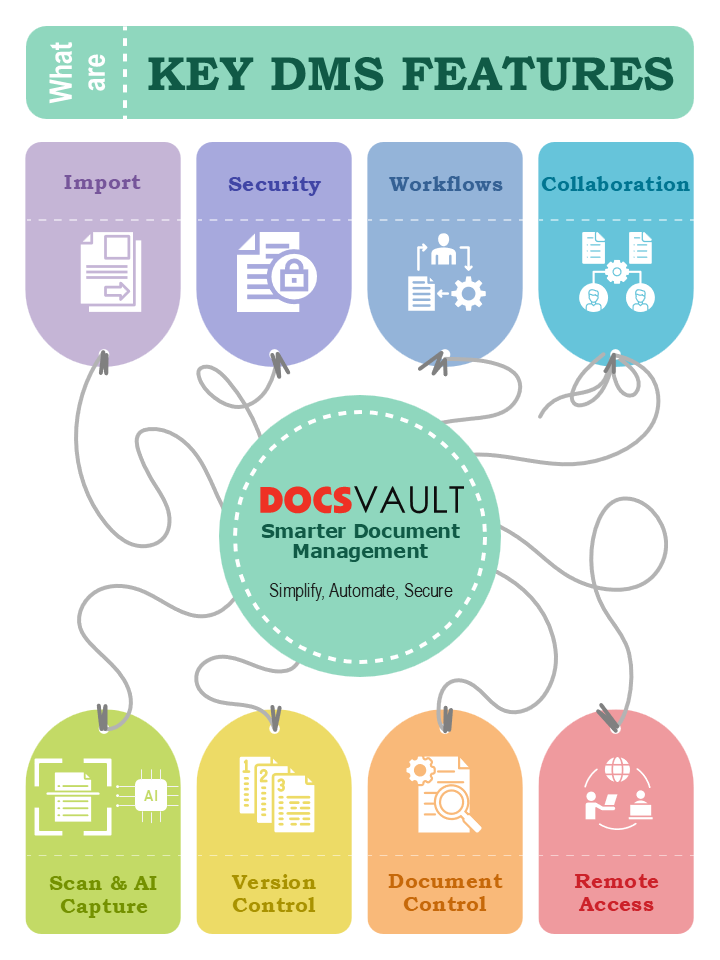
A DMS goes beyond basic file storage. Modern solutions, like Docsvault, include features that streamline document management, enhance security, and boost productivity:
- Simplified Document Capture: Multiple import options, including drag-and-drop, email, watched folders, and MS Office integration. Scan paper documents into searchable formats quickly.
- Document Profiling: Use metadata, and classification fields to organize and retrieve documents effortlessly through structured document profiling.
- Intelligent Indexing & OCR: Metadata-driven indexing ensures accurate organization. Optical Character Recognition (OCR) converts scanned documents into editable, searchable content. AI-based data capture speeds up processing.
- Advanced PDF Tools: Create, edit, annotate, and convert PDFs with capabilities like PDF printing, merging, and transforming scans into searchable PDFs.
- Document Control & Versioning: Track changes with version control, maintain complete document history, and prevent accidental overwrites.
- Advanced Security & Access Management: Role-based access controls, system-level permissions, and detailed audit trails ensure compliance.
- Workflow Automation & Collaboration: Automate workflow, approvals, and routing, set notifications and task reminders, and securely share documents with digital signature integration and enable faster submissions and processing with web-based eForms integrated directly into your workflow.
- Multi-Device Access: Access documents securely via desktop, web, or mobile, enabling collaboration across teams, departments, and locations.
- Compliance & Governance: Implement document retention rules, classification, and full auditability for legal and regulatory compliance.
For more details about the different types of DMS and guidance on which solution may be right for your business, check out our dedicated blog: Types of Document Management Systems – Choose the Best for You.
Benefits of Using a Document Management System

A robust DMS improves productivity, security, and operational efficiency. Key benefits include:
- Reduce Reliance on Paper & Storage Costs
Digitize physical documents, reclaim office space, and save on printing and storage expenses. For a deeper look into why organizations are moving toward digital document handling, explore Five Reasons Why You Need Online Document Management. - Save Time with Quick Document Retrieval
Metadata indexing and advanced search allow employees to find files instantly, boosting productivity. - Enable Secure Collaboration
Teams can share documents securely, collaborate in real time, and maintain data integrity even remotely. - Automate Workflows
Reduce human errors and speed up approvals with automated routing and notifications. - Strengthen Compliance & Security
Maintain role-based access, detailed audit trails, retention policies, and encryption to meet industry regulations. - Improve Operational Efficiency
Streamlined processes reduce bottlenecks and allow employees to focus on core business tasks.
How Different Departments Benefit from a Document Management System
A Document Management System is not a one-size-fits-all solution. It adapts to the unique needs of every department, ensuring efficiency, security, and compliance across the organization. Here’s how key business functions benefit from a modern DMS like Docsvault.
Human Resources
HR teams manage countless documents, from employee onboarding forms to policy updates. A DMS helps simplify and secure these processes with automation and centralized access.
Key Benefits:
- Employee File Management: Digitally store and organize employee records, resumes, and contracts from hiring to offboarding.
- Policy & Document Control: Create, update, and distribute HR policies with pre-defined templates and web forms.
- Workflow Automation: Streamline approvals for leave requests, performance reviews, and appraisals with full traceability.
- Digital Signatures: Approve offer letters and agreements securely using legally compliant e-signatures.
- Compliance & Retention Management: Classify, retain, and dispose of records based on internal and legal requirements.
A paperless HR department improves confidentiality, saves time, and enhances the employee experience.
Learn more: HR Document Management Solution
Accounting And Finance
Finance departments rely on precision and quick access to data. Docsvault DMS enables secure document handling and automated workflows to improve operational accuracy and compliance.
Key Benefits:
- Centralized Storage: Organize invoices, statements, and client financial documents in one secure repository.
- Automated Invoice Processing: Simplify approvals and reduce delays with pre-defined workflows.
- Efficient Document Requests: Simplify the collection of client documents with secure SSL connections, password protection, and predefined expiration dates.
- Advanced Security Controls: Protect confidential financial data while enabling secure sharing. Restrict access to sensitive information by hiding specific document sections.
- Email and Attachment Capture: Automatically store financial emails, receipts, and reports for easy retrieval.
With improved transparency and audit readiness, finance teams can reduce manual effort and enhance productivity.
Learn more: Accounting Document Management Solution
Legal
Legal teams handle sensitive documents that require security, traceability, and quick access. Docsvault helps centralize, protect, and manage case files efficiently.
Key Benefits:
- Centralized Repository: Securely store contracts, case records, and client documentation in a structured, searchable system while restricting access to authorized personnel only.
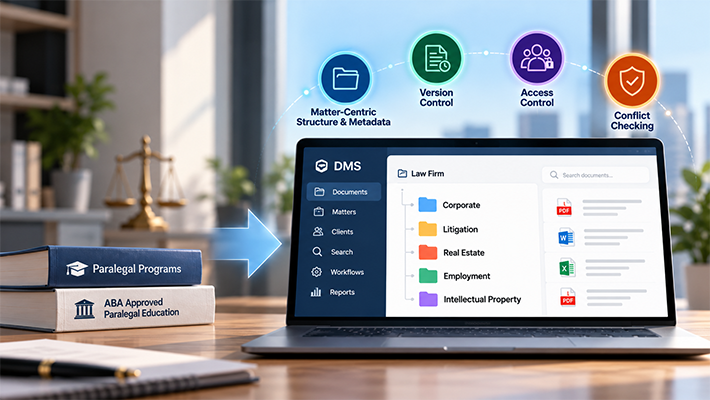
- Client & Matter Structure: Use standardized “Client > Matter” folder templates with metadata-driven naming (e.g., Client Name, Matter ID, Document Type) to enforce consistent filing across every case.
- Version Control: Track every change, restore past versions, and maintain document integrity across all matters.
- Automated Workflows: Streamline contract review, case-file approvals, and matter-centric routing processes for higher efficiency.
- Anywhere, Anytime Case Management: Access critical legal files remotely via web-based technology, ensuring seamless collaboration with colleagues and clients from any device.
A robust DMS helps legal professionals save time, reduce risks, and focus on strategy instead of paperwork.
Learn more: Legal Document Management Solution
Manufacturing
Manufacturing organizations depend on accuracy and consistency across production, vendor management, and compliance. Docsvault ensures every document, from designs to quality reports, is securely managed.
Key Benefits:
- Document Control: Store and manage engineering drawings, production manuals, and specifications.
- Quality and Compliance Management: Maintain ISO and regulatory documents with audit-ready access.
- Workflow Automation: Streamline approvals for change orders, purchase requests, and vendor documents.
- Collaboration: Enable secure access for suppliers and production teams to improve coordination.
This digital transformation improves traceability, ensures product consistency, and accelerates time to market.
Learn more: Manufacturing Document Management Solution
Government and Public Sector
Public sector organizations handle vast amounts of records that require transparency, accountability, and compliance. Docsvault provides a secure framework for digitization and efficient service delivery.
Key Benefits:
- Digital Recordkeeping: Convert paper archives into searchable digital repositories.
- Access Control: Protect confidential citizen data while ensuring authorized access.
- Workflow Automation: Simplify approvals, correspondence tracking, and interdepartmental communication.
- Audit and Compliance Support: Maintain clear document trails for RTI, audits, and public accountability.
By moving to a digital document management system, government departments can ensure transparency, efficiency, and faster service delivery.
Learn more: Government Document Management Solution
Docsvault: A Complete Document Management Solution
A Document Management System (DMS) is no longer optional, it’s a critical tool for any organization looking to boost productivity, reduce errors, secure information, and maintain compliance.
Docsvault, an on-premise document management software, delivers a comprehensive, secure, and flexible solution that empowers organizations to manage documents efficiently while ensuring complete control and compliance.
Transform your document management today, explore Docsvault for a smarter, faster, and more secure way to handle business information.
Fill out the form to receive a free demo to learn how a document management system can benefit your organization.
Demo Request
Document Management FAQs
Docsvault is available as Desktop & Online Document Management System, which makes it suitable for every kind of work environment. It is cloud-ready while still offering you full control of your data on your own servers onsite.
Any organization that deals with documents needs a secure document management to store, manage and track electronic documents and reduce paper use.
Docsvault’s simple interface and high flexibility allow businesses of any type to effectively use document management software that takes care of evolving business needs. Docsvault is being used successfully across many industries including:
- Accounting / Banking / Finance
- Insurance
- Healthcare Services
- IT Field
- Education Institution
- Government Agencies
- Manufacturing
- Real Estate/Construction
- Consultancy Services & Small Businesses
Document Management System can store, organize, manage, and track your documents efficiently. A document management system (DMS) offers many benefits including keeping your documents safe, secure, and easy to retrieve.
If your company experiences any of the following signs, you could benefit from a DMS:
- There is paper everywhere
- You are having trouble storing your files in an organized manner
- You want your data to be easily accessible from anywhere
- You need to provide enhanced security to your important data
- Collaboration with your workers needs to be faster and easier
- You spend a lot of time in searching for documents
- You want to save costs on printing, shipping, and reproducing lost documents
- Your staff requires a better document management system to improve productivity
You want to make your office a smart, eco-friendly office
AI enhances an on-premise DMS by automating document organization, extraction, and retrieval. It intelligently classifies documents, extracts key information using OCR, and enables faster, more accurate searches — helping businesses save time while maintaining complete data control within their own servers.
A DMS centralizes and organizes business documents so employees can efficiently capture, store, retrieve, and manage information — ensuring accessibility, compliance, and security.
Docsvault is one of the best file management systems that can be used for small as well as large enterprises and organizations.
By automating workflows, enabling instant retrieval, and supporting secure collaboration, Docsvault reduces manual effort and enhances business process automation for better operational efficiency.
Docsvault is one of the best document management software to organize and manage all your documents digitally.
While Google Drive is an essential tool for modern businesses, it is not a comprehensive document management system for business organizations.
Docsvault and Microsoft Office work best for organizing a filing system.
The key elements of document management are:
- Capture: This involves the initial collection of documents, whether they are physical or digital.
- Methods: Scanning, digital creation, importing from other systems.
- Storage: Securely storing documents in a centralized location.
- Options: Cloud storage, on-premises servers, hybrid solutions.
- Organization & Classification:
- Metadata: Assigning descriptive information (keywords, tags, dates) to documents for easy retrieval.
- Folders & Structures: Creating a logical and consistent filing system.
- Retrieval: Enabling quick and easy access to documents when needed.
- Search Functionality: Robust search capabilities (keyword, full-text, filters).
- Version Control: Tracking and managing different versions of documents.
- Security: Protecting sensitive information from unauthorized access.
- Access Controls: Restricting document access based on user roles and permissions.
- Encryption: Encrypting data in transit to prevent unauthorized access.
- Data Loss Prevention: Implementing measures to prevent data loss or breaches.
- Workflow & Collaboration:
- Workflow Automation: Automating document routing and approval processes.
- Collaboration Tools: Enabling real-time collaboration on documents.
- Compliance: Meeting legal and regulatory requirements for document retention and security.
- Integration: Integrating with other business systems (e.g., CRM, ERP) for seamless data flow.
AI is transforming document management from a manual, time-consuming process into a streamlined, intelligent function that drives efficiency, accuracy, and valuable insights. Such as:
- Data Extraction: AI extracts key information like dates, amounts, and name from documents, automating data entry and minimizing manual transcription errors.
- Classification & Tagging: AI algorithms analyze content, context, and metadata to automatically categorize documents (e.g., invoices, contracts, emails). This saves time, reduces errors, and ensures consistent organization.
- Workflow Automation: AI triggers actions based on rules and conditions, streamlining document workflows (e.g., automatic routing for approval, flagging for legal review).
AI empowers organizations to:
- Streamline operations: By automating routine tasks and improving efficiency.
- Reduce costs: By minimizing manual effort and errors.
- Gain a competitive edge: By extracting valuable insights from their document data and making data-driven decisions.
- Enhance compliance: By ensuring adherence to regulations and minimizing risks.
The best document management software is Docsvault, a robust all-in-one document management solution to manage your physical and digital documents. Its document management and records management tools help to ensure accountability for managing records and processes of document creation that are required to conduct the business of the organization.
This article covers:
- What is a Document Management System (DMS)?
- Why Your Business Needs a Document Management System
- Types of Document Management Systems
- Core Features of a Modern Document Management System
- Benefits of Using a Document Management System
- How Different Departments Benefit from a Document Management System
- Docsvault: A Complete Document Management Solution
- Demo Request