
Switching from Worldox? Secure, Structured Migration to Docsvault
Worldox support is ending on December 31, 2026. Transition now to a modern, on-premise document management system designed for law firms with full data migration support.
Request Worldox Migration Demo →
Demo Request Form





Worldox Is Reaching End of Support – Don’t Risk Disruption
If your firm is still relying on Worldox, you face:
- No future updates or security patches
- Increasing compliance risks
- Limited integration with modern workflows
Delaying migration can lead to operational disruptions and data management challenges.
Why Firms Are Moving Away from Worldox Now
With Worldox approaching end of support, firms are actively planning their transition to avoid last-minute disruption.
Common priorities we see:
- Retaining on-premise control instead of shifting to forced cloud models
- Preserving familiar matter-centric workflows
- Ensuring smooth migration with minimal downtime
- Maintaining predictable long-term IT strategy
- Protecting sensitive client data with secure access controls
Docsvault is designed specifically to support these requirements during your Worldox migration.
A Proven Worldox Migration Path Without the Complexity
Docsvault provides a structured, low-risk transition from Worldox with:
- Complete data migration support (profiles, metadata, Client and matter hierarchies remain intact)
- Minimal disruption to your daily operations
- Flexible deployment: on-premise or private cloud
- Faster search, improved document control, and automation
- Outlook filing continues seamlessly
How We Migrate Your Worldox Data
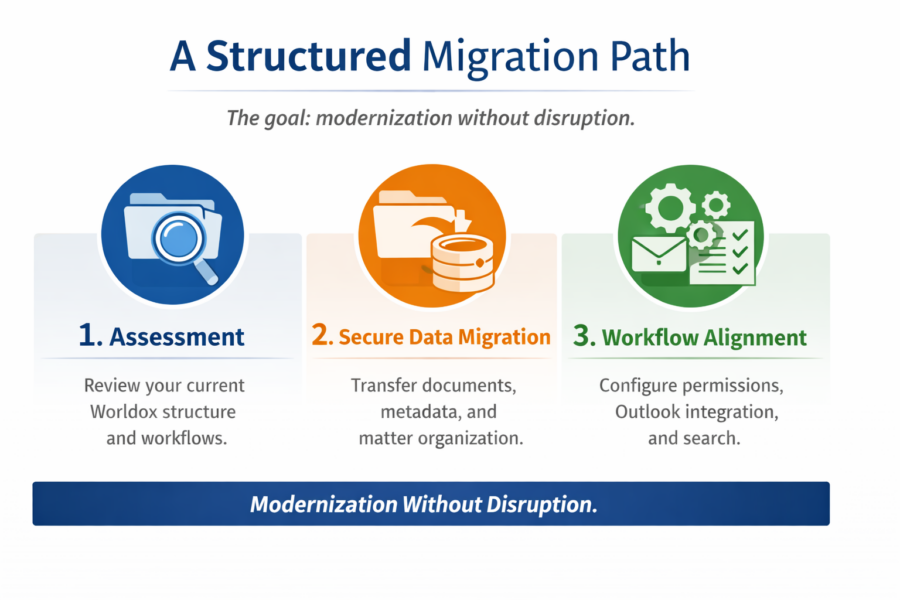
Our step-by-step migration approach:
- Assessment: Review and analyze your current Worldox structure and workflows.
- Data Migration: Securely transfer documents, metadata and matter. Preserving folder structures and indexing
- Workflow Alignment: Configure permissions, Outlook integration and search
- Validation – Ensure data accuracy and completeness
Dedicated migration specialists guide you throughout for smooth transition with mnimal downtime.
What You’ll See in the Demo
We walk through real legal workflows — not generic product features.
You’ll see how Docsvault handles:
Real workflows. No generic product tour.
Built for Continuity
A Legal DMS That Preserves Control and Familiar Structures
Migration Reassurance: What We Cover
Migrating from Worldox does not have to be disruptive.
In this demo, we’ll explain:
- How client and matter structures can be preserved
- How metadata mapping works during migration
- How searchability is maintained after transition
- What a realistic migration timeline looks like
- How rollout is phased to reduce disruption
- How user training supports adoption
You leave the session understanding the process — not guessing it.
How This Demo Helps You Decide
By the end of the demo, you should be able to answer:
- Does Docsvault support our current workflows?
- Can we remain on-premise with secure remote access?
- How complex would migration be?
- What are the long-term cost implications?
- How does this compare to NetDocuments for our needs?
