
DocAI · AI Assistant
Understand and Refine Document Content, Right Where You Read It
Select text in a document, choose an AI action, and get a summary, an explanation, a tighter paragraph, or a rewrite in seconds. DocAI AI Assistant is built into the Docsvault desktop client, so you never copy content into outside tools. Part of DocAI, the AI-powered add-on for Docsvault.
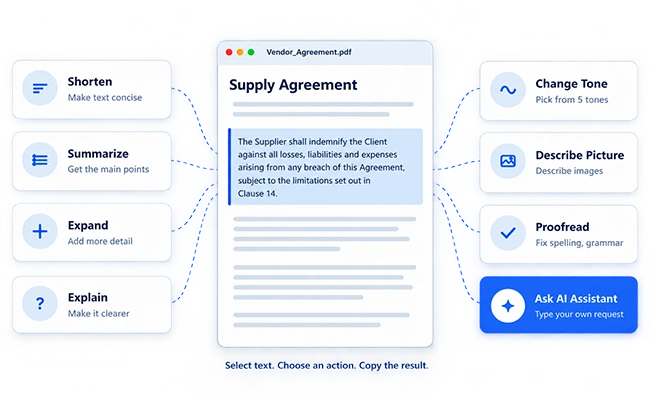
How AI Assistant Works
From Selection to Insight in Seconds
AI Assistant works inside the Docsvault document preview. No separate application, no exporting content.
What AI Assistant Can Do
Eight Ways to Work Smarter with Document Content
Every action works on the content you select. Pick an action to see what it does.
Selected text
↓
AI Assistant result
The Supplier indemnifies the Client for losses from any breach, within the limits in Clause 14, and must maintain adequate insurance.
Sample content for illustration.
Selected text
↓
AI Assistant result
- The Supplier covers the Client’s losses from any breach.
- This is subject to the limits in Clause 14.
- The Supplier must maintain adequate insurance.
Sample content for illustration.
Expands the selected text with additional detail.
Selected text
↓
AI Assistant result
The Supplier agrees to indemnify the Client against all losses, liabilities and expenses that arise from any breach of this Agreement. This obligation is subject to the limitations set out in Clause 14. The Supplier must also keep adequate insurance in place to support this commitment.
Sample content for illustration.
Selected text
↓
AI Assistant result
In plain terms: if the Supplier breaks the contract and the Client loses money as a result, the Supplier has to cover those costs. Clause 14 sets limits on how far this protection goes, and the Supplier must carry insurance so it can meet the obligation.
Sample content for illustration.
Selected text
↓
AI Assistant result
In the event of a breach of this Agreement, the Supplier will indemnify the Client against resulting losses, liabilities and expenses, subject to Clause 14, and will maintain adequate insurance.
Sample content for illustration.
Selected text

↓
AI Assistant result
A bar chart titled “Supplier spend by quarter”. Spend rises from Q1 to Q4, and Q4 is the highest bar.
Sample content for illustration.
Selected text
↓
AI Assistant result
The Supplier shall indemnify the Client against all losses and expenses, subject to the limitations set out in Clause 14.
Sample content for illustration.
Give your own instruction instead of using a predefined option.
Selected text
↓
AI Assistant result
▢ Indemnify the Client against losses from any breach
▢ Stay within the limits set out in Clause 14
▢ Maintain adequate insurance
Sample content for illustration.
Built Differently
What Makes AI Assistant Different
AI help should fit the way you already read and review documents, not add another tool to your day.
Where AI Assistant Helps
Everyday Tasks, Done Faster
For professionals who regularly work with lengthy or complex content.
AI Assistant supports your review and writing. It does not replace professional legal or compliance judgment.
One Add-On, Two AI Features
AI Assistant and AI Capture, Better Together
DocAI brings AI to both ends of your document lifecycle: getting documents in, and working with what is inside them.
Requires the DocAI add-on license. Learn more about DocAI
Secure and Under Your Control
DocAI – AI Assistant FAQs
A set of AI actions in the Docsvault document preview that help you summarize, explain, shorten, expand, proofread, and refine selected content.
PDF, Word, Excel, and text documents.
A DocAI add-on license for Docsvault. No administrator configuration is required.
