Worldox Alternative for Law Firms: Seamless Migration to Docsvault
Looking for a Worldox replacement that keeps your data on-premise?
Law firms searching for a Worldox alternative are often looking for a solution that preserves on-premise control while addressing modern requirements around document search, compliance, and matter-centric organization.
Docsvault is a modern document management platform built for law firms that want greater control, predictable costs, and familiar workflows, without being forced into a cloud-only model. Explore our document management system for law firms to learn how legal teams manage client–matter documents, emails, and compliance securely.
See how Docsvault supports law firms planning their next step beyond Worldox.
Migration planning and on-premise deployment options available.
Why Law Firms Are Considering Worldox Alternatives
Worldox (now part of NetDocuments) has undergone a significant shift in direction following NetDocuments’ acquisition of Worldox. Since the acquisition, development focus has moved toward NetDocuments’ cloud-native platform, and the long-standing Worldox on-premise desktop product is no longer positioned for continued innovation.
Worldox Cloud support ended in late 2023, and on-premise support ending Dec 2026, many firms are reassessing long-term certainty around product direction, support timelines, and deployment flexibility. For law firms that prioritize control, compliance, and predictable operating costs, this shift has become an important factor in evaluating alternatives.
Not sure what to look for when evaluating alternatives? Read our step-by-step legal DMS buyer’s guide →
What makes Docsvault a better alternative to Worldox?
Docsvault is designed to be a document management solution that feels familiar to Worldox users while offering modern capabilities that align with current legal workflow needs.
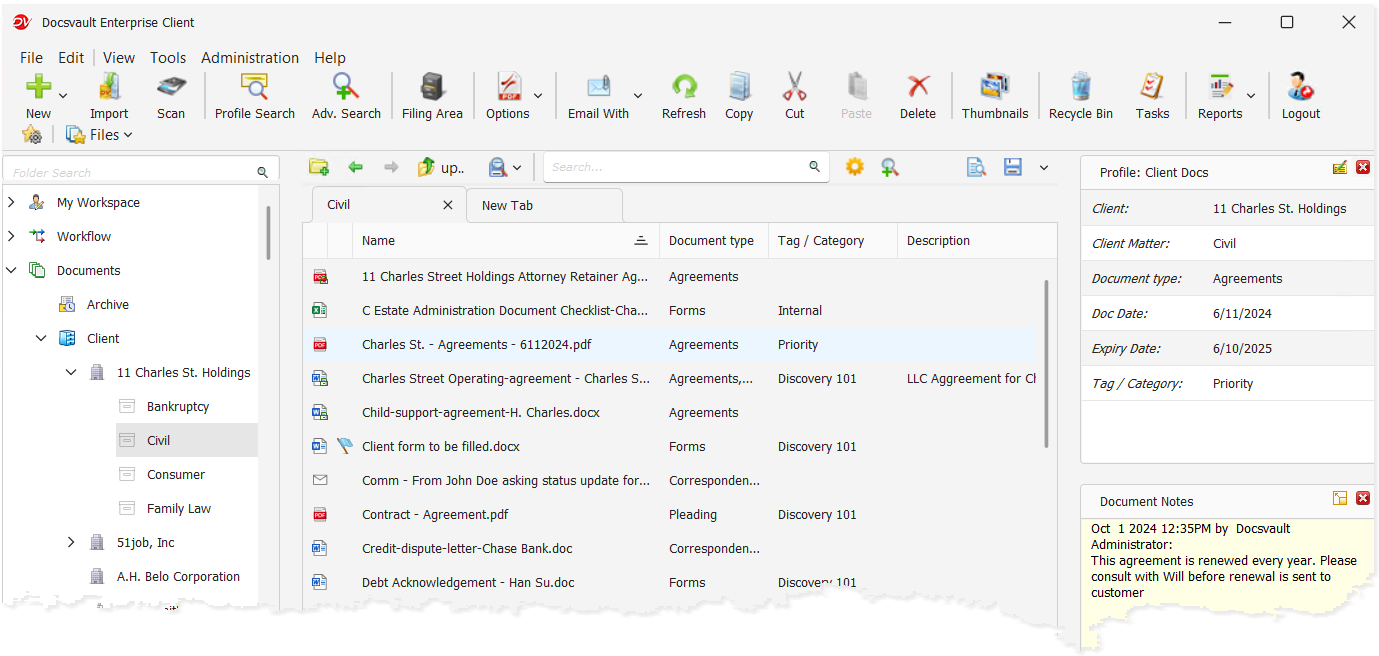
Docsvault offers powerful matter-centric organization, advanced full-text search, deep Microsoft Outlook integration, flexible on-premise or private cloud deployment, and structured migration with preserved metadata. These capabilities go beyond what Worldox now provides, enabling firms to maintain their client–matter structure while improving search precision, workflow efficiency, and deployment flexibility.
By combining familiar legal workflows with modern indexing architecture and built-in document control tools, Docsvault allows firms to transition confidently without sacrificing usability or control.
Feature comparison table: Worldox vs Docsvault
| Feature | Worldox | Docsvault |
|---|---|---|
| Client – Matter Structure | Profile-based structure (Client, Matter, Doc Type, etc.) | Client–Matter hierarchy with Profile-based templates; free-form folders also supported |
| Integration with Outlook/Office | Good | Tightly integrated with MS Office and Outlook – direct filing, deduplication, version control |
| PDF Tools | Depends on third-party tools | Built-in PDF editor for editing, redaction, Bates numbering, and annotation suite. |
| Search capabilities | Full-text search, separate indexer server required | SQL-based full-text + OCR, proximity & inflection search, no separate server |
| Compliance & Security | Ethic walls | Role-based permissions, audit trails, encryption, retention policies |
| Migration | Cloud-only deployment following NetDocuments acquisition | End-to-end Worldox migration preserving client–matter architecture on-premise |
How does Docsvault improve on Worldox’s features?
Docsvault improves on Worldox’s features by offering more flexibility, modern usability, and broader functionality that better meets the evolving needs of law firms and professional services organizations.
1. Client and Matter Documents
Docsvault organizes documents by client and matter, not just folders, so files, emails, and associated records are consistently grouped and easier to retrieve.
Read: Explore how matter-centric organization works
2. Advanced Email Management
Docsvault integrates seamlessly with Microsoft Outlook to capture emails and attachments directly into the appropriate matter. This prevents duplicate filing and enables full-text search across email content and attachments.
3. Deep Microsoft Office Integration
Save documents directly from Word, Excel, and PowerPoint into Docsvault without disrupting daily workflows. Built-in version control and automated footer stamping for Word and Excel support accuracy, consistency, and compliance.
4. All-in-One PDF Solution
Eliminate the need for multiple PDF tools with a fully integrated solution. Edit, annotate, redact, apply Bates numbering, generate PDF and PDF/A copies, and save directly from Adobe Acrobat into Docsvault for court-ready documents.
5. Strong Search, Indexing, and Findability
Docsvault provides powerful tools for finding documents:
- Search using metadata, titles, comments, or full-text content
- Locate information within scanned documents using OCR
- Apply proximity search for faster, more precise results
- Leverage intelligent indexing across repositories
These capabilities help lawyers find files faster and with greater context.
6. Version Control & Document Comparison
Docsvault maintains complete version histories and allows users to compare documents to track changes accurately – supporting confidence in contracts, agreements, and legal filings.
7. Compliance and Records Retention
Apply configurable retention policies to meet legal, regulatory, and industry requirements while supporting defensible document retention and eDiscovery readiness.
Read: Compliance and retention guidance
8. Enhanced Collaboration
Enable secure,centralized collaboration across departments, reducing information silos and improving productivity.
9. Workflow Automation
Automate document-centric processes to reduce manual effort, minimize errors, and improve efficiency across legal and business operations.
Read: How Legal Departments Can Benefit from Contract Workflow Automation
10. Flexible Data Ownership & Deployment Options
Not all firms are ready for a full cloud transition, and many have legitimate reasons for maintaining control over their data and infrastructure.
Docsvault supports:
On-Premise Deployment
Firms that require local control due to compliance, regulatory, or internal IT policies can deploy Docsvault on-premise.
Secure Remote Access
Organizations that need complete on-premise data control with secure access through desktop, web, and mobile interfaces.
Read: On-Premise Legal DMS with Secure Access
This flexibility helps firms:
- Control costs
- Meet compliance requirements
- Support remote work without surrendering on-premise control
Deploy quickly with an intuitive interface and familiar tools, allowing teams to transition smoothly without extensive training or disruption.
What are the pros and cons of Worldox vs Docsvault
| Feature | Worldox | Docsvault |
|---|---|---|
| Status | On-premise support scheduled to end Dec 31, 2026 | Active – frequent updates and new features |
| Deployment | On-premise only (cloud discontinued) | On-premise deployment and private cloud-hosting with windows environment. |
| Core Strength | Strong, long-established legal DMS with good document control and organization. It reliably manages documents, email indexing, and metadata in legal workflows. | Modern document management system with robust CDM features, powerful search, and workflow automation. |
| Ease of Use | Traditional interface can feel dated; some users find it less intuitive compared to newer platforms. | Users report intuitive interface with explorer-style navigation and easy document access. |
| Integration | Deep integration with legal tools and systems historically. | Microsoft Office and Outlook. REST API add-on enables seamless third-party integrations. |
| Support & Community | Some users have reported mixed support experiences, influenced by broader acquisition shifts. | High satisfaction ratings, good customer service and support responsiveness. |
| Future Roadmap | Development focus has shifted to the NetDocuments platform | Continuous development with modern legal capabilities |
Plan Your Worldox Migration with a Structured Assessment
Moving from Worldox to Docsvault starts with understanding your existing environment. A Migration Assessment helps identify your current document structure, metadata, configurations, and migration requirements so the transition can be planned around your firm’s specific needs.
Once those requirements are understood, Docsvault’s structured migration approach is used to transfer supported documents, metadata, matter structures, and other available information, based on the source environment and agreed migration requirements.
What Can Be Preserved
The information that can be preserved depends on the source environment, existing configuration, available data, and specific migration requirements. The Migration Assessment identifies these requirements before migration begins.
- Client and matter codes
- Worldox Docs IDs (if required)
- Folder and matter hierarchy
- Document metadata and custom fields
- Email threads, attachments, and filing associations
- Version histories
- Creation and modification dates
How it Works
Step 1 — Migration Assessment
We assess your existing Worldox structure and identify the documents, metadata, configurations, and other information that need to be considered for the transition to Docsvault.
Step 2 — Structured Migration
Based on the assessment, migration tools and processes are used to transfer supported documents, metadata, and matter structures, followed by validation to confirm the migrated data is accurate and searchable.
Step 3 — Searchability Validation
Migrated content is validated for indexing and searchability before the firm moves toward go-live, with the validation scope based on the agreed migration requirements.
Step 4 — Go-Live & Adoption Support
Once the migration is validated, the firm can move toward go-live with documentation, onboarding support, and best-practice guidance to help users transition to familiar document management workflows.
Most firms can be fully live in weeks, not months, depending on data volume and configuration complexity. Worldox Migration Assessment →
A Worldox Migration in Practice: Edwards Craver Veach PLLC
Edwards Craver Veach PLLC – U.S. Law Firm
Every Worldox migration has its own requirements. The Edwards Craver Veach experience provides a practical example of how a law firm approached the transition while prioritizing its client–matter structure and on-premise deployment.
They chose Docsvault. The result:
- Complete client–matter hierarchy preserved
- Full Outlook and Office integration from day one
- Powerful full-text search across all migrated documents and email
- On-premise deployment with secure remote access
- Predictable, cost-controlled licensing — no forced cloud costs
Read the full case study: Worldox Migration for Edwards Craver Veach →
Plan Ahead. Migrate with Confidence
Worldox on-premise support is scheduled to end on December 31, 2026.
Firms that begin migration planning early gain the time needed to preserve every file, validate client–matter structures, train users effectively, and transition without disruption.
Delaying evaluation can result in compressed timelines, reduced flexibility, and avoidable operational risk.
A vendor timeline should inform your strategy, not define it.
Worried About Making the Switch? Here’s What Firms Ask Us Most.
Docsvault is designed for law firms that need secure, organized, and compliant document management. It offers meta-driven filing and retrieval, AI-powered data capture, document comparison for Word, and Excel, and tight Microsoft Office and Outlook integration — helping firms maintain control over confidential information while improving productivity.
Yes. Docsvault can serve as a functional replacement for Worldox, offering matter-centric document management, metadata indexing, advanced search, and deep Microsoft Office integration.
In addition, it provides workflow automation, built-in PDF tools, and flexible deployment options—either on-premise or in a private cloud (single-tenant). Docsvault is not a SaaS or hybrid platform; all deployments remain fully controlled environments while still supporting secure web and mobile access.
Yes, full on-premise deployment is a core offering, not an afterthought. Docsvault is also available as a private cloud (single-tenant) deployment.
It is not a SaaS or hybrid platform. Web and mobile access are secure interfaces to your own hosted system, whether on-premise or in a private cloud.
Yes — Docsvault offers a comprehensive migration process that ensures a smooth transition from Worldox to Docsvault while preserving your valuable data and metadata:
- Structure preservation: The migration process maintains the original document structure and hierarchy, ensuring that your data is organized in a familiar manner within Docsvault.
- Metadata mapping: : Docsvault’s migration process allows for precise mapping of your existing DMS metadata fields to corresponding fields in Docsvault, preserving the essential information associated with your documents.
Our team will guide you through a smooth migration to Docsvault, ensuring a seamless transition. Docsvault’s migration team can assist in planning and executing a smooth migration process tailored to your business requirements.
Most firms complete migration in a matter of weeks. Timeline depends on data volume and configuration complexity — our team assesses this upfront so there are no surprises.
Docsvault offers flexible, predictable licensing for firms of all sizes — with no forced cloud migration costs and no per-user cloud subscription surprises. Contact us for a quote tailored to your firm →
That’s fine. The earlier you start planning, the smoother your transition will be. Book a no-obligation assessment and we’ll map out a timeline that works for you — well before the December 2026 deadline.
This article covers:
- Looking for a Worldox replacement that keeps your data on-premise?
- Why Law Firms Are Considering Worldox Alternatives
- What makes Docsvault a better alternative to Worldox?
- How does Docsvault improve on Worldox’s features?
- What are the pros and cons of Worldox vs Docsvault
- Plan Your Worldox Migration with a Structured Assessment
- A Worldox Migration in Practice: Edwards Craver Veach PLLC
- Worried About Making the Switch? Here’s What Firms Ask Us Most.