Why Law Firms Struggle With Document Management: 7 Common Problems

Legal work revolves around documents. Contracts, case files, discovery records, correspondence, and court filings must be organized and accessible throughout the lifecycle of a legal matter.
Most law firms already use several tools to store these documents – shared drives, email inboxes, or practice management systems. While these tools allow files to be saved and exchanged, they often lack the structure required to manage legal documentation effectively.
As document volumes increase and teams collaborate across multiple matters, even small inconsistencies in how files are stored or named can create confusion. Lawyers may spend valuable time searching for documents, verifying file versions, or locating attachments buried inside email threads.
Over time, these inefficiencies accumulate and reveal a common reality within many firms: documents exist everywhere, but managing them consistently becomes increasingly difficult.
These document management problems in law firms often arise when organizations rely on general-purpose storage tools instead of systems designed for legal workflows.
Understanding the most common document management problems law firms face helps explain why structured legal document management systems have become essential for modern legal operations.
Why Do Law Firms Struggle With Document Management?
Law firms struggle with document management primarily because documents are stored across multiple systems rather than within a centralized environment designed for legal workflows.
In many firms, documents are spread across shared drives, email inboxes, and individual desktops. This fragmented storage approach makes it difficult to maintain consistent organization and quickly locate the right document when needed.
Common problems that arise from this environment include:
- documents stored across multiple locations
- difficulty identifying the latest version of a file
- email attachments that remain buried inside inboxes
- inconsistent document organization across teams
- time lost searching for documents
Legal document management software addresses these challenges by centralizing storage, organizing documents by client matters, and enabling advanced search and version control.
Key Takeaways
Law firms frequently experience document management problems because document storage tools do not provide the structured workflows needed to manage legal documentation efficiently.
Some of the most common issues include:
- documents scattered across multiple systems
- confusion around document versions
- email attachments that are never properly filed
- inconsistent document organization across teams
- productivity loss caused by time spent searching for files
Modern legal document management systems address these challenges by centralizing document repositories, enabling advanced search, organizing files by client matters, and maintaining structured version histories.
Why Most Law Firms Don’t Actually Have Document Management (They Have Document Chaos)
Many law firms believe they already have document management simply because documents are stored somewhere within the organization.
Files may exist in shared drives, email folders, or practice management systems. While these tools allow documents to be saved, they rarely enforce the structure needed to manage legal files effectively.
Without centralized organization, consistent indexing, and automated version control, documents gradually become fragmented across multiple systems. Different lawyers may follow different naming conventions or folder structures, while email attachments remain isolated inside personal inboxes.
As document volumes grow, these fragmented storage patterns create an environment where files become increasingly difficult to track, retrieve, and manage collectively.
This situation is often described informally within firms as document chaos, an environment where documents exist, but the structure needed to manage them efficiently is missing.
What Are the Most Common Document Management Problems in Law Firms?
Document management problems typically arise when firms rely on general-purpose storage tools instead of systems designed for legal workflows.
Documents are often stored across:
- shared network drives
- Outlook email folders
- personal desktop directories
While each tool can store documents, they rarely work together as a unified system. As a result, law firms frequently encounter operational challenges related to document organization, search, collaboration, and compliance.
For a broader overview of structured systems designed for legal workflows, see: Document Management for Law Firms
The 7 Core Document Management Problems Law Firms Experience
Although document workflows vary between firms, several problems appear consistently across legal environments.
-
Lack of Centralized Document Storage
Documents are often distributed across multiple systems including shared drives, email inboxes, and personal computers. Without a centralized repository, maintaining consistent organization becomes difficult and files may be duplicated or misplaced.
-
Limited Document Search Capabilities
As document repositories grow larger, locating files through manual folder browsing becomes inefficient. Without advanced search tools or structured indexing, lawyers may spend significant time trying to locate specific documents.
-
Version Control Confusion
Legal documents frequently go through multiple revisions. When version control is handled manually through file naming conventions, teams often accumulate several versions of the same document.
📖 Compliance with Version Control in Legal Document Management
-
Email-Based Document Workflows
A large portion of legal communication happens through email. Contracts, drafts, and case materials are often exchanged as attachments, which remain stored in inboxes rather than being organized with the related case files.
-
Inconsistent Document Organization
Without standardized filing structures, different team members may organize documents according to personal preferences. Some categorize documents by client name, others by case number or document type.
This inconsistency makes it difficult for teams to locate files quickly.
-
Security and Compliance Risks
Legal documents frequently contain confidential client information. When files are scattered across multiple storage systems, enforcing access controls, retention policies, and audit tracking becomes significantly more difficult.
-
Productivity Loss from Administrative Tasks
Lawyers and support staff often spend valuable time searching for files, organizing folders, or confirming document versions. These administrative tasks reduce the time available for billable legal work.
The next sections examine how structured legal document management systems address these challenges by introducing centralized storage, structured indexing, and automated version control.
The “Final_Final2” Problem in Legal Documents
Many legal professionals have encountered document names like these:
Contract_Draft_Final.docx
Contract_Draft_Final2.docx
Contract_Draft_Final_ReallyFinal.docx
While this naming pattern may appear humorous, it reflects a deeper workflow issue.
When multiple people collaborate on a document through email attachments or shared folders, revisions are often saved as separate files rather than tracked within a version control system. Over time, teams accumulate multiple copies of the same document with slightly different names.
This creates confusion about which version represents the most recent document.
Structured document management systems eliminate this problem by automatically tracking revisions and maintaining a clear document history.
Visual Diagram: Document Chaos vs Structured Document Management
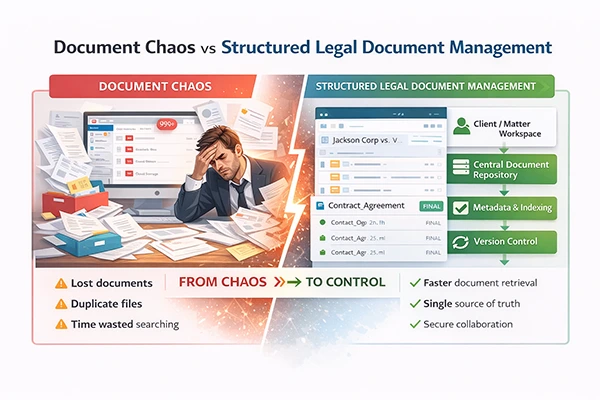
The Hidden Cost of Poor Document Management
Inefficient document workflows can have measurable impacts on productivity in document-intensive professions.
Research across knowledge-based industries suggests that professionals may spend up to 20-30% of their workday searching for information or documents.
In document-intensive environments like law firms, where contracts, filings, and correspondence accumulate across multiple systems, this time loss can significantly impact productivity and billable hours.
Improving document organization and retrieval is therefore not only a technical improvement but also a productivity strategy.
Why Document Management Problems Matter for Law Firms
Document management issues are not simply operational inconveniences.
When documents are difficult to locate or multiple versions exist, legal teams may spend unnecessary time searching for files or confirming information.
These inefficiencies can lead to:
- delays in case preparation
- increased administrative workload
- reduced productivity across legal teams
- risk of referencing outdated documents
- difficulty maintaining compliance with document retention policies
Improving document workflows can significantly reduce these operational bottlenecks.
What Effective Legal Document Management Looks Like
Effective document management introduces structure into how legal files are organized and retrieved.
- Matter-Centric Organization: Documents are stored within client or case workspaces, ensuring that all files related to a specific matter remain connected.
📖Structured Client & Matter Organization in Legal DMS - Metadata and Document Indexing: Metadata fields allow documents to be categorized using attributes such as client name, case number, document type, or responsible attorney.
📖 Legal Document Indexing and Filing Systems - Advanced Search and Retrieval: Advanced search capabilities enable lawyers to locate documents quickly using keywords, metadata, or document content.
📖 Legal Document Search for Law Firms - Integrated Email Filing: Emails and attachments can be saved directly to the relevant client matter, ensuring that communication records remain connected to the case.
📖 Email Management for Law Firms
How Legal Document Management Software Solves These Problems
Modern legal document management systems are designed specifically to address the operational challenges law firms face when managing large volumes of documents.
By introducing centralized storage, structured indexing, automated version control, and integrated email workflows, these systems transform fragmented document environments into organized repositories where legal teams can locate and manage information more efficiently.
If you are ready to evaluate your options, our step-by-step legal DMS buyer’s guide walks you through deployment decisions, feature checklists, and vendor comparison →
Key capabilities of modern legal document management systems typically include:
- Matter-based document organization that keeps all files related to a client or case in one structured workspace
- Structured document indexing using metadata fields such as client name, matter number, and document type
- Advanced document search that allows lawyers to quickly locate files using keywords, metadata, or document content
- Integrated email management that enables emails and attachments to be filed directly into the appropriate client matter
- Automatic version control that tracks revisions and maintains a complete document history
- Built-in PDF editing tools for annotation, redaction, merging, and document comparison
- Compliance and audit tracking to help firms maintain security, access control, and document retention policies
- Seamless Microsoft Office integration that allows lawyers to create, edit, and save documents directly within the document repository
Together, these capabilities help law firms reduce document chaos, improve productivity, and maintain better control over sensitive legal information.
For a deeper overview, see: Legal Document Management Software Explained
Frequently Asked Questions
Legal document management is the process of securely storing, organizing, retrieving, and sharing legal documents in a way that supports compliance, improves workflow efficiency, and enables seamless collaboration among legal professionals.
Law firms handle large volumes of sensitive legal documents. A DMS helps streamline document organization, improves searchability, ensures security and compliance, and enables efficient collaboration within teams.
In the context of legal document management and effective document management for law firms, a legal DMS strengthens security and compliance by enforcing role-based access controls, applying retention policies, and maintaining detailed audit trails. This helps law firms comply with regulations such as GDPR, HIPAA, and SOC 2 while reducing legal risk during audits and eDiscovery.
As part of modern legal document management and document management for law firms, a legal DMS centralizes and organizes documents and electronically stored information (ESI), making it easier to identify, collect, and review data during eDiscovery. Advanced search, secure access controls, and audit-ready records help law firms meet legal and regulatory requirements more efficiently.
Docsvault is designed for law firms that need secure, organized, and compliant document management. It offers meta-driven filing and retrieval, AI-powered data capture, document comparison for Word, and Excel, and tight Microsoft Office and Outlook integration — helping firms maintain control over confidential information while improving productivity.
When evaluating document management software, law firms should look for features such as:
- matter-centric document organization
- advanced document search and indexing capabilities
- email management
- version control and document history
- built-in PDF editing tools
- retention management and compliance controls
- security and role-based access control
- digital signatures
For a deeper explanation of these capabilities and how they support legal workflows, see Legal Document Management Software Explained.
Conclusion
Law firms rarely struggle because they lack documents. The challenge is usually the absence of structure in how those documents are managed.
When files are scattered across shared drives, email inboxes, and personal desktops, even simple tasks such as locating the correct document can become unnecessarily time-consuming.
Structured legal document management systems help firms centralize document storage, improve searchability, maintain version control, and protect sensitive client information.
Over time, these improvements allow legal teams to spend less time managing files and more time focusing on legal work.
As legal practices continue to generate increasing volumes of digital information, implementing structured document management becomes essential for maintaining efficiency, compliance, and long-term operational control.
This article covers:
- Why Do Law Firms Struggle With Document Management?
- Key Takeaways
- Why Most Law Firms Don’t Actually Have Document Management (They Have Document Chaos)
- What Are the Most Common Document Management Problems in Law Firms?
- The 7 Core Document Management Problems Law Firms Experience
- The “Final_Final2” Problem in Legal Documents
- Visual Diagram: Document Chaos vs Structured Document Management
- The Hidden Cost of Poor Document Management
- Why Document Management Problems Matter for Law Firms
- What Effective Legal Document Management Looks Like
- How Legal Document Management Software Solves These Problems
- Frequently Asked Questions
- Conclusion