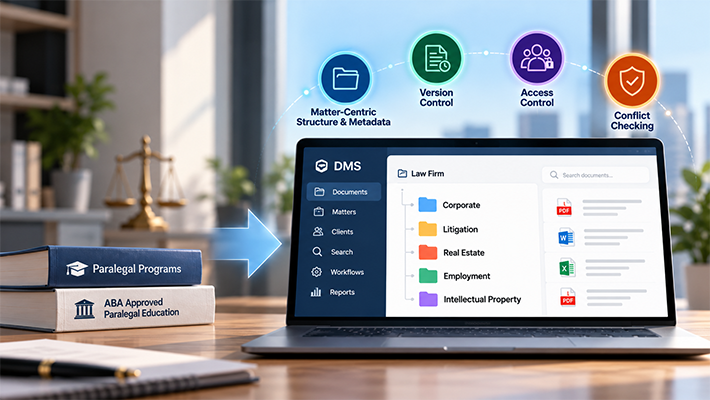
Legal Document Indexing: Metadata, Profiles, and Faster Document Retrieval

Introduction
In today’s legal world, information is everything — but finding the right document at the right time can be a frustrating, time-consuming challenge for many firms. Recent legal industry reports indicate that over half of law firms struggle with timely document retrieval, often due to inconsistent indexing and disorganized digital file structures. These inefficiencies increase operational costs, delay case preparation, and heighten compliance risks.
With caseloads growing and legal regulations tightening, traditional filing systems and disorganized folder structures are no longer sustainable. The answer lies in a modern legal document management system powered by metadata-driven filing solution.
In this article, we’ll explore how legal document indexing helps law firms modernize their filing systems using metadata, document profiles, and filing templates to improve document retrieval, compliance, and operational efficiency. We’ll also look at practical examples of how these capabilities support legal document management and matter-centric filing.
The Problem with Traditional Filing in Law Firms
Legal professionals manage thousands of case-related documents — contracts, pleadings, discovery materials, court filings — and the inefficiencies of manual folder systems are well-known. Beyond wasted time, inconsistent filing increases compliance risks and jeopardizes client service.
Many firms still rely on outdated folder structures and inconsistent labeling, leading to delays, duplication, and increased audit risks. Approximately 40% of legal compliance failures stem from misfiled or mishandled documents, exposing firms to audit risks and operational delays. Automating document intake using structured document capture workflows and standardized indexing practices helps eliminate these filing inconsistencies at the source.
Why Metadata Matters in Legal Document Management
Modern legal document management is no longer based solely on folders. While folder structures remain important, law firms increasingly rely on metadata to organize, classify, and retrieve information efficiently.
Metadata is information that describes a document. In legal environments, common metadata fields include:
- Client Name
- Matter Name
- Document Type
- Author
- Status
- Practice Area
- Contract Type
For multi-practice law firms, metadata requirements can vary across departments and practice areas. A well-structured document management system must accommodate these differences while maintaining consistent organization across the firm. Explore how multi-practice law firms manage complex document structures as they grow.
When metadata is applied consistently, legal teams can locate documents using profile search, automate filing and naming conventions, support retention policies, and maintain a standardized filing structure across all matters.
For example, instead of manually browsing through multiple folders, a user can retrieve all signed settlement agreements for a specific matter simply by searching the document profile:
Client Name = Acme Solutions
Matter Name = Property
Document Type = Settlement Agreement
Status = Signed
This metadata-driven approach improves consistency, reduces filing errors, and enables faster document retrieval throughout the matter lifecycle.
Finding the right document quickly is critical in legal practice. Metadata-driven indexing allows legal professionals to search by client, matter, document type, and other profile fields, dramatically reducing retrieval time compared to traditional filing methods.
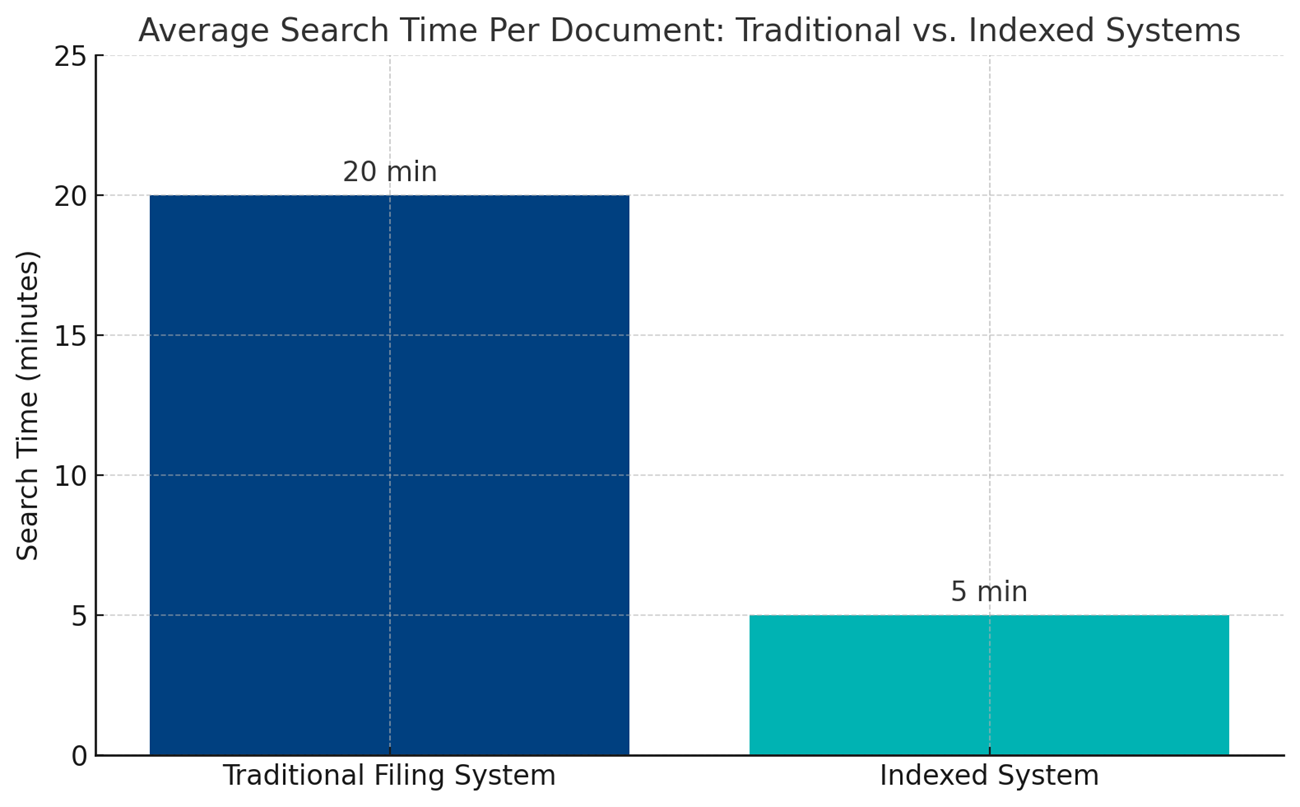
By combining document profiles, metadata, and advanced search capabilities, indexed document management systems help legal teams spend less time searching and more time preparing cases, serving clients, and maintaining compliance.
What Are Document Profiles and Indexing?
Document indexing is the process of assigning structured metadata to documents within a document management system. This metadata is used to classify, organize, search, secure, and manage documents throughout their lifecycle.
In Docsvault, metadata is organized through Document Profiles. A profile is a collection of index fields designed to capture information relevant to a specific business process, department, or document category.
For legal organizations, profile fields commonly include:
- Client Name
- Matter Name
- Document Type
- Author
- Status
- Practice Area
- Case Number
By applying consistent profiles and index values, legal teams can standardize document organization while supporting matter-centric filing, advanced search, records management, and compliance requirements.
When consistently applied, document indexing allows firms to:
- Instantly locate all documents related to a specific matter
- Sort documents by type (contracts, pleadings, filings, correspondence)
- Track document versions and history
- Support matter-centric filing structures
- Apply retention and legal hold policies
- Control access based on confidentiality requirements
Learn more in our article: What is Document Indexing?
How Docsvault’s Document Profiling & Tagging Supports Legal Firms
Docsvault legal solutions simplify document profiling with customizable index fields tailored to legal workflows. Every document can be tagged with metadata such as Client Name, Case Number, Document Type, and Filing Status — ensuring consistent classification and rapid retrieval.
Key Features
- Customizable Metadata Fields: Firms can create custom metadata fields like Client Name, Case Number, Document Type, and Court Filing Status.
- Consistent Document Classification: Every case file adheres to a consistent classification system, ensuring seamless organization and retrieval.
- Improved Searchability: Users can filter or search documents by any of the assigned metadata fields, cutting down retrieval time drastically.
Legal Use Case
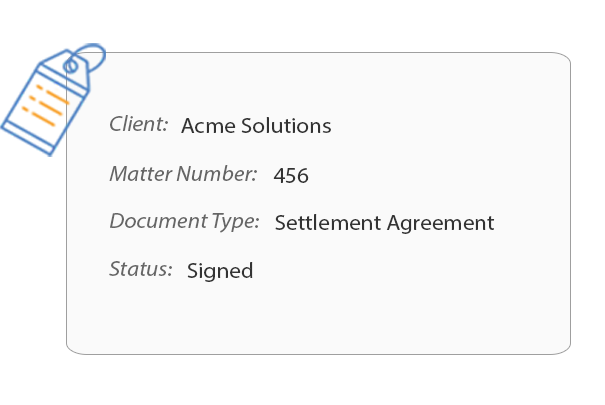
A paralegal needing all signed settlement agreements for Matter #456 from Client XYZ can filter:
- Client Name: Acme Solutions
- Matter Number: 456
- Document Type: Settlement Agreement
- Status: Signed
— Search results delivered in seconds.
Filing Templates: Standardized Structure for Every Legal Matter
Legal cases involve recurring document types and demand consistent folder structures. Docsvault’s Filing Templates automate the creation of predefined folders for each new matter, ensuring consistency and compliance.
Read how secure client and matter management in an on-premise DMS transforms legal operations in our article: Secure On-Premise DMS for Client & Legal Matter Management.
- Automatic Folder Generation: When a new case is opened, predefined folder templates for Pleadings, Discovery, Correspondence, Contracts, and other categories are created automatically.
- Eliminates Human Error: Reduces the risk of misfiled documents or missing folders by standardizing file storage.
- Improves Compliance: Ensures all required categories and subfolders are consistently created for every matter, supporting internal policies and audit readiness.
Example:
- Correspondence
- Court Filings
- Discovery
- Contracts
- Research Notes
- Settlement Agreements
This structured approach guarantees consistency, whether five or fifty legal staff are contributing to a case.
Document Searching: Smart, Speedy Legal File Retrieval
Metadata indexing for legal document management empowers firms to conduct highly specific searches.
Firms using structured metadata indexing have reduced document search times by up to 75%, significantly improving case preparation speed.
Docsvault’s Legal Document Search Features Include:
- Full-Text Search: Search inside the content of documents to find relevant files containing specific keywords or phrases.
- Metadata-Based Filtering: Narrow down results by filtering on indexed metadata fields like Client Name, Matter Number, Document Type, Date Created, or Filing Status — for pinpoint-accurate retrieval.
- Profile Search Window: An intuitive search dialog that simplifies the search experience while supporting advanced query types, improving usability for busy legal professionals.
- Boolean Search Support (AND, NOT, OR): Perform complex, highly targeted searches using Boolean logic to combine or exclude keywords.
Example:
“contract AND renewal NOT agreement”
Finds documents containing both contract and renewal, but excludes those mentioning agreement. - Proximity Search: Locate documents where two words or phrases appear within a specific distance from each other — ideal for pinpointing clauses or related terms in contracts and depositions.
Example:
settlement w/10 agreement
Finds “settlement” within 10 words of “agreement.” - Inflectional Search: Automatically retrieves word variations including different tenses and plural or singular forms, so a single query covers more ground.
Example:
Searching run returns results for run, running, ran, and runs. - Permission-Controlled Secure Search Results: Search results are restricted by user permissions, ensuring confidential documents stay protected.
Legal Use Case
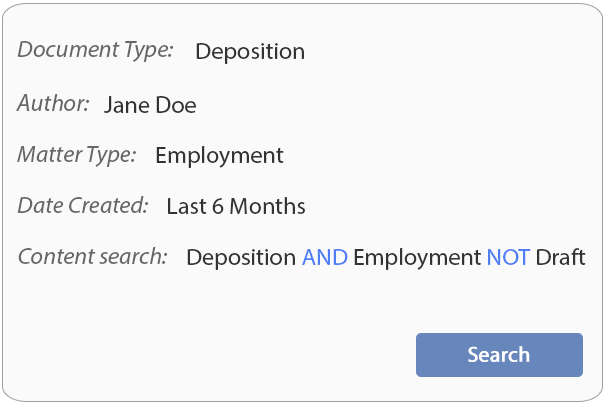
If a partner needs to find all deposition transcripts prepared by a specific associate for all employment cases from the past year, they can filter:
- Document Type = Deposition
- Author = [Associate’s Name]
- Matter Type = Employment
- Date Created = Last 12 Months
- Then refine using Boolean content search:
Deposition AND Employment NOT Draft
Within seconds, they’ll have a complete, accurate, and permission-respecting list of relevant files.
Metadata and Indexing Best Practices for Law Firms
A successful legal document indexing strategy depends on consistency rather than complexity. One of the most common mistakes law firms make is attempting to capture too much information for every document. Excessive metadata requirements often reduce user adoption and create inconsistent records.
To maximize the value of document indexing:
- Standardize key metadata fields such as Client Name, Matter Name, Matter Number, Document Type, Author, and Status.
- Use controlled values whenever possible to prevent inconsistent naming.
- Align metadata profiles with practice areas and document categories.
- Use metadata to drive filing templates, naming conventions, workflows, and retention policies.
- Balance folder structures and metadata rather than relying exclusively on one approach.
- Review and refine indexing standards periodically as the firm grows.
A well-designed indexing strategy enables legal teams to file documents consistently, support matter-centric organization, improve search accuracy, simplify audits, and reduce the time spent locating information.
Avoid Free-Form Data Entry
One of the most common indexing challenges is inconsistent metadata entry. Validation rules, predefined values, and input masks help ensure that matter numbers, client names, and other critical fields follow established standards. Learn how validation masks help reduce indexing errors and improve data consistency.
The Benefits of Modern Legal Document Management
Switching to a legal document management software with indexing and smart metadata features delivers operational and compliance advantages.
Key Benefits:
- Faster Access to Case Files: Reduced time spent on manual searches means quicker case preparation and improved client service.
- Enhanced Compliance and Risk Management: Consistent filing practices reduce misfiling risks and support legal and regulatory audits.
- Improved team collaboration: Team members can locate, share, and contribute to case files in a unified, organized environment.
- Scalability for growing caseloads: As your caseload and document volume grow, your filing system remains clean, consistent, and manageable.
- Secure, role-based document control: Ensures sensitive documents are only accessible to authorized users.
Conclusion: Why Legal Firms Need to Modernize Now
Outdated filing systems expose law firms to compliance risks, inefficiencies, and client dissatisfaction. Tools like legal document indexing, filing templates, and smart search functionalities are no longer optional — they’re essential.
Solutions like Docsvault offer an integrated, scalable, and secure way for firms to modernize document management and indexing, ensuring faster file access, improved compliance, and better service delivery. Learn how a legal document management system helps law firms organize, secure, search, and manage matter-related documents throughout their lifecycle.
This article covers:
- Introduction
- The Problem with Traditional Filing in Law Firms
- Why Metadata Matters in Legal Document Management
- What Are Document Profiles and Indexing?
- How Docsvault’s Document Profiling & Tagging Supports Legal Firms
- Filing Templates: Standardized Structure for Every Legal Matter
- Document Searching: Smart, Speedy Legal File Retrieval
- Metadata and Indexing Best Practices for Law Firms
- The Benefits of Modern Legal Document Management
- Conclusion: Why Legal Firms Need to Modernize Now