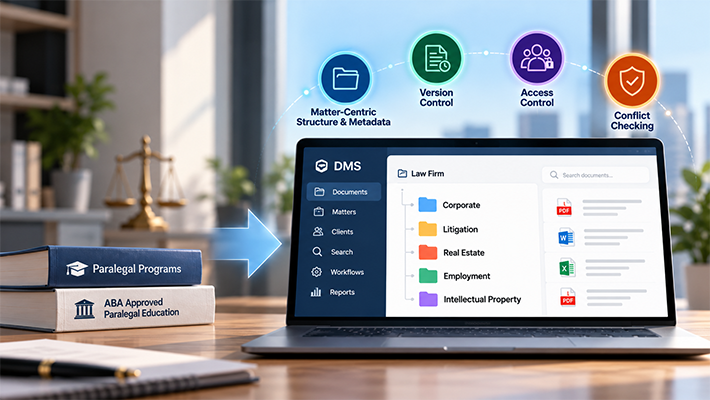
Key Features of Legal Document Management Software

Legal document management software is built to support structured, matter-driven document handling used by law firms, legal departments, and compliance teams. . This page explains how core features operate at a system level, focusing on feature behavior, integrations, and document handling processes without covering strategy, selection criteria, or outcomes. For broader discussions on adoption strategy and operational workflows, refer to our guide on document management for law firms.
Why Features Matter in Legal Document Management
Legal organizations manage high volumes of confidential, regulated, and time-sensitive information across multiple matters and clients. Feature design directly impacts operational reliability and regulatory compliance.
Effective feature sets enable:
- Matter-based organization and standardized filing
- Context-aware document retrieval
- Regulatory compliance and audit traceability
- Workflow efficiency for attorneys and legal staff
Well-implemented features reduce administrative friction and ensure document governance remains consistent at scale.
Core Features of Legal Document Management Software
A legal document management system should support the entire document lifecycle.
1. Matter-Centric Filing Using Profiles and Templates
Legal document management platforms use profile-driven filing templates aligned with client–matter structures common in law firm environments. While flexible folder hierarchies exist, most legal implementations rely on standardized metadata profiles.
System-level filing process::
- Documents, emails, or scanned files are saved into the system.
- Mandatory indexes such as client and matter are enforced at the time of capture.
- Filing templates determine the storage location based on profile values.
- Folder structures are created or populated automatically.
- The same profile can be reused to file related documents, emails, and scanned records.
This ensures consistent classification across all content types from the moment they enter the system.
2. Advanced Search and Indexing Capabilities
Legal document management software supports document retrieval through combined metadata indexing and content-based search enabling users to locate records using multiple query methods.
Explore how Docsvault handles matter-based filing
Indexed search coverage includes:
- File names and descriptions
- Version notes and document annotations
- Date fields
- Profile and index values
- Text within document content
Search methods supported:
- Profile-based search using index values
- Boolean logic with AND, OR, and NOT operators
- Proximity search to locate terms within a defined distance
- Inflectional search to match word variants and grammatical forms
An optional OCR add-on extends full-text search to scanned and image-based documents, enabling consistent retrieval across digital and scanned records.
3. Outlook-Based Email Management
Email management is handled through desktop integration with Microsoft Outlook, allowing incoming and outgoing messages to be captured using the same filing structure as documents.
Email capture process:
- Emails are selected directly from Outlook.
- Messages are saved into the document management software.
- Filing profiles are applied using client–matter indexes.
- Emails and attachments can be stored together or separately.
- Duplicate detection prevents the same email from being stored more than once.
This approach ensures emails follow the same classification, indexing, and retrieval standards as other legal records.
4. Automated Version Control and Built-In Document Comparison
Legal document management software enforces version control automatically, maintaining a complete and traceable history of document changes throughout the editing lifecycle.
Versioning behavior includes:
- A new version is created each time a document is saved.
- Check-in and check-out controls regulate concurrent access and edits.
- Undo check-out allows users to discard changes before committing a version.
- Historical version tracking
Document comparison capabilities include:
- Side-by-side comparison of different versions of the same document.
- Comparison between separate files of the same format, such as Word-to-Word or Excel-to-Excel.
- Inline change highlighting
All version review and comparison actions are performed within the system, removing the need to export files or rely on external comparison tools.
5. All-in-One PDF Tools
Built-in PDF utilities eliminate reliance on third-party editors.
Common capabilities include:
- PDF editing and annotation
- Redaction for privileged content
- Bates numbering for litigation production
- Court-ready formatting
This ensures evidentiary documents remain system-controlled and audit-tracked.
6. Digital Signatures
Digital signature functionality enables secure electronic execution of legal documents.
Integrated signing workflows provide:
- Faster approval cycles
- Tamper-proof signing records
- Automatic version updates
- Full audit logging
Signed documents remain indexed, searchable, and linked to matter records.
For extended compliance context, refer to Importance of Digital Signature in Legal Operations.
7. Retention Management and Compliance Controls
Retention rules in legal document management software are configured at both folder and profile levels, enabling controlled lifecycle handling of legal records.
Lifecycle management capabilities include:
- Automatic deletion of digital records after retention expiration
- Approval-based processing for physical records, including batch-level authorization
- Archive and delete policies for inactive or expired content
All user actions such as viewing, editing, and deletion are recorded in audit logs, which can be reviewed within the system or exported for compliance reporting.
8. Deployment Models and Secure Access
Legal document management software supports multiple deployment models to align with legal IT environments and security requirements.
Deployment options include:
- On-premise installation on Windows servers
- Private cloud deployment using Windows virtual machines
Access methods supported:
- Desktop client applications
- Browser-based web access
- Mobile applications
All access methods connect to a single centralized repository, ensuring consistent document access and control across devices and locations.
Now that you understand the core features of a legal DMS, the next step is evaluating how to choose the right system for your firm. See our legal DMS buyer’s guide →
Feature Mechanics Summary
| Feature Area | Functional Coverage |
|---|---|
| Matter-centric filing | Profile-driven filing templates with automatic folder creation |
| Search and indexing | Metadata, Boolean, proximity, inflectional search, and OCR add-on |
| Email management | Outlook email capture with duplicate detection |
| Version control | Automatic version creation with check-in and check-out controls |
| Document comparison | Version-level and same-format file comparison |
| All-in-one PDF Tools | Built-in PDF editor for editing, annotation, bates and stamping |
| Digital Signature | Facilitate legally binding digital signatures and workflow approvals for internal and external stakeholders. |
| Retention management | Folder- and profile-level lifecycle enforcement |
| Deployment | On-premise and private cloud deployment with unified access |
Choosing the Right Features for Your Law Firm
When evaluating a legal document management platform, assess functionality across five core areas:
- Search & Retrieval Needs – Are documents easy to locate?
- Compliance Requirements – Do retention and audit tools meet regulations?
- Integration – Does it connect seamlessly with Outlook, Office, or other tools?
- Workflow Efficiency – Can approvals, signatures, and collaboration be automated?
- Deployment & Control – On-premise, hybrid, or cloud—what fits your IT policies?