Docsvault Email Templates: Create and Send Repetitive Emails Faster
Sending the same type of email repeatedly can lead to unnecessary copy-pasting, manual data entry, and inconsistent messages. This becomes particularly inefficient when the email also needs information from a document, such as a customer name, document number, date, or other indexed information.
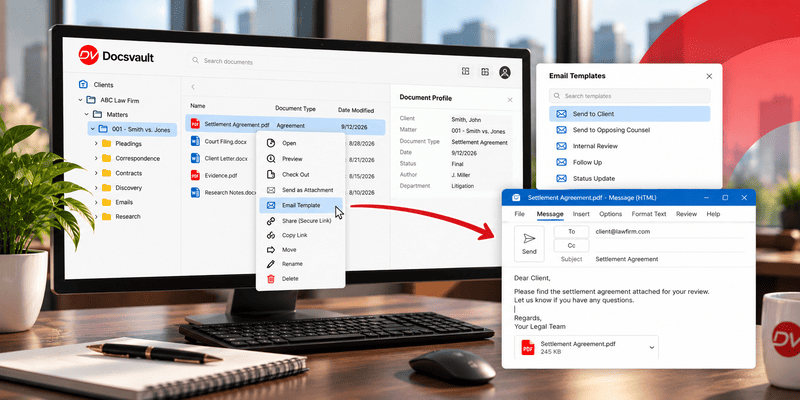
Docsvault Email Templates provide a reusable way to create these recurring messages. Templates can contain predefined email content and dynamic fields that can be populated with values from a document’s profile. Users can also send documents as attachments and use the built-in Address Book to find recipient information more quickly.
Instead of recreating a similar email every time, users can select an appropriate template, review the populated information, make any necessary changes, and send the message
What Are Email Templates?
An email template is a predefined email message that can be reused whenever a similar communication is required.
For example, an organization may regularly send:
- Payment reminder emails
- Agreement or contract renewal messages
- Document delivery emails
- Customer or client communications
- Internal notifications
- Routine administrative correspondence
Rather than copying an older email and manually replacing names, dates, document numbers, or other information, a template can contain reusable text and dynamic fields.
Docsvault Email Templates can use dynamic field values derived from the attached document’s profile, including email address information.
This makes the template useful not just for standardizing the wording of an email, but also for connecting the email with information already associated with the document.
How Do Docsvault Email Templates Work?
The basic process is:
Create a template → Add reusable content → Insert dynamic fields → Select a document → Apply the template → Review the email → Send
Create reusable email templates
Organizations can create multiple Email Templates for different departments, categories, or recurring communication requirements.
A template can contain predefined message content so users do not have to recreate the same email every time. Docsvault provides a built-in WYSIWYG editor for designing the email message.
Templates can therefore help standardize recurring communications while allowing users to start with an approved message.
Use dynamic fields from document profiles
One of the key capabilities of Docsvault Email Templates is the ability to use dynamic fields.
Instead of manually entering information that is already stored with a document, the template can use values from the document’s profile.
For example, a template might contain fields such as:
- Customer or client name
- Document number
- Date
- Other custom index fields
- Recipient email address
When the template is used, the relevant values can be populated from the document’s profile.
This reduces repetitive manual entry and helps keep document-related emails consistent with the information stored in the repository.
Use the Address Book for recipients
Docsvault’s built-in Address Book can store contact information used for email communications. When composing an email, users can begin typing a person’s name or email address and use the available contact information rather than entering the complete address manually.
Send Documents Using an Email Template
Email Templates are particularly useful when the email needs to accompany one or more documents.
Users can select documents and choose an Email Template to create the message. The selected documents can then be sent as email attachments.
Review and edit before sending
A template provides the starting point for the email rather than preventing users from making changes.
Users can modify the message before sending it when additional context or a specific response is required. Docsvault’s feature documentation specifically notes that users can change the message before sending.
This allows organizations to maintain a consistent starting format without making every email identical.
Email Templates vs. Copying Previous Emails
Copying an old email may seem convenient, but it requires users to manually identify and replace information each time.
| Copying a Previous Email | Docsvault Email Template |
| Find an earlier email to copy | Select a predefined template |
| Manually replace names and details | Use dynamic fields from document profiles |
| Manually enter recipient information | Use the Address Book |
| Attach documents separately | Select documents when creating the email |
| Individual users may use different wording | Shared templates can standardize recurring communication |
| Risk carrying over outdated information | Populate relevant values from the document profile |
| Start with an old message | Start with an approved reusable message |
The purpose of Email Templates is therefore not simply to make typing faster. They provide a structured way to reuse recurring document-related communications.
How Email Templates Fit Into Document Management
Email communication is often part of the same business process as document creation, review, storage, and retrieval.
For example, consider a contract stored in a document repository.
The document may have profile information such as:
- Client name
- Contract number
- Contract date
- Renewal date
- Client email address
Instead of retrieving those details manually when sending a recurring message, an Email Template can use relevant profile values in the email.
The resulting process becomes:
Document → Document Profile → Email Template → Dynamic Values → Attachment → Email
This connects communication with the information already maintained in the document management system.
Docsvault also maintains an email log for messages sent using Email Templates, allowing users and administrators to refer to sent-email activity.
Practical Uses for Docsvault Email Templates
Email Templates can be useful wherever employees repeatedly send similar messages.
Payment reminders
A finance or accounts team can use a predefined message for recurring payment communications while using relevant document information in the email.
Agreement and contract communications
Legal, sales, or administrative teams can create standardized messages for recurring agreement-related communication.
Document delivery
Users can select a document, apply an appropriate template, and send the document as an attachment without recreating the accompanying message.
Routine business correspondence
Departments can maintain reusable templates for frequently sent communications while still allowing users to edit the message when individual circumstances require it.
Standardize Repetitive Document Communication
The value of Email Templates extends beyond saving a few keystrokes.
When multiple users send similar communications, reusable templates can help establish a consistent structure for those messages. Shared templates can also make commonly used communications easier for team members to access.
At the same time, users can edit the populated message before sending it, allowing them to add information specific to the recipient or situation.
This creates a balance between standardization and flexibility.
How to Use Email Templates in Docsvault
The exact interface can vary by application version, but the general workflow is straightforward:
- Create an Email Template with the reusable message content.
- Add dynamic fields where document profile information should appear.
- Configure the template for the appropriate users or groups.
- Select a document that needs to be emailed.
- Choose the appropriate Email Template.
- Review the populated email and make any necessary changes.
- Attach the selected document, when required.
- Send the email.
For detailed instructions, see the Docsvault Email Template user guide and Using Email Template.
Why Use Email Templates in a Document Management System?
A document management system already contains much of the information employees need when communicating about documents.
Email Templates allow organizations to make better use of that information.
Instead of treating the email as a separate activity, users can connect the communication to:
- The document being sent
- The document’s profile
- Indexed information
- Recipient information
- The document attachment
- Email activity
This can reduce repetitive work while helping users maintain more consistent document-related communications.
Docsvault’s Email Templates feature is designed specifically around this relationship between reusable email content and document information.
Conclusion
Repetitive emails do not need to be recreated from scratch every time.
Docsvault Email Templates allow organizations to create reusable messages, populate relevant information from document profiles, select recipient information from the Address Book, and send documents as attachments. Users can review and modify the message before sending, while email activity can be maintained through the email log.
For organizations that frequently communicate about documents, Email Templates provide a practical way to connect document information and recurring email communication in one workflow.