Secure Document Sharing: How to Share Files Safely

Businesses share documents with clients, customers, vendors, consultants, partners, and other external parties every day. Email attachments may seem like the easiest option, but they can become difficult to manage when documents are sensitive, frequently updated, or need to be exchanged repeatedly.
Secure document sharing provides a more controlled way to exchange files. Instead of repeatedly sending copies as attachments, organizations can provide access to specific documents through a controlled sharing method. They can also use document request links when the goal is to collect files from someone outside the organization.
This guide explains how secure document sharing works, what controls to consider, and when to use document-sharing links or document-request links
What Is Secure Document Sharing?
Secure document sharing is the process of giving another person controlled access to specific documents or folders while applying appropriate safeguards around that access.
It is different from simply attaching a file to an email.
With an email attachment, you send a copy of the document. If the document changes later, you may need to send another copy. Multiple versions can then exist in different inboxes, downloads folders, and local systems.
With a controlled sharing link, the recipient can be given access to the specific document or folder without requiring access to the organization’s wider document repository.
The approach is particularly useful when documents contain confidential business, financial, legal, employee, customer, or other sensitive information.
A document management system can provide the central repository behind this process, keeping documents organized and allowing sharing to become part of the broader document lifecycle rather than a separate activity.
Why Move Beyond Email Attachments?
Email remains useful for many everyday communications, but it is not always the best mechanism for exchanging business documents.
Consider what happens when a document goes through several rounds of review:
- Someone sends the first version as an attachment.
- The recipient downloads and reviews it.
- The document is updated.
- A new version is sent.
- Someone eventually needs to determine which copy is current.
- Another person may forward an older attachment to someone else.
The problem is not necessarily that email is inherently unsafe. The problem is that attachments create copies, and copies can become difficult to control.
For documents that require more control, a dedicated sharing mechanism can provide a clearer process.
How to Share Documents With External Recipients
The basic external-sharing workflow is straightforward:
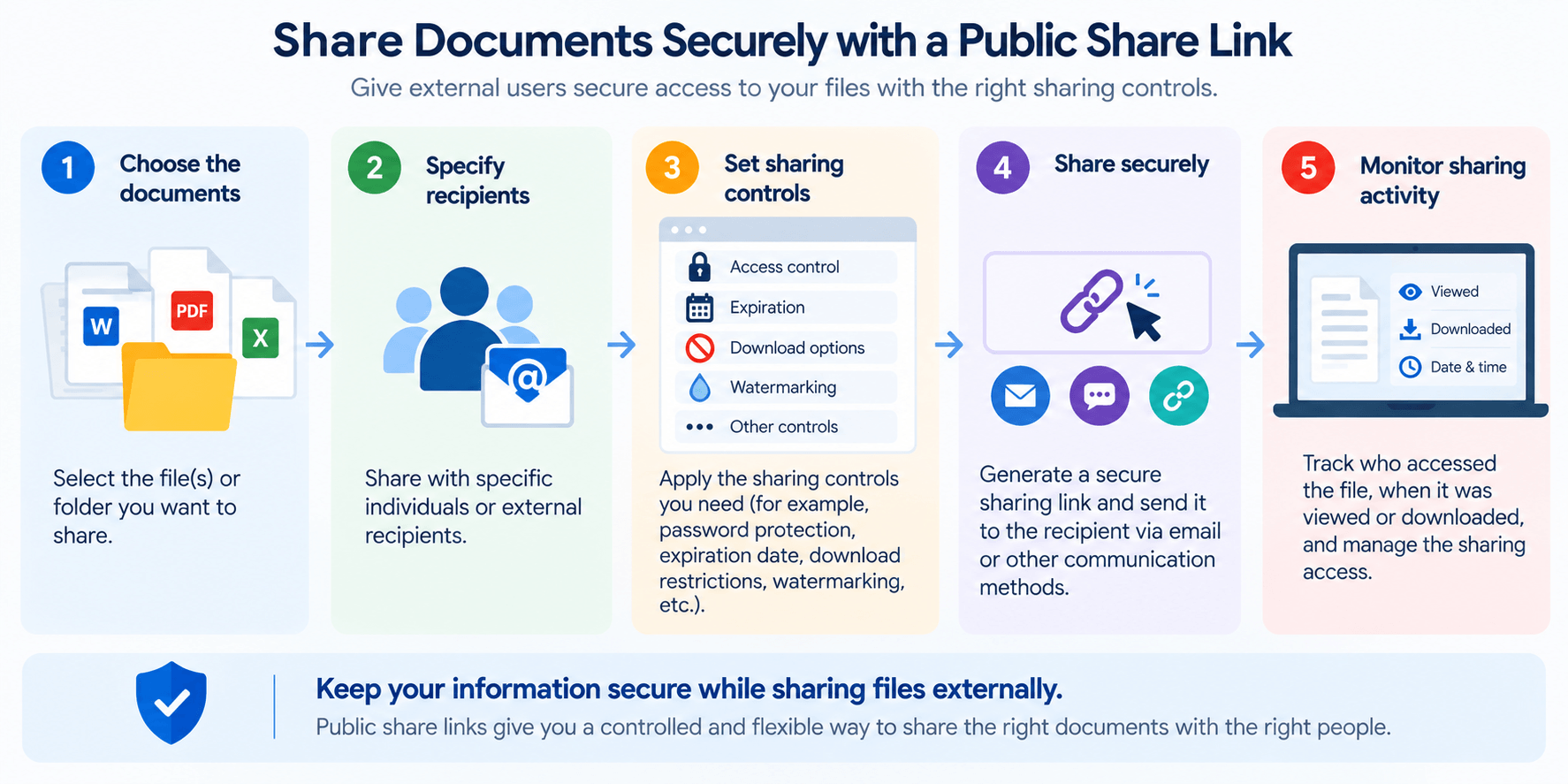
Select the document → create a controlled sharing link → send the link to the recipient → manage the access according to the sensitivity and purpose of the document.
A sharing link can be useful when a client, vendor, consultant, customer, or other external party needs access to a specific document without requiring access to the organization’s wider document repository.
For example, a company might need to send a contract to an outside consultant for review. Rather than attaching the document to several emails, the company can provide a link to the specific document and apply appropriate controls to that shared access.
The same principle can apply when several related documents need to be provided together.
Sharing a Folder Instead of Individual Files
Sometimes the requirement is not to share one document but a collection of documents.
A folder-based sharing approach can be useful when an external party needs access to multiple related files. It can also reduce the need to create and distribute a new attachment every time another document needs to be made available.
Docsvault’s Public Share Links allow authorized users to create public URLs for files or folders and share them with external recipients. Docsvault provides controls including password protection, expiration dates, and download prevention.
What Makes a Document-Sharing Link More Controlled?
A link by itself does not make document sharing secure. The important question is what controls are available around the link and how they are configured.
Depending on the sensitivity of the information, organizations should consider controls such as:
Password Protection
A password can add another barrier to access, particularly when a shared document contains sensitive information.
Expiration
A document does not necessarily need to remain accessible indefinitely. An expiration date can limit the period during which a sharing link remains valid.
Download Restrictions
In some situations, recipients may only need to access a document without downloading a copy. A sharing solution may provide an option to prevent downloads where appropriate.
Recipient and Access Information
For sensitive documents, organizations may want visibility into who accessed shared information and when. Access information can provide additional context when reviewing document-sharing activity.
Watermarking
Watermarks can help identify documents that have been shared externally. For example, a watermark may include information such as a date, document version, or other identifying details.
Keeping Shared Documents Current
Document versions can create confusion when files are exchanged repeatedly.
Suppose a customer receives a document on Monday and the organization updates it on Wednesday. If the customer still has Monday’s attachment, there is no automatic indication that a newer version exists.
A document-sharing link provides a different approach.
When you create a Public Share Link for a document in Docsvault, the recipient can access the latest version of that document. You do not need to create a new link simply because the document has been updated.
There are also situations where the exact version matters. For example, a business may need to provide the version that was approved on a particular date or the version used during a specific review.
In such cases, Docsvault allows users to share a particular version of the file rather than the latest version.
This gives organizations a choice: share the document’s latest version when ongoing access is required, or share a specific version when the exact document state matters.
How to Collect Documents From External Parties
Document sharing is only half of the problem.
Organizations also frequently need to receive documents from external people.
For example:
- A client needs to submit financial records.
- A contractor needs to provide compliance documents.
- A customer needs to upload supporting information.
- A vendor needs to submit invoices or other documentation.
- An external party needs to provide several files for review.
Sending an email asking someone to “reply with the documents attached” creates the same attachment-management problems in reverse.
A document request link provides a different workflow:
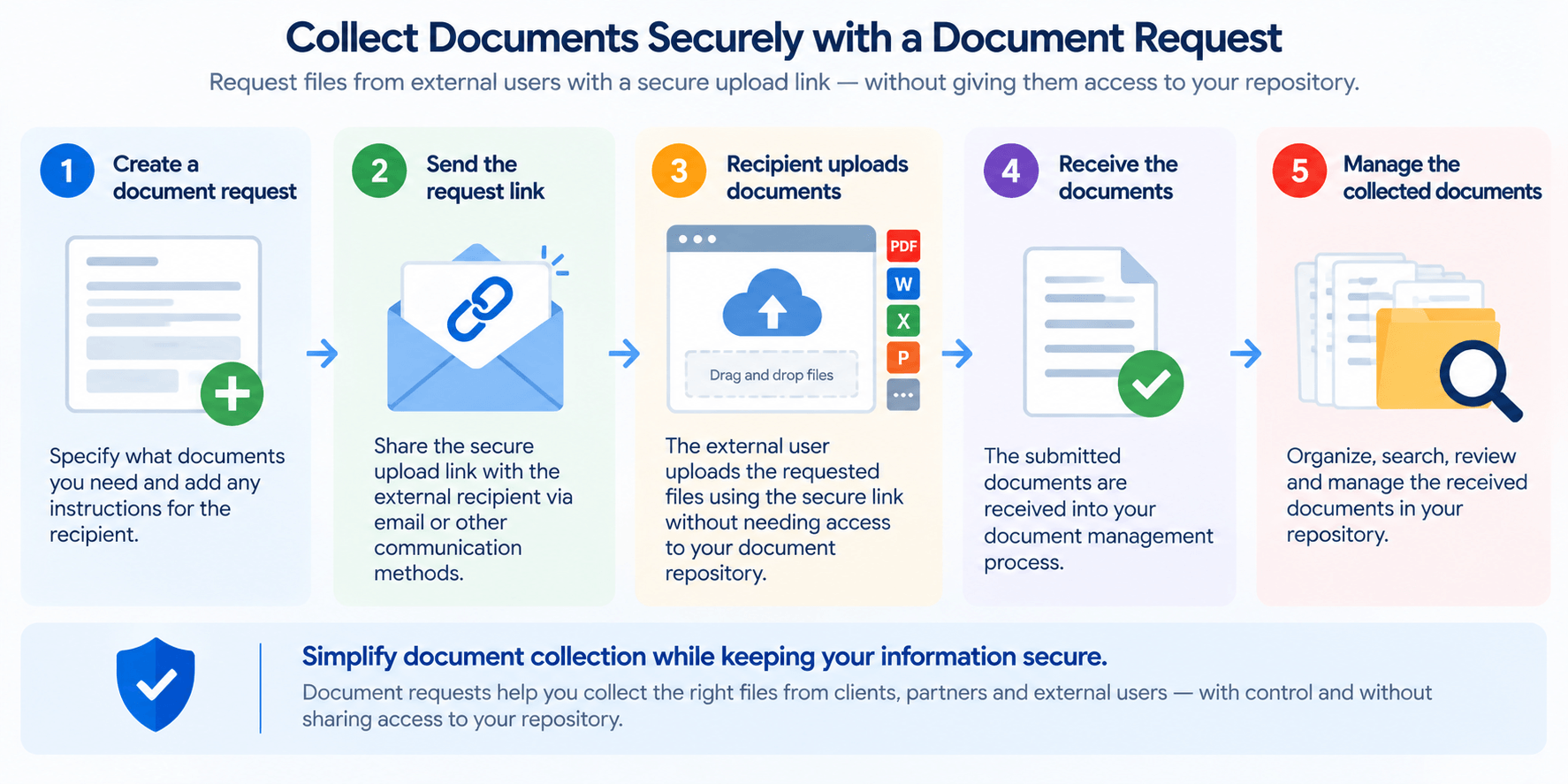
Create a request → send the upload link → external recipient uploads the files → documents are received into the designated location.
Docsvault’s Document Request capability allows organizations to collect documents from people who do not have a Docsvault account. Uploaded documents can be directed to a specified location in Docsvault, while request settings can include expiration, password protection, allowed file extensions, file-size limits, and file-count limits.
This makes document collection different from simply sharing a folder and asking someone to email files back.
Share Link vs. Document Request: Which Should You Use?
The simplest way to think about the two workflows is:
| Requirement | Appropriate approach |
| Give an external person access to a document | Public Share Link |
| Give an external person access to several documents | Public Share Link / Shared Folder |
| Let recipients access the latest version of a shared document | Public Share Link |
| Share an exact version of a document | Share a Specific Version |
| Collect documents from an external person | Document Request Link |
| Restrict how long a link remains available | Link Expiration |
| Require an additional password for link access | Password Protection |
| Limit the types or number of files an external person can upload | Document Request Controls |
The distinction is simple:
Sharing sends information outward. Document requests bring information inward.
Keeping these workflows separate makes it easier to choose the appropriate method for each situation.
Track What Happens to Shared Documents
Sharing sensitive documents is not only about controlling access when a link is created. Organizations may also need visibility into what happened afterward.
Depending on the sharing system, useful information can include:
- Who accessed the shared content
- When the link was accessed
- Whether documents were downloaded
- Which files were shared
- When a link expires
- Whether a sharing link is still active
Docsvault provides share management, share logs, and downloadable reports for Public Share Links.
Document Request Links can also be managed and reported, including information such as the request location, creation date, recipient, expiry, password setting, allowed extensions, file-size limit, and file-count limit.
For organizations with formal security or governance requirements, this type of visibility can be an important part of the overall document-management process.
How Can Docsvault Help With Secure Document Sharing?
Docsvault connects document sharing with the organization’s central document management environment rather than treating sharing as an isolated file-transfer activity.
For external sharing, Public Share Links allow authorized users to share specific files or folders with people outside the organization. Recipients can access the shared content through a public URL, while organizations can configure controls such as passwords, expiration dates, and download prevention.
For the opposite workflow, Document Requests provide upload links that allow external users to submit documents without having a Docsvault account. Uploaded files can be stored directly in a specified Docsvault location, and the request can be configured with controls appropriate to the collection process.
These capabilities keep external document exchange connected to the broader document-management environment, where organizations can also manage document versions, audit trails, permissions, and other aspects of the document lifecycle. The approved Product Knowledge Base identifies Public Share Links as external links and Document Requests as upload links within Docsvault’s collaboration capabilities.
For businesses that regularly exchange documents with clients, customers, vendors, consultants, or other external parties, this can provide a more structured alternative to managing every document exchange through email attachments.
Final Thoughts
Secure document sharing is not simply about replacing an email attachment with a link.
A good sharing process considers who needs access, what they need to access, how long they need it, whether they should be able to download it, and what information the organization needs to retain about the exchange.
It is equally important to consider the reverse workflow. When an organization needs documents from an external party, a document request link can provide a more structured way to collect those files.
For businesses that regularly exchange sensitive or business-critical documents, connecting these activities to a document management system can provide greater consistency and control than treating every document exchange as a separate email transaction.