Document Management for Education: Benefits, Use Cases & Best Practices

Educational institutions manage far more than lesson plans and academic materials. Admissions records, student files, certificates, transcripts, staff documents, policies, financial records, correspondence, and administrative forms all need to be stored, retrieved, shared, and maintained over time.
When these documents remain spread across filing cabinets, shared folders, individual computers, and email inboxes, administrative teams can spend unnecessary time looking for information, checking which version is current, or requesting documents from another department.
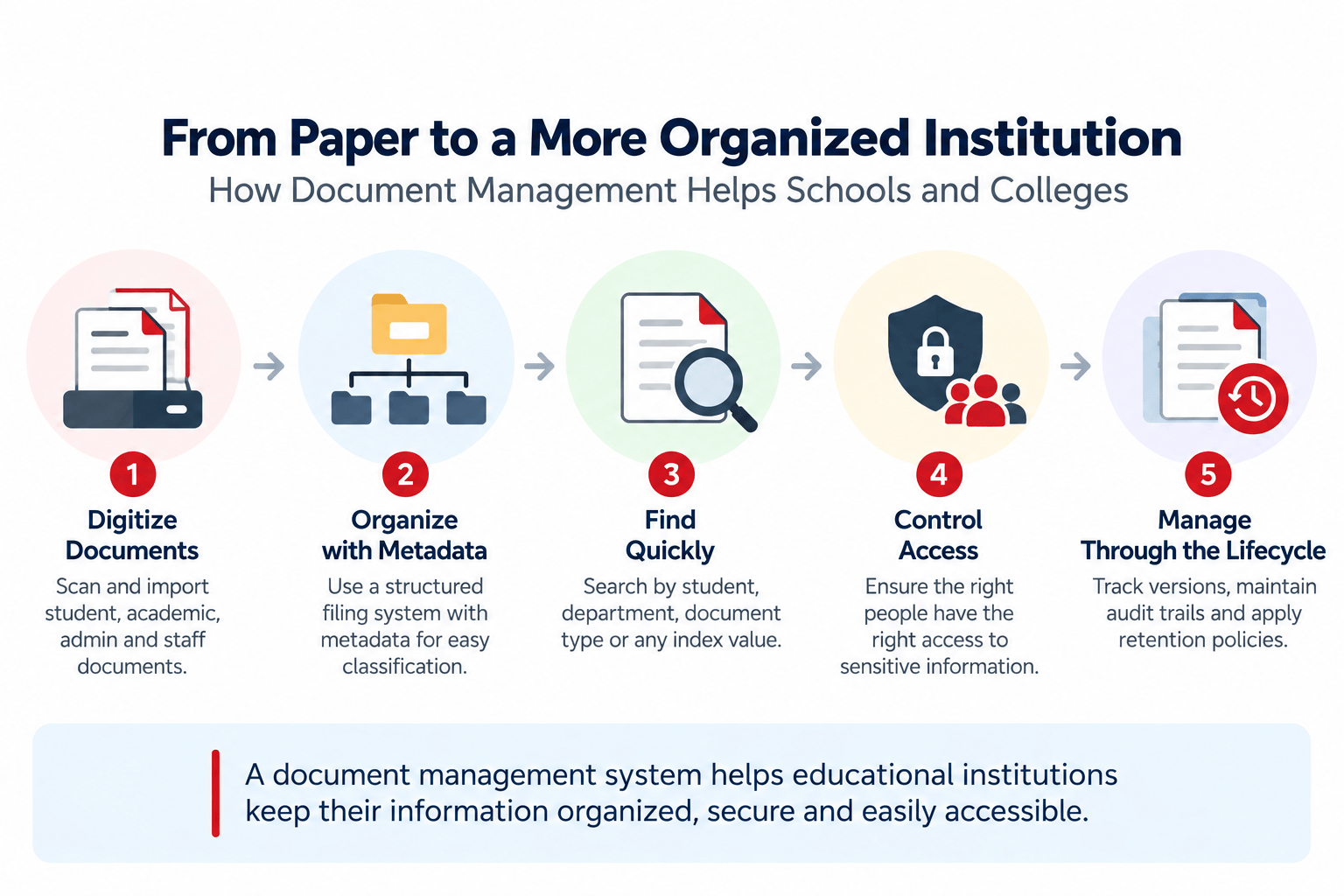
A document management system for education provides a structured way to capture, organize, search, secure, and manage these documents throughout their lifecycle.
What Is Document Management for Education?
Document management for education is the structured process of capturing, organizing, storing, securing, retrieving, and managing documents used by schools, colleges, universities, and other educational institutions.
A document management system (DMS) takes this process beyond simple file storage. Instead of relying only on folders and filenames, an education DMS can use document profiles, metadata, permissions, search, version control, audit trails, workflows, and records-management policies to create a more controlled document environment.
The objective is not simply to make documents digital. It is to make institutional information organized, accessible, controlled, and easier to manage.
Why Do Educational Institutions Need Document Management?
Schools and colleges often have multiple departments handling documents at the same time. Admissions may manage applications and supporting documents while academic departments maintain student records, administration manages policies and correspondence, and finance handles invoices, payment records, and related documentation.
The challenge becomes greater when documents are stored using inconsistent methods.
Common problems include:
- Paper files that are difficult to locate quickly
- Documents stored across multiple computers or shared folders
- Inconsistent naming and filing practices
- Duplicate copies of the same document
- Difficulty determining the latest version
- Delays when another department needs a document
- Limited visibility into who accessed or changed information
- Time-consuming retrieval of older records
- Manual processes for approvals and document routing
The result is often a document environment where staff know that the information exists but cannot immediately determine where it is, which version is current, or who has access to it.
What Documents Can an Education DMS Manage?
A document management system can support many of the document types created and received by educational institutions.
Student and Admissions Records
Examples include:
- Admission applications
- Supporting documents
- Student records
- Transcripts
- Certificates
- Correspondence
- Academic records
A structured filing system can make it easier for authorized staff to locate documents associated with a student or administrative process.
Staff and Human Resources Documents
Educational institutions also maintain documents related to employees and faculty, such as:
- Employment records
- Forms
- Policies
- Training records
- Correspondence
- Administrative documents
These documents can be organized according to the institution’s filing and access requirements.
Academic and Curriculum Documents
Departments may need to manage:
- Curriculum documents
- Course materials
- Academic policies
- Examination-related documents
- Department records
- Approval documents
A controlled repository can make these documents easier to retrieve and manage as they are revised.
Administrative and Financial Documents
Document management can also extend to:
- Policies and procedures
- Financial records
- Procurement documents
- Vendor correspondence
- Administrative forms
- Institutional records
The exact structure should reflect how the institution operates rather than forcing every department into the same filing model.
Common Document Management Use Cases in Education
The value of a DMS becomes clearer when viewed through everyday institutional processes.
- Centralizing Student Records
Instead of maintaining paper files or documents across multiple locations, an institution can establish a centralized repository for authorized users.
Documents can be organized using a consistent filing structure and additional metadata so that staff can retrieve information without relying entirely on physical file locations.
- Digitizing Paper Records
Many institutions still have historical records that originated on paper.
Scanning allows these records to be converted into digital documents and brought into a centralized repository. OCR can additionally make supported scanned documents searchable.
This can reduce dependence on physical filing cabinets while making historical information easier to retrieve.
- Managing Admissions Documentation
Admissions processes can generate substantial documentation.
A document management system can provide a structured location for applications and supporting documents, while workflow capabilities can be used where documents need review or approval.
The objective is to create a consistent process rather than having every department maintain its own collection of files.
- Controlling Document Versions
Policies, forms, curriculum documents, procedures, and other institutional documents can change over time.
Version control helps maintain revision history and reduces confusion about which version should be used.
This becomes particularly important when multiple people work with the same documents.
- Improving Document Retrieval
Search is one of the most important reasons for moving beyond basic file storage.
A DMS can combine structured metadata with document search capabilities so users can locate information based on the information associated with a document rather than remembering exactly where a file was stored.
- Managing Access to Sensitive Records
Not every employee needs access to every document.
Role-based permissions and user or group access controls allow institutions to establish who can access particular information.
This is particularly relevant where student, employee, financial, or other sensitive institutional records are involved.
- Routing Documents for Review and Approval
Some institutional documents require review or approval before they can be finalized.
Workflow automation can route documents through defined steps and provide notifications or reminders to the appropriate users.
This can reduce dependence on manual follow-up.
What Should an Education Document Management System Include?
Institutions evaluating document management solutions should look beyond basic digital storage.
Structured organization
The system should support a consistent filing structure while allowing institutions to organize documents according to their own administrative needs.
Metadata and document profiles
Metadata provides additional information about a document, such as document type, department, student, date, or status.
This makes structured search and retrieval possible without relying solely on filenames.
Search
Look for both full-text and metadata-based search capabilities so users can retrieve information using different approaches.
Scanning and OCR
If the institution has significant paper records, scanning and OCR capabilities can be important parts of the digitization process.
Version control
Version history helps organizations manage revisions and avoid confusion when documents are updated.
Security and permissions
The system should provide appropriate access controls so that documents are available to authorized users without unnecessarily exposing sensitive information.
Audit trails
An audit trail can provide visibility into document-related activity and support institutional accountability.
Workflow
Workflow capabilities can help automate document review, approval, routing, and follow-up processes where appropriate.
Records retention
Educational institutions should also consider how documents are retained and eventually archived or disposed of according to their policies and applicable requirements.
A Real-World Example: S.R.N. Mehta School
The difference between a hypothetical case study and a real implementation is important.
Docsvault has a documented customer case study for S.R.N. Mehta School, a private school in Karnataka, India. The school reported challenges with disorganized paper-based storage, delayed retrieval, filing and labeling errors, and misplaced documents.
After adopting Docsvault, the school scanned documents into a central repository. The case study reports that employees could access documents from the repository, reducing back-and-forth between departments and branches and making retrieval quicker.
The school also reported benefits from access control, audit trails, workflow, and reminders. Its executive trustee specifically highlighted the ability to maintain documents in one repository and search for them rather than relying on physical files.
Read the full S.R.N. Mehta School document management case study.
This example illustrates an important point: the value of document management is not simply replacing paper with PDFs. It is creating a system in which institutional information can be captured, organized, retrieved, controlled, and used more efficiently.
How Docsvault Supports Document Management for Education
Docsvault provides document management capabilities that can be applied to educational environments, including document scanning and capture, document profiles and indexing, search, document security, version control, audit trails, workflow, and records management.
For example, institutions can digitize paper documents, organize documents using profiles and index values, search the repository, control access, maintain document history, and route documents through defined processes.
Docsvault is also designed as a secure, customer-controlled document management platform, with on-premise and customer-hosted private-cloud deployment options.
For a broader overview of how Docsvault is positioned for educational institutions, see the Educational Document Management solution.
How to Choose a Document Management System for an Educational Institution
Before selecting a solution, educational institutions should consider how documents are currently created, received, organized, accessed, and retained.
Ask:
- Where are documents currently stored?
Map paper files, network folders, local computers, email attachments, and other repositories.
- How are documents classified?
Determine which information users need to retrieve documents efficiently.
- Who needs access?
Identify departments, roles, and users that require access to different types of information.
- How are documents revised?
Determine whether staff need version history, check-in/check-out, or other document-control capabilities.
- Which processes require approval?
Identify forms, policies, certificates, financial documents, and other records that move through review or approval.
- How are paper records being digitized?
If the institution has substantial paper archives, evaluate scanning, OCR, indexing, and import capabilities.
- How will records be retained?
Consider retention requirements and how documents should be archived or disposed of when they reach the end of their required lifecycle.
- Can the system integrate with existing work?
Consider Microsoft Office, Outlook, identity systems, and other applications already used by the institution.
Education Document Management: From Filing to Information Management
A document management system should not simply reproduce a filing cabinet on a computer.
The larger opportunity is to establish a consistent way to manage institutional information.
That means:
Capture documents → classify them → organize them → secure them → retrieve them → route them when necessary → maintain their history → retain them appropriately
For schools and colleges dealing with growing volumes of student, academic, administrative, and operational records, this approach can provide a more structured alternative to disconnected paper files, folders, and email attachments.
Docsvault’s Educational Document Management solution provides the commercial overview, while the S.R.N. Mehta School case study provides a real customer example.
Final Thoughts
For educational institutions, document management is ultimately about more than reducing paper.
It is about creating a reliable way to organize institutional information, retrieve documents when they are needed, control access, manage revisions, and support everyday administrative processes.
The right approach starts by understanding how an institution actually handles its documents today, then designing a structured system around those workflows.
For organizations considering a dedicated education document management solution, real implementation experience matters. The S.R.N. Mehta School case provides one example of how moving from paper-based storage to a centralized document repository affected document retrieval, organization, and administrative work.