How to Control Document Versions: Best Practices
How to Control Document Versions
Have you ever encountered files named Presentation_v1, Presentation_v1.1, Presentation_Final, Presentation_Final_Updated, and Presentation_Final_Approved?
When organizations rely on filenames to distinguish document revisions, it can become difficult to determine which file is current, what changed, and whether an earlier version can be recovered.
Document version control provides a more structured approach. Instead of creating separate copies of a document for every revision, a document management system can maintain versions within a controlled repository.
This allows teams to work with the latest version while preserving previous versions for reference, comparison, or recovery.
In this guide, we’ll explain how to control document versions, the practices that help prevent version conflicts, and how Docsvault supports document version management.
What Is Document Version Control?
Document version control is the process of tracking and managing revisions to a document throughout its lifecycle.
When a document is revised, the previous version is retained rather than simply being overwritten. A controlled version history can help users:
- Identify the latest version
- Review previous versions
- Determine who made changes
- Track when revisions occurred
- Compare different versions
- Recover an earlier version when necessary
Version control is one component of a broader document management system. For a broader explanation of why version control matters, see the benefits and importance of document version control.
Why Do Organizations Need to Control Document Versions?
Without a consistent version-control process, organizations can encounter several problems.
Multiple copies of the same document
Documents may exist in shared folders, email attachments, local computers, and other locations. Different users may then work from different copies.
Accidental overwriting
When multiple users edit a document independently, one person’s changes can overwrite another person’s work.
Difficulty identifying the current version
Filename conventions such as Final, Final2, or FinalApproved depend on users consistently naming files. They do not provide a reliable record of document revisions.
Loss of previous content
If a document is overwritten, important information from an earlier version may be difficult to recover.
Limited accountability
Organizations may need to know who changed a document and when. A controlled version history and audit trail provide greater visibility into document activity.
Review and approval confusion
Documents often move through drafting, review, revision, and approval. Without controlled versioning, reviewers may unknowingly work from an outdated copy.
How to Control Document Versions
Effective document version control is not simply about keeping old copies. It requires a consistent process for creating, editing, reviewing, and managing document revisions.
1. Keep Documents in a Centralized Repository
Start by keeping controlled documents in a central repository rather than allowing multiple uncontrolled copies to circulate.
A centralized repository makes it easier to:
- Locate the current document
- Apply access permissions
- Maintain version history
- Search for documents
- Control document activity
- Manage documents throughout their lifecycle
A document management system goes beyond basic file storage by combining centralized document storage with organization, search, security, workflow, and document-control capabilities.
For an overview, see What Is a Document Management System?.
2. Use Check-In and Check-Out
Check-in/check-out is an important control when multiple people work with the same document.
A typical process is:
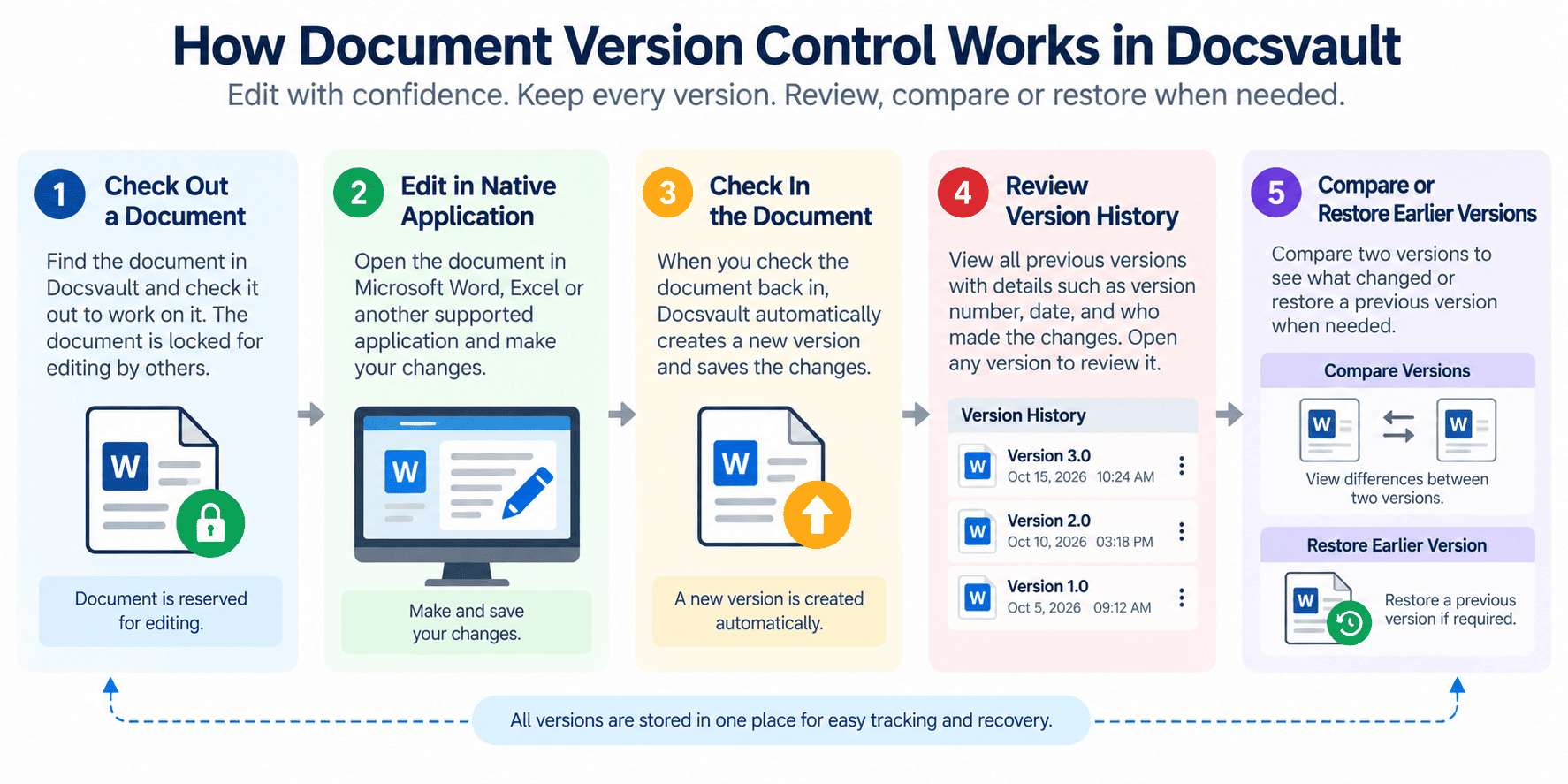
Check out → Edit → Check in → Create new version
When a user checks out a document, it is controlled for editing while that user works on it. After the changes are complete, the document is checked back in and the updated version is preserved.
This reduces the risk of two users independently editing the same document and unintentionally overwriting each other’s work.
Docsvault includes Check-in / Check-out as part of its document-control capabilities.
3. Create a New Version for Each Revision
A controlled versioning system should preserve meaningful revisions instead of requiring users to create separate files manually.
For example, instead of:
- EmployeePolicy.docx
- EmployeePolicy_v2.docx
- EmployeePolicy_Final.docx
- EmployeePolicy_Final_Approved.docx
the organization can maintain one document with its revision history.
This keeps the document identity consistent while allowing users to distinguish between versions.
Docsvault’s Document Version Control feature preserves versions of a document so users can access the latest or an older version when required.
4. Maintain Version History
Version history provides a record of how a document has changed over time.
For important documents, users should be able to determine:
- What versions exist
- Which version is current
- When a version was created
- Who made the change
- Whether an earlier version needs to be reviewed
Maintaining this history is particularly useful for documents that undergo frequent revisions, reviews, or approvals.
Docsvault provides Version History as part of its document version-control capabilities.
5. Control Who Can Modify Documents
Version control should work together with access control.
Not every user needs permission to modify every document. Organizations can establish appropriate permissions based on user roles, document sensitivity, and business requirements.
For example:
| User | Possible access |
| General user | View |
| Contributor | View and edit |
| Reviewer | View and review |
| Manager | Review and approve |
| Administrator | Manage permissions |
The actual permission structure should be based on the organization’s document-management policies.
Docsvault provides user- and group-based permissions and role-based security capabilities that can be used alongside document version control.
6. Add Version Notes
A version number tells you that a revision exists. A version note can explain why the revision was made.
For example:
- Updated pricing information
- Revised policy language
- Incorporated reviewer comments
- Added approved specifications
- Corrected customer information
Version notes are particularly useful when a document passes through several review cycles.
Docsvault supports Version Notes, allowing users to add descriptive information to document versions.
7. Compare Versions When Reviewing Changes
Sometimes knowing that a new version exists is not enough. Reviewers need to know what changed.
Document comparison can help identify differences between versions and make the review process more efficient.
Docsvault’s Compare Documents and Versions capability supports comparisons of Word, Excel, and text documents, including different versions of the same document. It also provides side-by-side and redlining comparison options.
This can be useful for:
- Contracts
- Policies
- Reports
- Proposals
- Technical documents
- Collaborative documents
See Compare Documents and Versions in Docsvault for more information.
8. Maintain an Audit Trail
Version history and audit trails serve related but different purposes.
Version history focuses on the different revisions of a document.
An audit trail records activity associated with the document.
Using both can provide greater visibility into document activity and support accountability.
Docsvault includes both Version History and Audit Trail among its document-control capabilities.
For organizations with formal compliance or records-management requirements, version control should therefore be considered as part of a broader document-control process.
For more information, see Compliance with Version Control.
9. Establish Rules for Retaining Versions
Not every organization needs to manage document versions in exactly the same way.
Version-retention practices may depend on:
- Document type
- Business process
- Internal policies
- Regulatory requirements
- Records-management requirements
The important point is to establish clear rules rather than allowing users to decide individually which versions to retain or delete.
For records-heavy environments, the U.S. National Archives and Records Administration (NARA) provides electronic records-management requirements that address lifecycle management of electronic records. Its guidance also recognizes the importance of maintaining versions and associated records appropriately.
See NARA Universal Electronic Records Management Requirements for additional guidance.
Document Version Control Workflow
A practical version-control process can be summarized as:
Find the document → Check out → Edit → Check in → Create new version → Review → Approve → Retain
- Find the current document: Locate the document in the organization’s controlled repository.
- Check out the document: Check out the document according to the organization’s editing process.
- Edit the document: Make the required changes using the appropriate application.
- Check in the document: Return the edited document to the repository.
- Create the new version: Preserve the revised document as a new version rather than creating an unrelated file copy.
- Add a version note: Where appropriate, document the reason for a significant revision.
- Review or compare the revision: Use version history or document comparison when reviewing changes.
- Approve the document: If the document is subject to an approval process, route it through the appropriate workflow.
- Retain the history: Manage previous versions according to the organization’s document and records management requirements.
How Docsvault Controls Document Versions
Docsvault combines document version control with other document-control capabilities to help organizations manage revisions within a centralized document repository.
Key capabilities include:
Version Control
Docsvault preserves document versions so users can access the latest or an older version when required.
Check-In / Check-Out
Users can check documents out for editing and check them back in as part of a controlled editing process.
Version History
Version history provides access to the document’s previous versions and supports review of the document’s revision history.
Version Notes
Users can add descriptive notes to versions to provide additional context about revisions.
Document Comparison
Users can compare versions of the same document or compare different documents of supported types to identify changes.
Audit Trail
Audit trails provide additional visibility into activity associated with documents.
Together, these capabilities provide a structured approach to document revision management rather than relying solely on manually named file copies.
See Docsvault Document Version Control for the feature details.
Document Version Control Best Practices Checklist
Use this checklist when establishing or reviewing your document version-control process:
- Keep controlled documents in a centralized repository.
- Establish a consistent check-in/check-out process.
- Avoid using filenames as the primary version-control mechanism.
- Maintain a version history.
- Control who can modify sensitive documents.
- Use version notes for significant revisions.
- Compare versions when reviewing substantial changes.
- Maintain audit trails.
- Establish rules for retaining previous versions.
- Include version control in document approval processes where appropriate.
- Train users on the organization’s version-control procedures.
- Review the process periodically.
Document Version Control vs. Manual File Naming
| Manual file naming | Document version control |
| Creates multiple document copies | Maintains revisions within the document’s history |
| Relies on users to name files correctly | Version history is maintained systematically |
| Can make the current file difficult to identify | Current and previous versions can be distinguished |
| Older copies may be scattered | Previous versions remain associated with the document |
| Provides limited revision context | Provides version history and related information |
| Can increase the risk of overwriting | Check-in/check-out can help control concurrent editing |
Manual naming conventions can still be useful for identifying documents, but they should not be the primary mechanism for managing document revisions.
Frequently Asked Questions on Document Version Control
Yes. Docsvault maintains document version history, allowing users to access previous versions. Supported documents and versions can also be compared to identify changes, and an earlier version can be restored when required.
Check-in/check-out controls the editing process for a document. A user checks out the document to make changes and checks it back in when finished, helping reduce conflicting edits and accidental overwrites.
Document version control is the process of tracking and managing revisions to a document while preserving previous versions. It helps organizations identify the current version, review changes, and access earlier versions when necessary.
Conclusion
Controlling document versions is about more than adding numbers to filenames. A reliable process should provide a controlled way to edit, track, review, compare, and preserve document revisions.
Centralized storage, check-in/check-out, version history, access controls, version notes, document comparison, and audit trails can work together to reduce version confusion and improve document integrity.
Docsvault brings these capabilities together through Document Version Control, Check-in/Check-out, Version History, Version Notes, Audit Trail, and Document Comparison.
Explore Docsvault Document Version Control or request a Docsvault demo to see how controlled document versioning can fit into your document-management process.
This article covers:
- How to Control Document Versions
- What Is Document Version Control?
- Why Do Organizations Need to Control Document Versions?
- How to Control Document Versions
- Document Version Control Workflow
- How Docsvault Controls Document Versions
- Document Version Control Best Practices Checklist
- Document Version Control vs. Manual File Naming
- Frequently Asked Questions on Document Version Control
- Conclusion