Document File Naming: Best Practices for Consistent File Names
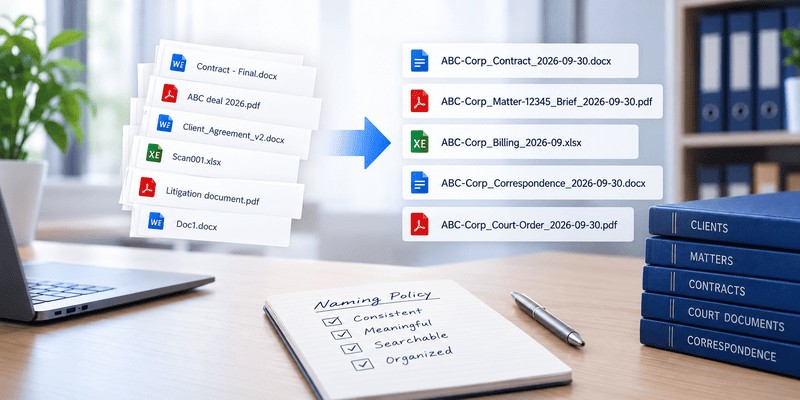
Finding the right document becomes harder when file names are inconsistent, unclear, or based on information that is difficult to remember.
Consider a folder containing files named:
- Joesalaryslip.1
- 152-SUT103-409E-01-12
- Joe-Brown-SUT103-Salary-Jan-2026
All three names may identify the same type of document, but the third provides more recognizable information that can help a user understand what the file contains.
A consistent file naming convention gives users a predictable way to identify documents and can make files easier to organize, retrieve, and manage.
In a document management system, however, filenames are only one part of document organization. Structured metadata and document profiles can provide additional information that should not be forced into the filename.
This guide explains how to create practical document file naming conventions and how Docsvault Filename Templates can help standardize them.
What Is a File Naming Convention?
A file naming convention is a defined set of rules for creating document filenames consistently across an organization.
A naming convention might specify:
- Which information should appear in a filename
- The order in which information should appear
- How dates should be formatted
- Which abbreviations should be used
- Whether the original filename should be retained
- How document types should be identified
- Whether filenames should contain department, client, matter, or project information
For example, an organization might establish a convention such as:
Client_Matter_DocumentType_Date
A document could then be named:
ABC-Corp_Contract_Agreement_2026-09-30
The exact convention should depend on the organization’s documents and how users need to identify them.
The important principle is consistency. A naming convention is useful when users apply the same structure repeatedly.
Why Consistent File Names Matter
Inconsistent filenames make documents harder to recognize and can make manual file management more difficult.
For example, these filenames communicate the same general information in different ways:
- ABC Contract Final
- ABC_Contract_9-30-26
- ABC-Corp_Agreement_2026
- ContractABCFinal2
If different users create files using different patterns, it becomes harder to determine what information a filename contains.
A consistent naming structure can help users:
- Identify documents more easily
- Recognize document types
- Distinguish documents with similar names
- Sort files more predictably
- Establish consistent document-management practices
- Reduce unnecessary manual naming decisions
However, filenames should not be expected to contain every piece of information about a document. In a document management system, metadata can provide a more structured way to store additional information.
7 File Naming Best Practices
1. Define a standard naming structure
Start by deciding what information should appear in the filename and in what order.For example:Client_Matter_DocumentType_Datecould produce:SmithCo_Litigation_Complaint_2026-09-30Another department might use:Department_DocumentType_Datesuch as:
HR_EmployeePolicy_2026-09-30
The important point is to define the structure before users begin creating large numbers of documents.
2. Use meaningful information
A filename should provide enough information to help a user understand what the document represents.Compare:Document123.pdfwith:Acme_InsurancePolicy_2026.pdfThe second filename provides immediately recognizable information.Avoid relying entirely on unexplained numbers or internal codes unless those identifiers are meaningful to the people using the documents.
3. Use consistent date formats
If dates are part of your naming convention, choose one format and use it consistently.For example:
2026-09-30
is unambiguous and provides a consistent structure.
The important thing is not necessarily which date format an organization selects, but that users follow the same convention.
Docsvault Filename Templates can also incorporate date and time elements into generated filenames, including formats such as YYYY-MM-DD, month names, short years, and time values.
4. Use consistent document-type names
Organizations should establish consistent terminology for recurring document types.For example, choose one standard:
- Contract
rather than allowing users to alternate between:
- Contract
- Agreement
- ContractDoc
- LegalAgreement
- FinalContract
Where different terms represent genuinely different document types, they can remain separate. The objective is to avoid unnecessary variations for the same type of document.
5. Avoid unnecessary complexity
A filename does not need to contain every available piece of information.
For example:
2026-09-30-ABC-001-Contract-Legal-Department-Final-Reviewed-Client-Version.pdf
may contain useful information, but it is difficult to read and maintain.
A shorter structure such as:
ABC_Contract_2026-09-30.pdf
may be easier to work with when the remaining information is already available through document metadata.
The best naming convention is one that provides useful identification without turning the filename into a substitute for the entire document profile.
6. Decide how revisions should be represented
Organizations should establish a consistent approach to revised documents.For example, they may distinguish documents using:
- Revision numbers
- Version identifiers
- Dates
- Document status
However, when a document management system provides version control and version history, users do not necessarily need to encode every revision into the filename.
This is an important distinction:
Filename = identifies the document
Version history = tracks document revisions
Keeping those concepts separate can prevent filenames from becoming unnecessarily complicated.
7. Document the naming convention
A naming convention only works when users know what the rules mean.Document the organization’s standard and explain:
- Required elements
- Element order
- Date format
- Approved document-type names
- Abbreviations
- Examples
- Exceptions, if any
This is particularly important when multiple departments or users create documents.
File Names vs. Document Metadata
A filename can provide useful identifying information, but it should not be the only way an organization organizes documents.
A document management system can use structured metadata, such as:
- Client
- Matter
- Document Type
- Department
- Case Number
- Date
- Status
For example, instead of putting every piece of information into a long filename:
ABC-Corp_Litigation_Contract_Legal_12345_2026-09-30.pdf
an organization could use a simpler filename:
ABC-Corp_Contract_2026-09-30.pdf
while maintaining information such as the matter, case number, department, and status as document profile fields.
This separates file naming from document metadata. Users can then search and filter documents using structured index fields rather than relying only on information contained in filenames.
In Docsvault, Document Profiles provide the structured information layer through index fields. Filename Templates can then use values from those profile fields when generating filenames.
How Docsvault Filename Templates Standardize File Naming
Manually applying a naming convention can become difficult when many users import documents. Even when an organization has a documented naming policy, users may apply it differently.
For example, one user might name a document:
ABC_Contract_2026-09-30.pdf
while another might use:
Contract-ABC-September-30-2026.pdf
Docsvault Filename Templates provide predefined naming structures that can use static text, dynamic values, and information from document profile fields to generate consistent filenames.
A Filename Template is associated with a Document Profile, and multiple Filename Templates can be assigned to the same profile. Templates can be configured using information such as:
- Client Name
- Matter Title
- Document Type
- Case Number
- Department
- Date
- Time
- Original filename
For example, a naming structure such as:
Client_Matter_DocumentType_YYYY-MM-DD
can use information entered in the document profile to create a consistent filename.
This moves part of the naming process from individual user decisions to predefined naming rules.
How Filename Templates Work During Import
The way Filename Templates are applied depends on whether documents are being filed manually or automatically.
Manual Filing
During Manual Filing, the user selects the appropriate Document Profile and enters the required profile information.
The user then presses F4 to display the available filename combinations for that profile. These combinations are based on the index fields used in the Filename Templates associated with the profile.
The workflow is:
Select Profile → Enter Profile Information → Press F4 → View Available Filename Combinations → Select Filename
A profile can have multiple Filename Templates, allowing different predefined naming structures to be available for the same profile. Filename Templates can also be Public or Private.
Auto Filing
Auto Filing works differently. The filename combination is defined as part of the Filing Template.
When a document is processed through Auto Filing, the configured Filing Template determines the filename combination. The user does not need to press F4 or manually select a Filename Template during the import.
The basic workflow is:
Filing Template → Profile and Filename Configuration → Import Document → Profile Information Populated → Filename Generated
This makes Filename Templates useful for both user-driven and rule-based filing processes, while keeping the naming structure tied to the organization’s filing configuration.
What Can a Filename Template Include?
Filename Templates can combine different types of information.
Static text: Fixed elements can identify categories, departments, or other consistent elements. For example: Invoice_ or HR_ can form part of the filename structure.
Index field values: Templates can use information from document profiles, such as Client, Matter, Document Type, or Case Number.
Date and time: Date and time values can be included when they form part of the organization’s naming convention.
Original filename: The original filename can also be incorporated into the generated filename, with prefixes or suffixes used as part of the naming structure.
Private and Public Filename Templates
Docsvault supports both Private and Public Filename Templates.
A Private Filename Template is available to the user who created it, while a Public Filename Template can be made available for broader use.
This allows organizations to establish common naming structures while also supporting situations where an individual user needs a separate naming pattern.
Filename Templates vs. Manual File Naming
| Manual File Naming | Filename Templates |
|---|---|
| User decides the filename each time | User can choose from predefined naming structures |
| Naming can vary between users | Naming structures can be standardized |
| Information may need to be entered manually | Dynamic values can use document profile information |
| Greater dependence on user knowledge of the naming policy | Naming rules are defined in advance |
| More difficult to apply a consistent pattern across users | Predefined templates help apply consistent naming |
| Changes to naming conventions must be communicated to users | Authorized users can update the configured templates |
Filename Templates do not replace a well-designed naming policy. Instead, they provide a way to translate that policy into reusable naming structures that can be applied during document filing.
How to Create an Effective File Naming Policy
Before creating Filename Templates, organizations should decide what information actually belongs in a filename and what information should be maintained as document metadata.
A practical naming policy should define:
- What information should every filename contain?
- In what order should that information appear?
- Which terms should be standardized?
- What date format should be used?
- Which information should remain in document metadata instead of the filename?
- Which naming rules should apply across the organization?
- Which rules are specific to particular departments, document types, or filing processes?
Once these decisions are established, Filename Templates can translate the approved rules into reusable naming structures.
The result is a more consistent approach to document filing: the naming policy defines the standard, while the Filename Template helps apply that standard.
Conclusion
A good file naming convention gives users a predictable way to identify documents. But as document collections grow, relying entirely on users to manually follow naming rules can become difficult.
The more effective approach is to combine clear naming standards with structured document metadata and reusable naming rules.
Docsvault Filename Templates allow organizations to define predefined naming structures and use information from document profiles to generate consistent filenames during import.
This makes file naming part of a broader document-management strategy rather than a task users have to solve independently every time they add a document.