My Workspace in Docsvault: Documents, Tasks & Favorites
A document management system can contain thousands of documents, folders, searches, tasks, and activities. While a structured repository makes information easier to organize and manage, users also need a convenient way to get back to the documents and activities they work with most often.
My Workspace in Docsvault provides that personalized working area.
It brings frequently used documents and tools together so users can quickly access recent documents, favorites, saved searches, tasks, reminders, and other activities without navigating through the entire repository each time.
You can think of My Workspace as a personal dashboard within Docsvault – a workspace focused on the documents, tasks, and activities that matter to you.
What Is My Workspace in Docsvault?
My Workspace is a personalized area within Docsvault that gives each user convenient access to frequently used information and activities.
Instead of replacing the main document repository, My Workspace provides a personalized view of your work within that repository.
Depending on what you need to do, My Workspace can help you:
- Find documents you recently created or modified.
- Access frequently used files and folders through Favorites.
- Return to Saved Searches.
- Review tasks and reminders through the Tasks Calendar.
- Work with personal tasks.
- Access Public Share Links.
- Manage Document Requests.
- Access Signature Requests.
This makes My Workspace useful for everyday document work without changing the underlying organization of the document repository.
What Can You Access from My Workspace?
My Workspace brings together several areas that support day-to-day document and task management.
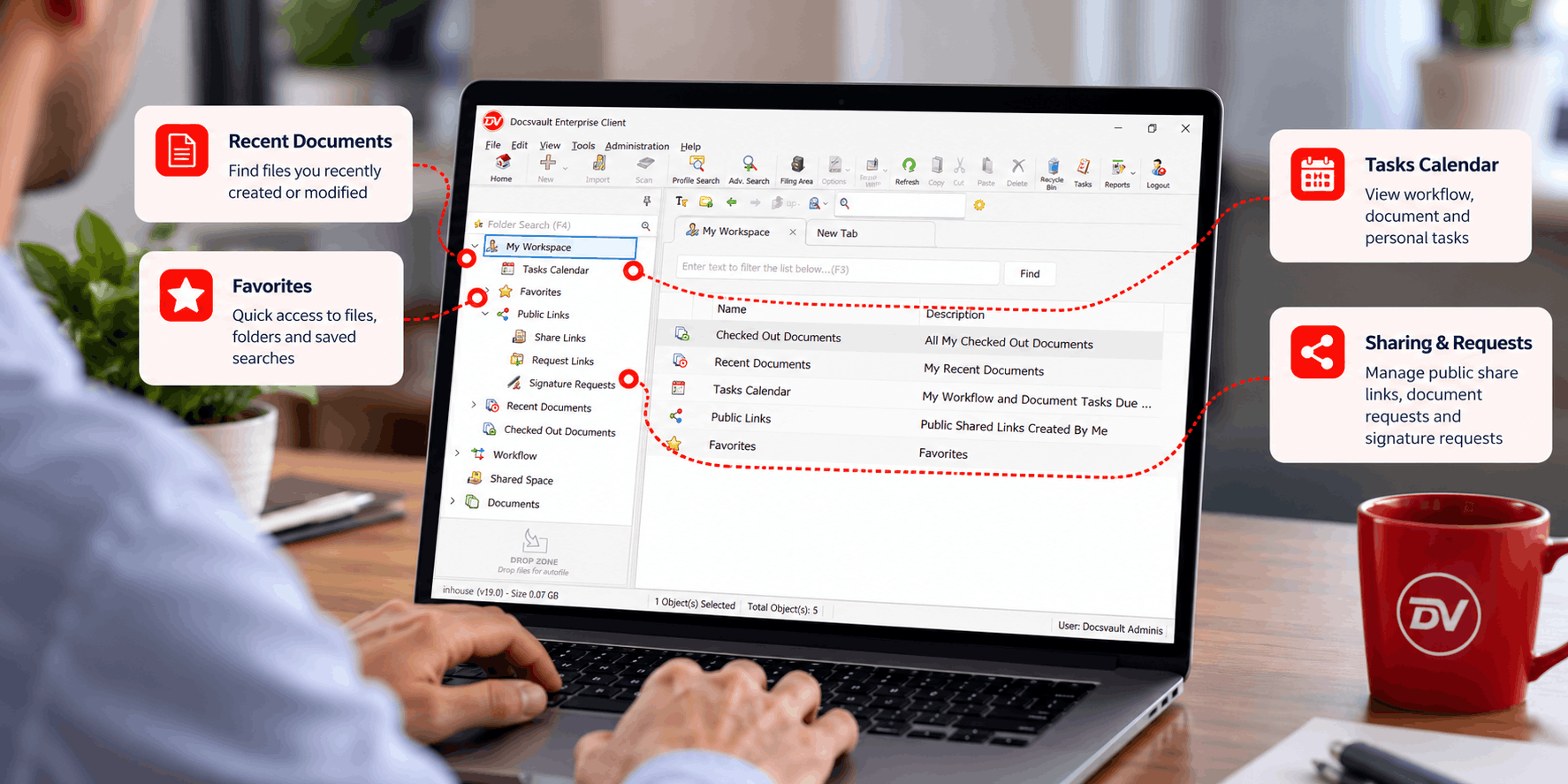
1. Recent Documents
Recent Documents provides a quick way to return to documents you have recently worked with.
The list includes documents from any location within the Docsvault system, so you do not have to remember where each document is filed.
Recent Documents is organized into three views:
Created
Created shows files that you recently added to Docsvault.
This can be useful when you have just imported, scanned, or otherwise added documents and want to return to them quickly.
Modified
Modified shows files that you recently edited or overwritten.
For example, if you have been working on several documents during the day, the Modified view provides a convenient way to return to those files.
All Recent
All Recent combines files that you recently created and modified.
This provides a broader view of your recent document activity when you do not need to distinguish between newly added and recently modified documents.
Why Recent Documents Matter
In a large document repository, remembering the exact location of every document you have worked on is unnecessary.
Recent Documents provides a personal shortcut to the documents you have been working with, regardless of where those documents are stored.
2. Favorites
Favorites provides another way to create a personalized view of frequently used information.
You can add:
- Files
- Folders
- Saved Searches
This is particularly useful for documents or locations that you access regularly.
For example, instead of repeatedly navigating through multiple folders to reach a frequently used file or folder, you can add it to Favorites and access it from your personal workspace.
Favorites and Saved Searches
Saved Searches can be particularly useful when you regularly need to locate documents based on specific search criteria.
Rather than recreating the same search each time, a Saved Search can be added to Favorites for quick access.
This means Favorites is not limited to individual documents. It can also provide shortcuts to repeatable information-retrieval tasks.
3. Tasks Calendar
The Tasks Calendar brings task-related activities into a calendar view.
It can provide visibility into:
- Workflow tasks
- Document tasks
- Personal tasks
This gives users a central place to see tasks that require attention rather than relying on separate lists or manually remembering upcoming activities.
The calendar view is particularly useful when tasks have deadlines or need to be completed as part of an ongoing document-related process.
Personal Tasks and Reminders
Personal tasks are intended for activities that an individual user needs to remember or complete.
They are visible in the Tasks Calendar, alongside other applicable tasks.
You can also create a personal task directly from the Tasks Calendar using My Personal Task.
This makes the Tasks Calendar more than a view of workflow activity. It can also serve as a personal reminder area for tasks associated with your daily work.
For example, a user may need to remember to:
- Follow up on a document.
- Review information before a deadline.
- Complete a document-related activity.
- Perform a recurring administrative task.
The specific task does not need to be part of a formal workflow to be visible as a personal task.
4. Sharing, Document Requests and Signature Requests
My Workspace also provides access to activities associated with working with documents beyond the repository itself.
These include Public Share Links, Document Requests, and Signature Requests.
Public Share Links
Public Share Links provide a way to share selected documents externally through a link.
They are useful when someone outside the Docsvault environment needs access to a document without being given access to the repository itself.
Public Share Links are part of Docsvault’s external document-sharing capabilities.
Learn more about Public Share Links →
Document Requests
Document Requests work in the opposite direction.
Instead of giving someone access to an existing document, a Document Request provides an upload link that can be used to collect documents from an external person.
This can be useful when an organization needs documents from a client, customer, applicant, vendor, or another external party.
The requester can provide a link for uploading the required documents without providing the external person with repository access.
Learn more about Document Requests →
Signature Requests
Signature Requests provide access to document-signing activities from within Docsvault.
They are useful when documents need to be sent for signatures and the progress of those requests needs to be managed as part of normal document work.
Because these activities are connected to documents, having access to Signature Requests from My Workspace helps keep document-related work together rather than requiring users to look in unrelated areas.
Learn more about Digital Signatures Request in Docsvault →
Why Is My Workspace Useful?
The value of My Workspace is not that it replaces the document repository. Its value is that it gives each user a personalized starting point for everyday work.
Faster access to recent work
Recent Documents provides direct access to files you recently created or modified, regardless of their location in the repository.
Personalized document access
Favorites lets you create shortcuts to frequently used files and folders.
Repeatable searches
Adding Saved Searches to Favorites makes frequently used searches easier to access.
Better task visibility
The Tasks Calendar brings workflow, document, and personal tasks into a single calendar-oriented view.
Centralized document activities
Public Share Links, Document Requests, and Signature Requests provide access to activities that extend beyond simply storing documents.
Together, these capabilities make My Workspace a practical personal working area within a larger document management system.
My Workspace and the Docsvault Repository
A document management system needs both structured information management and convenient user access.
Docsvault’s repository provides the structured environment where documents are organized and managed. It supports capabilities such as folders, Document Profiles, metadata, search, version control, security, workflow, and records management.
My Workspace serves a different purpose.
It provides each user with a personalized way to access the information and activities that are most relevant to their current work.
How My Workspace Fits Into Everyday Document Management
A typical user’s workday might involve several different types of activity.
You may start by opening a document you recently modified. Later, you may need to return to a frequently used folder or Saved Search. You may then check the Tasks Calendar for an upcoming task, create a personal reminder, or review a document-sharing or signature activity.
Without a personalized workspace, each activity may require navigating to a different area of the system.
My Workspace brings these commonly used activities into one place.
This is especially useful in document-intensive environments where users regularly move between documents, searches, tasks, and document-related activities.
My Workspace as a Personal Dashboard
Although My Workspace is the product terminology, it can be helpful to think of it as a personal dashboard for your document work.
The distinction is important:
- A traditional dashboard often focuses on metrics, reports, or business KPIs.
- My Workspace focuses on the documents, searches, tasks, and activities relevant to the individual user.
It is therefore better understood as a personal working dashboard rather than an analytics dashboard.
How Docsvault Supports a Personalized Document Workspace
Docsvault combines Personal Workspace with the broader capabilities of its document management platform.
The platform includes document organization through folders, Filing Templates, Document Profiles, metadata and custom index fields; search capabilities including Full-Text Search, Metadata Search, Advanced Search and Saved Searches; document control through Version Control, Check-in/Check-out and Version History; and workflow and collaboration capabilities including Tasks & Reminders, Personal Workspace, Public Share Links and Document Requests.
This combination allows users to work from a structured document repository while maintaining a personalized view of the information and activities they use most frequently.
Conclusion
A document management system should make information easy to manage—not just store.
My Workspace in Docsvault provides a personalized starting point for everyday document work. Recent Documents helps users return to files they have created or modified, Favorites provides shortcuts to important files, folders and Saved Searches, and the Tasks Calendar brings workflow, document, and personal tasks into view.
With access to Public Share Links, Document Requests, and Signature Requests as well, My Workspace brings many of the activities surrounding document work into one convenient personal workspace.
For organizations using Docsvault to manage documents across departments, clients, projects, or matters, My Workspace provides the individual user with a simpler way to navigate and act on the information that matters to them.
Explore Docsvault’s Personal User Workspace →