Small Business Document Management System: Complete Guide, Benefits, Costs & How to Choose (2026)

Every small business starts with a simple way of managing documents. Files are stored in Windows folders, shared through email, or synchronized using Google Drive, Dropbox, Microsoft SharePoint, or Box. Initially, this approach works well. With only a few employees and a manageable number of documents, finding information isn’t particularly difficult.
As the business grows, however, document management becomes increasingly complex. Customer files, contracts, invoices, HR records, proposals, emails, engineering drawings, project documents, and compliance records accumulate across multiple systems. Employees begin spending valuable time searching for files, duplicate copies become common, and no one is completely certain which version is the latest.
At this stage, the challenge is no longer about storing documents. It’s about managing business information efficiently.
A Small Business Document Management System (DMS) helps organizations organize, secure, search, share, and control documents from a centralized repository. Instead of relying solely on folders, a DMS uses intelligent indexing, metadata, version control, permissions, workflow automation, and audit trails to help businesses work more efficiently while protecting valuable information.
Whether you run a law firm, accounting practice, engineering company, healthcare clinic, manufacturing business, insurance agency, or any other professional services organization, implementing the right document management system can improve productivity, strengthen security, and prepare your business for future growth.
In this guide you’ll learn:
- What a Small Business Document Management System is
- Why growing businesses outgrow shared folders and cloud storage
- The difference between cloud storage and a dedicated DMS
- Benefits of document management software
- Typical costs and return on investment
- Essential features to look for
- How to choose the right solution for your business
What Is a Small Business Document Management System?
A Small Business Document Management System is software that helps businesses capture, organize, store, retrieve, secure, and manage documents throughout their lifecycle.
Unlike basic file storage, a DMS is designed to manage business information rather than simply store files. It provides a structured environment where documents are organized using metadata, permissions, version history, and business rules instead of relying entirely on folder structures.
A modern document management system typically includes:
- Centralized document repository
- Full-text and metadata search
- OCR (Optical Character Recognition) for scanned documents
- Version control
- Role-based security
- Document check-in/check-out
- Workflow automation
- Audit trails
- Microsoft Office integration
- Outlook email management
- Mobile and remote access
- Records retention
Instead of searching through multiple folders or email conversations, employees can quickly retrieve documents using customer names, invoice numbers, project names, keywords, or text contained within the document itself.
The result is faster access to information, improved collaboration, better security, and more consistent document management across the organization.
The Growth Journey of Business Documents
Most businesses don’t decide to buy a document management system overnight. They typically follow a predictable path as they grow.
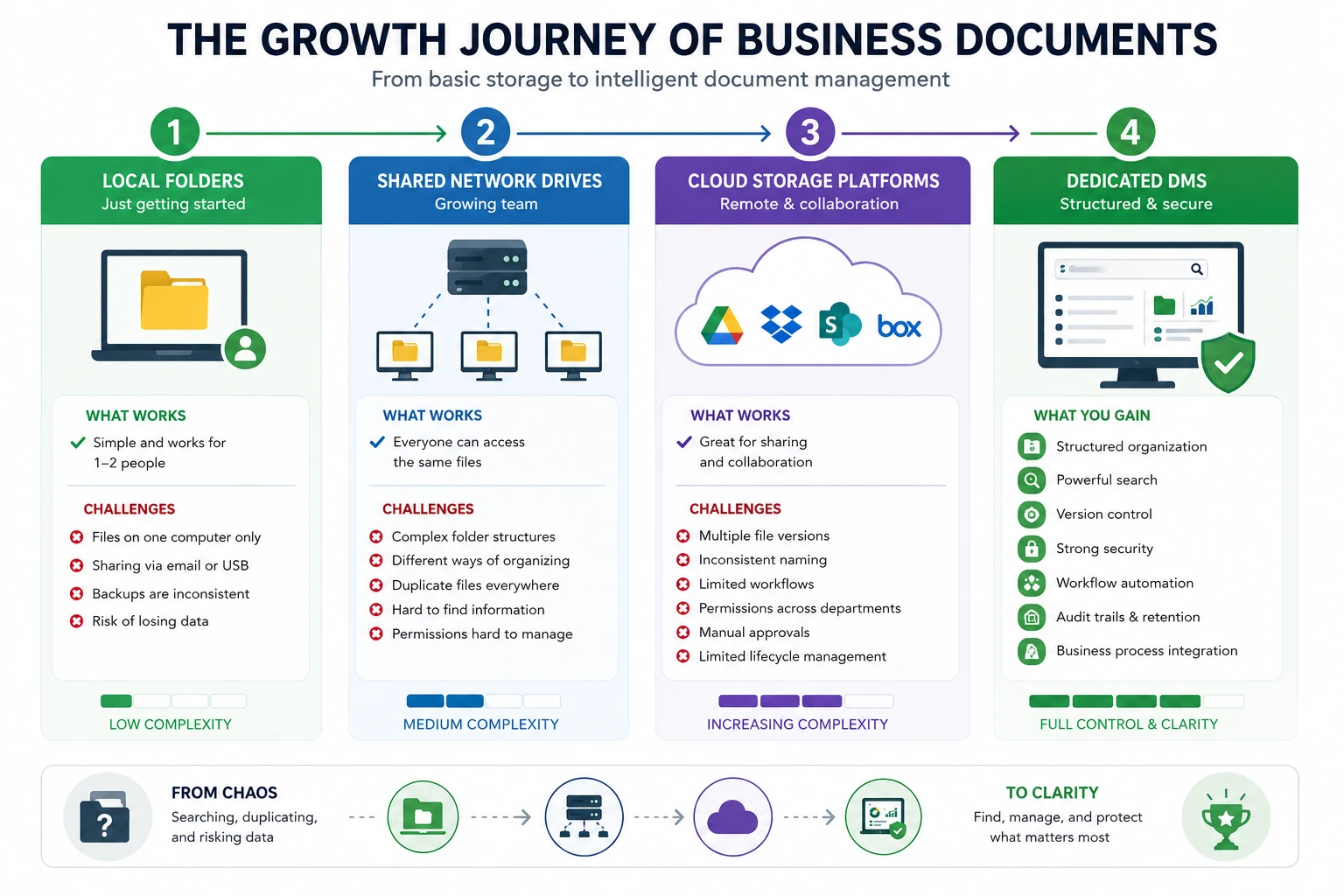
Stage 1: Local Folders
In the early stages, documents are usually stored on individual computers.
Documents
├── Customers
├── Sales
├── HR
├── Projects
└── Finance
This works when only one or two people need access.
However, challenges quickly appear:
- Files exist only on one computer.
- Sharing depends on email or USB drives.
- Backups are inconsistent.
- A failed hard drive can result in lost documents.
Stage 2: Shared Network Drives
As the business expands, documents move to a shared server or network drive.
Everyone can now access the same files, but new problems emerge:
- Folder structures become increasingly complicated.
- Different employees organize files differently.
- Duplicate documents appear in multiple folders.
- Employees spend more time searching than working.
- Permissions are difficult to manage consistently.
Stage 3: Cloud Storage Platforms
To support remote work and collaboration, many businesses adopt cloud storage platforms such as:
- Google Drive
- Dropbox Business
- Microsoft SharePoint
- Box
These platforms are excellent for file sharing and collaboration. However, as document volumes grow, businesses often discover that cloud storage alone doesn’t solve every document management challenge.
Common issues include:
- Multiple versions of the same document
- Inconsistent naming conventions
- Limited workflow capabilities
- Difficulty managing permissions across departments
- Manual approval processes
- Limited document lifecycle management
Stage 4: Dedicated Document Management System
As businesses continue to grow, they often require more than file storage.
A dedicated document management system introduces structure through:
- Metadata-based organization
- Advanced search
- Version control
- Document security
- Workflow automation
- Audit trails
- Records retention
- Business process integration
Rather than asking:
“Where did someone save this document?”
employees simply search for the information they need.
Do Small Businesses Really Need a Document Management System?
One of the biggest misconceptions is that document management software is only for large enterprises.
In reality, many businesses begin experiencing document management challenges long before they reach 20 employees.
A five-person accounting practice may manage thousands of tax returns every year.
A ten-person engineering company may store thousands of drawings, specifications, and project revisions.
A small law firm may handle confidential client matters that require strict access controls and version history.
The need for document management isn’t determined by the number of employees—it depends on the number of documents, the complexity of business processes, and the importance of information.
You should consider implementing a document management system if:
- Employees spend too much time searching for documents.
- Business files are stored across multiple locations.
- Teams frequently work on the same documents.
- Sensitive information requires better security.
- Approval processes rely heavily on email.
- Compliance requirements are increasing.
- Document volumes continue growing every year.
If several of these situations apply to your business, a dedicated DMS can help improve productivity while reducing operational risks.
10 Signs You’ve Outgrown Shared Folders and Cloud Storage
Many businesses don’t realize they’ve reached the point where a document management system would make a significant difference.
The following signs indicate your existing approach may no longer be sufficient.
1. Employees Frequently Ask, “Where’s the Latest Version?”
Documents are saved with names like:
- Contract_Final
- Contract_Final_v2
- Contract_Final_Updated
- Contract_Final_Latest
Nobody is completely certain which version should actually be used.
2. Finding Documents Takes Too Long
If employees regularly spend several minutes searching for contracts, invoices, proposals, or customer files, productivity suffers.
Those minutes quickly become hours every week.
3. Documents Are Stored in Multiple Locations
Some files exist:
- On local computers
- In email
- On network drives
- Inside Google Drive
- Inside Dropbox
- In SharePoint
Without a centralized repository, information becomes fragmented.
4. Sensitive Information Isn’t Properly Protected
HR files, payroll information, contracts, financial reports, and customer records should only be accessible to authorized employees.
Basic shared folders often lack the level of control growing businesses require.
5. Approval Processes Are Manual
Employees send documents through long email chains waiting for comments or approvals.
Tracking progress becomes difficult, and outdated versions are frequently approved by mistake.
6. Compliance Requirements Are Increasing
Many industries require businesses to retain documents, maintain audit histories, and demonstrate who accessed or modified information.
Manual document management makes compliance increasingly difficult.
7. Remote Work Has Become Common
Employees need secure access to documents whether they’re working from home, visiting customers, or travelling.
Simply emailing files back and forth increases both security risks and version confusion.
8. Customer Response Times Are Slowing
When employees struggle to locate contracts, purchase orders, previous quotations, or customer correspondence, response times increase and customer satisfaction suffers.
9. Business Growth Is Creating Information Chaos
Every new employee, customer, supplier, and project generates additional documentation.
Without standardized document management practices, growth often leads to inconsistent filing and duplicate information.
10. You’re Managing Documents Instead of Running the Business
Perhaps the clearest sign is when employees spend more time organizing, searching, and recovering documents than actually using them to serve customers or complete projects.
At this stage, implementing a document management system becomes less about technology and more about improving the way your business operates.
Cloud Storage vs Document Management System
Many small businesses assume cloud storage platforms and document management systems are interchangeable. While both store files electronically, they are designed to solve different business problems.
Cloud storage platforms focus primarily on storing, synchronizing, and sharing files.
A document management system focuses on managing business documents throughout their lifecycle, from creation and approval to retrieval, retention, and secure disposal.
| Feature | Google Drive | Dropbox | Box | SharePoint | Document Management System |
|---|---|---|---|---|---|
| File Storage | |||||
| File Sharing | |||||
| Remote Access | |||||
| Basic Version History | |||||
| Metadata-based Organization | Limited | Limited | Partial | Partial | |
| Advanced Search | Limited | Limited | Good | Good | |
| Workflow Automation | Basic | Basic | Good | Good | |
| Audit Trails | Basic | Basic | Good | Good | |
| Records Retention | Limited | Limited | Good | Good | |
| Granular Security | Good | Good | Good | Good |
Cloud storage remains an excellent solution for startups and very small teams that primarily need file sharing and collaboration.
As businesses grow, however, they often require additional capabilities such as:
- Advanced search
- Metadata
- Document Indexing
- Workflow automation
- Version control
- Audit trails
- Records Management
- Granular Security
These capabilities are the primary strengths of a dedicated document management system.
Benefits of a Small Business Document Management System
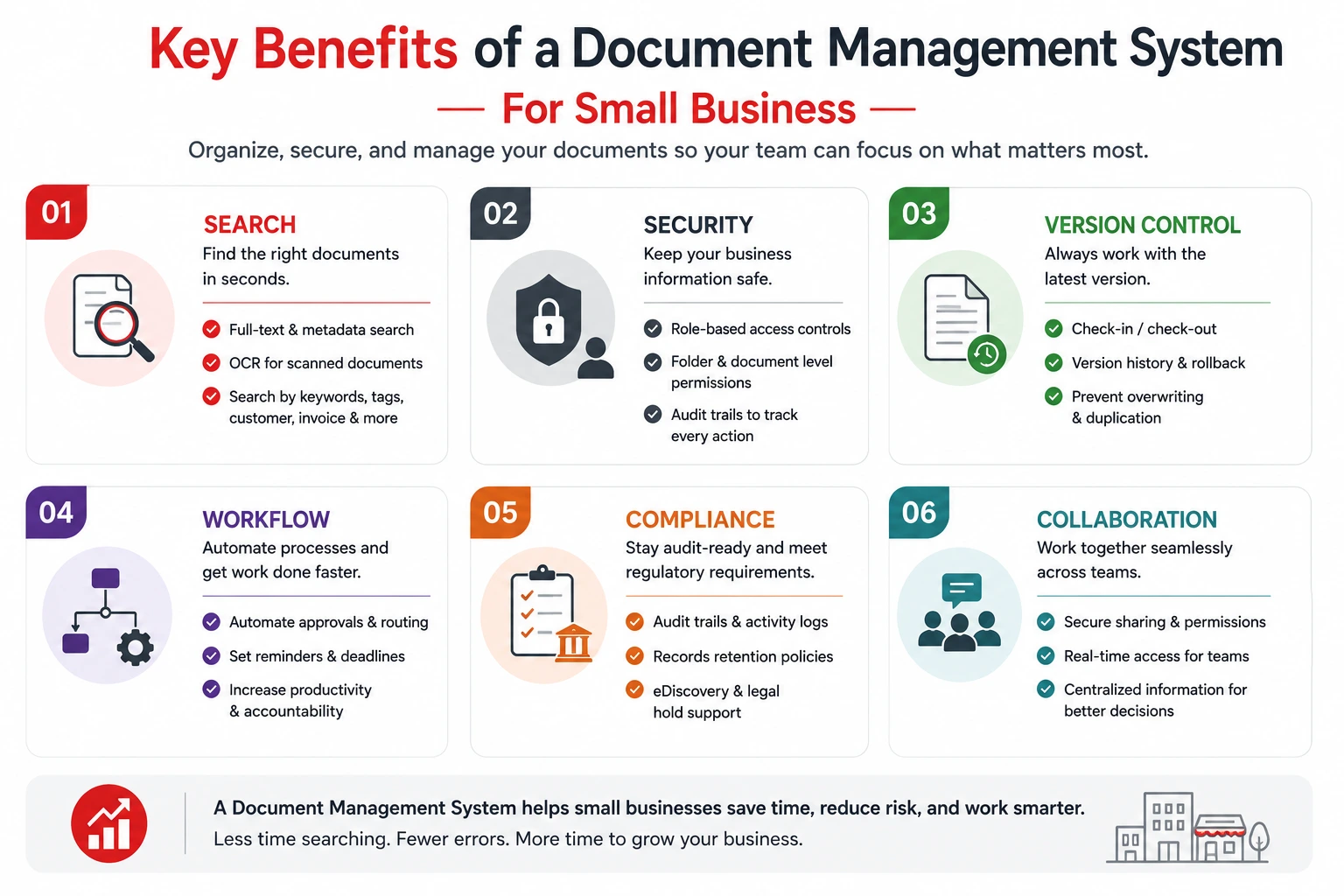
A document management system is more than a digital filing cabinet. It helps businesses improve productivity, strengthen security, reduce manual work, and establish consistent document management practices.
1. Find Information Faster
Employees shouldn’t have to remember where a document was saved or who last edited it.
A document management system allows users to search by:
- Customer or client name
- Project or matter
- Invoice number
- Vendor
- Employee
- Keywords
- Metadata
- Text inside scanned documents using OCR
Instead of searching through multiple folders, the required document can often be found in seconds.
2. Eliminate Duplicate Documents
One of the biggest frustrations in growing businesses is version confusion.
Files such as:
- Proposal Final
- Proposal Final V2
- Proposal Final Updated
- Proposal Final Latest
create uncertainty and increase the risk of employees using outdated information.
A document management system maintains a complete version history, allowing users to:
- Track document revisions
- Restore previous versions
- See who made changes
- Prevent simultaneous editing conflicts
This ensures everyone works from the latest approved version.
3. Improve Collaboration
Modern teams often work across multiple offices or remotely.
Instead of emailing attachments back and forth, employees can work from a centralized document repository where everyone has access to the latest version.
This improves:
- Team collaboration
- Project coordination
- Customer responsiveness
- Remote working
- Knowledge sharing
4. Strengthen Security
Not every employee should have access to every document.
For example:
- HR staff need employee records.
- Finance teams need accounting documents.
- Managers need confidential reports.
- Engineers need project drawings.
A document management system provides role-based permissions so businesses can control who can:
- View
- Edit
- Download
- Delete
- Share
specific documents or folders.
This reduces the risk of accidental or unauthorized access.
5. Automate Business Processes
Many document-related processes are still handled manually.
Examples include:
- Invoice approvals
- Contract reviews
- Employee onboarding
- Purchase requests
- Quality document approvals
A document management system can automate these processes by routing documents to the right people, sending reminders, tracking status, and recording approvals.
Automation reduces delays while improving consistency.
6. Support Compliance
Many industries must retain documents for several years while demonstrating who accessed or modified them.
A document management system helps by providing:
- Audit trails
- Version history
- Records retention
- Controlled access
- Secure disposal policies
These capabilities make compliance easier while reducing business risk.
7. Scale as Your Business Grows
Document volumes increase much faster than most businesses expect.
More employees, more customers, more suppliers, and more projects all generate additional information.
A document management system provides a structured foundation that continues supporting the business as it grows without requiring employees to constantly reorganize folders or change filing methods.
How Much Does a Document Management System Cost?
Pricing depends on several factors including:
- Number of users
- Storage requirements
- Deployment model
- Workflow requirements
- OCR requirements
- Integrations
- Implementation services
- Support
Typical Pricing
| Solution | Typical Starting Price* |
|---|---|
| Google Workspace Business Starter | Around US$7/user/month |
| Microsoft 365 Business Standard | Around US$15/user/month |
| Dropbox Business | Around US$18/user/month |
| Box Business | Around US$18/user/month |
| Dedicated Document Management Systems | Approximately US$15–80+/user/month |
*Public list prices may change over time and vary by edition, region, storage, and contract terms.
While software licensing is important, businesses should also consider the total cost of ownership, including productivity improvements, reduced manual work, improved compliance, and better information security.
For many organizations, the time saved searching for documents alone provides a measurable return on investment.
What Features Should You Look For?
Choosing the right document management solution isn’t about selecting the product with the longest feature list. Instead, focus on capabilities that will improve your day-to-day operations.
Look for software that includes:
- Full-text search
- OCR for scanned documents
- Metadata and document indexing
- Version control
- Document check-in/check-out
- Workflow automation
- Role-based permissions
- Audit trails
- Records retention
- Microsoft Office integration
- Outlook email management
- Mobile access
- Digital signatures
- AI-assisted document capture
These features help reduce manual work while making information easier to locate, secure, and manage.
Choosing the Right Solution
Before selecting a document management system, consider the following questions.
How many documents do you manage?
Businesses handling thousands of documents benefit most from structured document management.
Does your business handle confidential information?
Accounting firms, law firms, healthcare providers, insurance agencies, manufacturers, and engineering companies often require stronger document security than shared folders or cloud storage can provide.
Will your business continue growing?
Choose software that can support additional users, departments, and document volumes without requiring another migration in a few years.
Which deployment model fits your business?
Some organizations prefer:
- Cloud deployment
- On-premise deployment
- Customer-hosted private cloud
The right option depends on your security policies, compliance requirements, IT resources, and business preferences.
Does it integrate with your existing software?
Look for integration with tools your employees already use, such as:
- Microsoft Word
- Excel
- Outlook
- PDF applications
- Accounting software
- ERP systems
- CRM platforms
Good integration improves adoption while reducing duplicate work.
Best Solutions for Managing Business Documents
Small businesses generally have two categories of solutions available.
Cloud Storage & Collaboration
Ideal for businesses primarily requiring file sharing and collaboration.
Google Drive
Best for: Small teams using Google Workspace.
Strengths:
- Easy collaboration
- Affordable
- Simple sharing
- Remote access
Limitations:
- Limited document governance
- Basic workflows
- Folder-based organization
Dropbox Business
Best for: File synchronization across multiple devices.
Strengths:
- Reliable synchronization
- Good user experience
- Remote collaboration
Limitations:
- Designed primarily for storage rather than structured document management.
Box
Best for: Organizations requiring stronger cloud governance.
Strengths:
- Security
- Collaboration
- Enterprise integrations
Limitations:
- Advanced document management often requires additional configuration.
Microsoft SharePoint
Best for: Organizations invested in Microsoft 365.
Strengths:
Excellent Microsoft integration
- Collaboration
- Document libraries
- Workflow capabilities
Limitations:
- Effective document management typically requires planning, governance, and administration.
Dedicated Document Management Systems
Dedicated DMS platforms are built specifically for managing business documents.
Docsvault
Ideal for organizations looking for:
- Centralized document management
- On-premise deployment
- Customer-hosted private cloud
- Strong document security
- Metadata-based organization
- OCR
- Workflow automation
- Outlook email management
- Microsoft Office integration
- Audit trails
- Built-in PDF tools
- AI-powered document capture (optional)
Docsvault is particularly well suited to growing organizations in legal, accounting, engineering, manufacturing, healthcare, insurance, government, and other professional services.
Other Dedicated DMS Solutions
Depending on your business requirements, you may also evaluate:
- M-Files
- DocuWare
- Laserfiche
- NetDocuments
- iManage
Each offers different strengths depending on deployment preferences, industry focus, workflow requirements, and budget.
Why Growing Businesses Choose Docsvault
As businesses grow, document management becomes more than simply storing files.
Organizations need a solution that helps them organize information, protect confidential documents, improve collaboration, automate approvals, and support future growth.
Docsvault is designed to meet these needs through:
- Centralized document and email management
- Flexible deployment options
- Fast metadata and full-text search
- Version control
- Granular security
- Workflow automation
- Microsoft Office integration
- Outlook integration
- OCR
- Built-in PDF editing
- AI-powered document capture
- Scalable architecture
Whether you’re managing contracts, engineering drawings, HR records, customer files, invoices, or compliance documentation, Docsvault provides a structured environment that grows with your business.
Frequently Asked Questions
SharePoint includes document management capabilities such as version control and metadata tagging. However, it is primarily designed as a collaboration and enterprise content platform within the Microsoft ecosystem.
Organizations that require structured document indexing, document workflows, and document lifecycle management may prefer a dedicated document management system.
Law firms, accounting firms, engineering companies, manufacturers, healthcare providers, insurance agencies, government organizations, and other professional services often benefit significantly from document management software.
Cloud storage focuses on storing and sharing files, while a document management system manages the complete lifecycle of business documents, including version control, workflows, security, metadata, audit trails, and records retention.
Google Drive works well for basic file storage and collaboration. As document volumes, security requirements, and business processes become more complex, many organizations benefit from a dedicated document management system.
Yes. Most modern document management systems integrate with Microsoft Word, Excel, PowerPoint, and Outlook.
A document management system helps businesses securely store, organize, retrieve, share, and manage business documents from a centralized repository.
Conclusion
Every growing business reaches a point where shared folders and cloud storage are no longer enough. As document volumes increase and business processes become more complex, finding information, controlling access, managing versions, and maintaining compliance become increasingly challenging.
A dedicated document management system provides the structure, security, and automation needed to manage business information efficiently. By centralizing documents, improving search, automating workflows, and strengthening document control, businesses can reduce administrative effort while improving productivity and customer service.
If your organization is spending more time searching for documents than using them, now may be the right time to evaluate a document management solution.
Docsvault helps growing businesses organize, secure, and manage documents through flexible deployment options including on-premise document management and private cloud, advanced search, workflow automation, and scalable document management designed for professional organizations.
This article covers:
- What Is a Small Business Document Management System?
- The Growth Journey of Business Documents
- Do Small Businesses Really Need a Document Management System?
- 10 Signs You’ve Outgrown Shared Folders and Cloud Storage
- 1. Employees Frequently Ask, “Where’s the Latest Version?”
- 2. Finding Documents Takes Too Long
- 3. Documents Are Stored in Multiple Locations
- 4. Sensitive Information Isn’t Properly Protected
- 5. Approval Processes Are Manual
- 6. Compliance Requirements Are Increasing
- 7. Remote Work Has Become Common
- 8. Customer Response Times Are Slowing
- 9. Business Growth Is Creating Information Chaos
- 10. You’re Managing Documents Instead of Running the Business
- Cloud Storage vs Document Management System
- Benefits of a Small Business Document Management System
- How Much Does a Document Management System Cost?
- What Features Should You Look For?
- Choosing the Right Solution
- Best Solutions for Managing Business Documents
- Why Growing Businesses Choose Docsvault
- Conclusion