Document Indexing: A Complete Guide to Organizing, Finding, and Managing Documents

What Is Document Indexing?
Finding a document should not depend on remembering its exact filename, knowing which folder someone used, or opening files one by one to find the right information.
Document indexing is the process of associating documents with structured information, often called metadata or index values that helps people identify, organize, search, retrieve and manage documents.
For example, instead of relying only on a filename such as:
Smith_Invoice_Final.pdf
a document can also be associated with information such as:
- Customer
- Document type
- Invoice number
- Invoice date
- Status
- Department
- Project or matter
Metadata provides information that describes a document or gives it context. The National Archives describes metadata for electronic records as including descriptive, administrative, technical, and contextual information.
Structured metadata also contributes to findability. NIST guidance identifies rich metadata and registering or indexing metadata in a searchable resource as important aspects of making information findable.
In a document management system, indexing is the process of associating documents with structured information so that they can be organized, searched, retrieved, and managed more effectively.
Why Does Document Indexing Matter?
A document repository can contain thousands or millions of files. As the volume grows, relying exclusively on folders and filenames becomes increasingly difficult.
A well-designed indexing structure can help organizations:
- Find documents using meaningful information
- Apply consistent classification
- Reduce dependence on filenames
- Improve document retrieval
- Support more precise searches
- Reduce repeated data entry
- Connect related documents through shared information
- Support filing and automation processes
- Apply consistent document-management policies
The objective is not to capture as much metadata as possible.
The objective is to capture the information that provides genuine value for retrieval, organization, automation, compliance, or reporting.
Too little indexing makes documents difficult to distinguish. Too much indexing can create unnecessary work and discourage consistent use.
Document Indexing vs. Metadata
The terms indexing and metadata are closely related, but they describe different things.
Metadata is information that describes or provides context about a document.
Indexing is the process of assigning or capturing that information so it can be used to organize, search, retrieve, or manage the document.
For example, the metadata associated with a legal document might include:
| Index field | Example value |
| Client | Smith & Associates |
| Matter | Employment Dispute |
| Document Type | Correspondence |
| Date | March 15, 2026 |
| Attorney | Jane Smith |
| Status | Active |
The appropriate fields will vary by organization and document type.
For example, an accounting department may need fields such as client, account number, invoice number, tax year, document type, and status, while a law firm may need client, matter, attorney, document type, practice area, and date.
The important consideration is whether the information helps users perform a real business task.
Document Indexing vs. Filing
Indexing and filing solve related but different problems.
Filing determines where a document is stored.
Indexing describes the document using structured information that helps identify and retrieve it.
Consider a legal document:
Folder: Client → Smith & Associates → Employment Dispute
Index values:
Client = Smith & Associates
Matter = Employment Dispute
Document Type = Correspondence
Date = March 15, 2026
The folder structure provides location.
The index values provide additional context.
A document management system can use both together, allowing organizations to combine structured filing with metadata-based retrieval.
What Information Should You Index?
The best index fields are those that help people answer questions they are likely to ask when looking for a document.
Start by asking:
“What information would someone use to find this document later?”
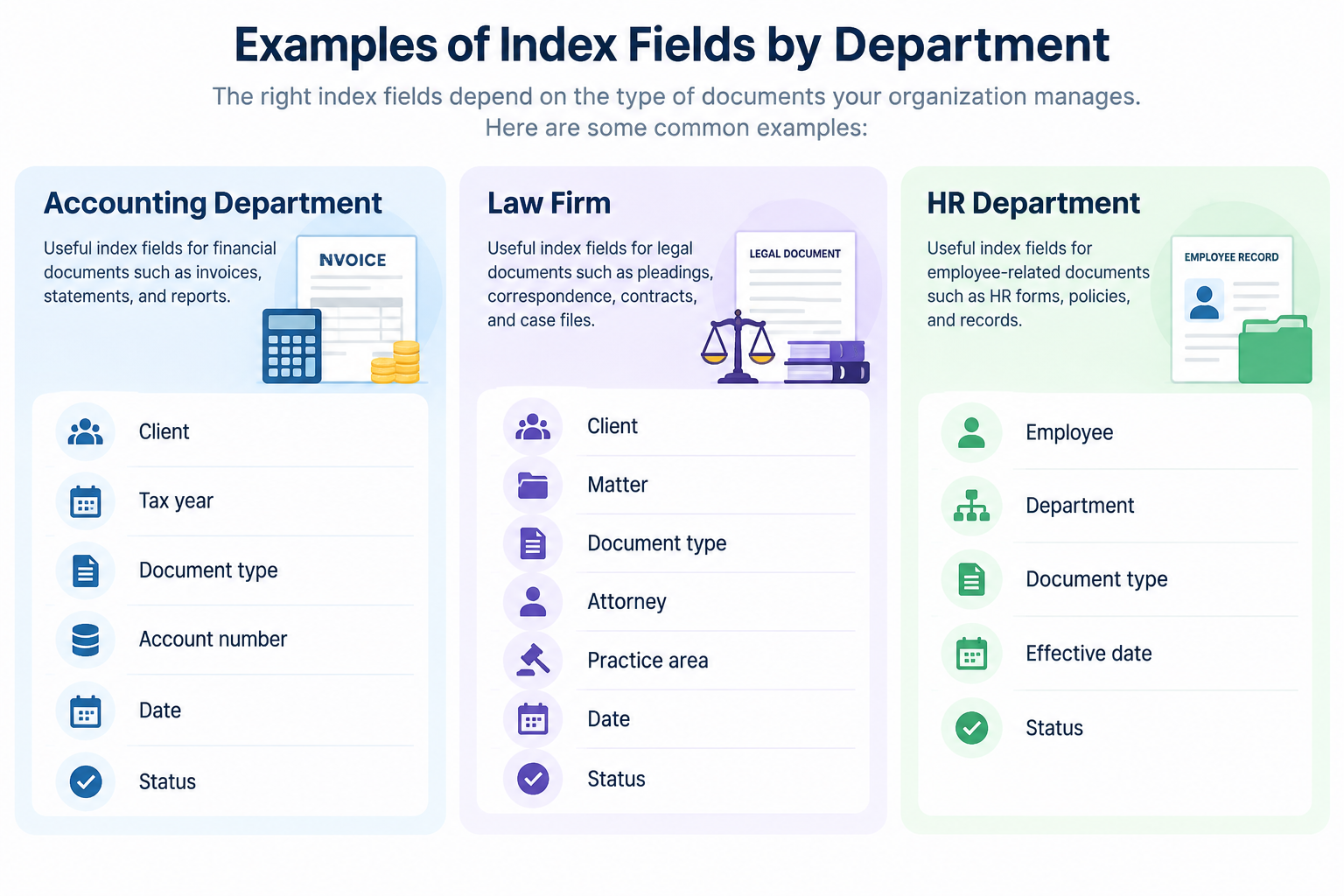
The goal is not to reproduce every piece of information contained in the document. Instead, identify the information that provides useful classification and retrieval value.
Use consistent values
If the same client can be entered as:
- ABC Corporation
- ABC Corp.
- A.B.C. Corporation
searches and reporting can become less consistent.
Where practical, organizations should establish consistent values, formats, and naming conventions for important index fields.
Using controlled and standardized values can also improve consistency and support navigation and search. NARA recommends controlled vocabularies and standardized authorities where applicable.
Avoid unnecessary fields
Every field introduces another decision or data-entry requirement.
If a field does not contribute meaningfully to retrieval, organization, automation, compliance, or reporting, it may not belong in the profile.
A useful indexing system is not necessarily the one with the most fields. It is the one that captures the right fields consistently.
How to Create a Standard Document Indexing Policy
Document indexing should also fit within the organization’s broader records-management practices. ISO 15489-1 identifies metadata, assigned responsibilities, policies, controls, and processes for creating, capturing, and managing records as components of effective records management.
- Identify the document types
List the major categories of documents the organization manages.Examples might include:- Contracts
- Invoices
- Correspondence
- Reports
- Applications
- Personnel records
- Client documents
Different document types may require different index fields.
- Define the required index fields
Determine which information should be captured for each document type.For example, an invoice may require customer, invoice number, date, and amount, while a contract may require customer, contract type, effective date, and expiration date.
- Standardize important values
Define how common values should be represented.This is particularly important for information such as:- Client names
- Departments
- Document types
- Status values
- Locations
- Practice areas
- Determine which information should be mandatory
Not every field needs to be required.Identify the information that must be present for a document to be properly classified or retrieved.For example, a matter number may be mandatory for documents belonging to a particular legal matter, while an optional description may not be.
- Define responsibilities
Clearly establish who is responsible for maintaining the organization’s indexing standards. This may include defining who can create or update indexing structures, review indexing quality, approve changes, and address inconsistencies.Responsibilities should be clearly assigned so that indexing remains consistent as document types, business processes, and retrieval requirements change.
- Review the policy periodically
Indexing requirements change as organizations add document types, departments, workflows, and business processes.Review the policy periodically and update it when the information users need to capture or retrieve changes.
How to Reduce Document Indexing Errors
Once indexing standards have been defined, organizations also need practical controls that help users apply those standards consistently.
Use validation
Where a field must follow a specific format, establish rules that prevent invalid values.
For example, an invoice number may need to follow a defined structure.
Use controlled values where appropriate
If users repeatedly select from the same set of values, predefined choices can reduce variations and typing errors.
Make important fields mandatory
Required fields can prevent documents from entering the repository without essential classification information.
Minimize repetitive entry
If information is already available from another reliable source, look for ways to avoid asking users to enter it again.
Review actual indexing problems
An indexing system should be evaluated based on actual search behavior. If users consistently struggle to find documents because an important classification is missing, the index structure may need to change.
How Is Document Indexing Performed?
Document indexing can be performed manually, assisted by document-capture technologies, or automated to varying degrees.
Manual indexing
With manual indexing, a user reviews a document and enters information into the appropriate fields.
This approach can work well when:
- Document volumes are manageable
- Documents contain information that requires human interpretation
- The number of fields is limited
- Accuracy depends on human judgment
The disadvantage is that manual indexing can become repetitive as document volumes increase.
Automated or assisted indexing
Automation can reduce the amount of information users need to enter manually when relevant information can be reliably captured from the document, generated by the system, or obtained from another trusted source.
The technology used depends on the document type and the organization’s requirements.
This is where modern document management platforms can extend basic indexing with capture, validation, automation, and AI capabilities.
Document Indexing During Scanning and Document Capture
Scanning converts paper documents into digital files, but digitization alone does not necessarily make those documents easy to organize or retrieve.
Indexing can be incorporated into the document-capture process so that information is associated with documents as they enter the repository.
For example, a scanned invoice might be associated with its customer, invoice number, date, and other relevant information during the intake process.
Docsvault supports document scanning and batch scanning as part of its core document-capture capabilities, while additional capture technologies can extend how information is extracted from incoming documents.
How Docsvault Supports Document Indexing
Docsvault uses Document Profiles and indexes to associate structured information with documents and folders.
A Document Profile is a group of custom index fields designed for a particular document type or classification requirement. Docsvault’s Document Profiling and Tagging capability supports custom index fields for categorization and search.
The result is a metadata-driven approach in which documents can be organized and retrieved using information beyond their filenames and physical location.
Index Field Options in Docsvault
Docsvault provides different ways to populate index fields depending on the type of information being captured.
User Input Indexes
A User Input Index allows users to enter information manually.
This is useful for information that needs to be entered or reviewed by a user, such as a client name, invoice number, description, or other document-specific value.
Static Indexes
A Static Index provides predefined values that users can select from.
For example, a Document Type index might contain:
- Contract
- Invoice
- Correspondence
- Report
Using a defined list can help maintain consistent values instead of allowing different users to enter variations of the same term.
Dynamic Indexes
A Dynamic Index can automatically populate information rather than requiring the user to type it.
Docsvault supports dynamic values such as system-related information and other automatically generated values. Its product material also identifies dynamic user/group fields for scenarios such as document approvers, salespeople, or managers.
Dynamic indexes can reduce repetitive entry and help maintain consistent information.
Dependent Index Fields
Some index fields have a logical relationship with other fields.
For example:
Client → Matter
A user selects a client first, and the available matter values can then be limited to matters associated with that client.
Docsvault supports Dependent Indexes, allowing relationships between index fields.
This can make indexing more structured by presenting users with more relevant choices instead of unrelated values.
Inheriting Index Values
Some documents share information because they belong to the same folder or organizational context.
In these cases, repeatedly entering the same information can create unnecessary work and introduce inconsistencies.
Docsvault can inherit index values from a parent folder, allowing relevant information to carry into documents within that structure. The current Document Profiling and Tagging capability specifically identifies inheritance from parent-folder index values.
This can be useful when documents stored together share information such as a client, project, department, or other classification.
Validation, Mandatory Fields, and Locked Values
A useful indexing system should help users enter information consistently.
Docsvault supports capabilities that can be used to establish a more controlled indexing structure, including:
- Validation for index values
- Mandatory fields for required information
- Locked values where an index value should not be changed
These controls can help reduce inconsistencies and maintain the quality of metadata stored with documents.
Using Index Values to Automate Filing
Indexing does not have to stop at search.
Index values can also be used to determine where documents should be stored and how they should be named.
Docsvault’s Filing Templates can use index values to generate folder structures and consistent file names, descriptions, and notes. The current Filing Templates feature supports index-based folder logic and strict predefined folder structures.
For example, a filing structure could use values such as:
Client → Matter → Document Type
The index information captured during document intake can then help determine the appropriate filing destination.
This creates a useful connection:
Index → File → Find
Rather than asking users to manually create and navigate complex folder structures, the system can use defined rules to apply the structure consistently.
Profile Templates for Consistent Indexing
Organizations may have different profiling requirements across departments, document types, or repository areas.
Docsvault supports Profile Templates, which group one or more profiles and allow them to be applied to different areas of the repository.
This can help administrators maintain consistent profiling requirements without having to configure each area independently.
Connecting Indexes to External Business Data
Organizations often already maintain information about customers, vendors, accounts, or other entities in business systems.
When the same information is required during document indexing, manually reproducing it can create unnecessary data entry and potential inconsistencies.
Docsvault supports connections between profile/index information and external databases. The Product Knowledge Base identifies External Database Connection as an add-on capability.
This capability is available through Advanced Profiles, an add-on.
The value is straightforward: where a trusted external source already contains the information needed for indexing, that information can help reduce duplicate entry and maintain consistency.
AI-Assisted Document Indexing with DocAI
Manual indexing becomes particularly repetitive when employees process large numbers of documents.
Docsvault’s DocAI AI Capture addresses this part of the process by extracting configured information from documents and using the extracted values to populate index fields.
For example, a document can enter the Docsvault import workflow, DocAI can analyze it, extract information such as an invoice number, vendor, date, or amount, and populate the corresponding index fields. The extracted information can then be reviewed before the document is finalized.
AI Capture is configured around Document Profiles, so different document types can have different information extracted according to their requirements.
This changes the indexing workflow from:
Read document → type values → file document
to:
Import document → AI extracts information → populate index fields → review → file
DocAI is an optional add-on to Docsvault.
OCR and Document Indexing
OCR serves a related but different purpose.
Optical Character Recognition (OCR) converts text contained in scanned or image-based documents into searchable text.
That matters because indexing and full-text search answer different questions.
Metadata indexing might answer:
Show me all contracts for Client A.
Full-text search might answer:
“Find documents containing the phrase ‘termination clause.'”
An organization may use metadata such as client, matter, document type, and date to narrow a search, while OCR makes the text within scanned documents searchable. OCR is available as an add-on.
This means organizations can combine structured metadata with full-text search rather than depending entirely on either approach.
Using Indexed Information to Relate Documents
Index values can also help connect related documents.
For example, multiple documents may share the same:
- Client
- Matter
- Project
- Account
- Case number
Docsvault includes Document Relations, which can help users access related documents even when those documents are stored in different locations within the repository
Docsvault also supports Auto Relations, allowing relationships to be established between documents with matching index values so users can access relevant documents more easily.
This is another reason to think carefully about the information captured during indexing: good metadata can support more than search.
Searching and Reporting with Indexed Information
The ultimate purpose of indexing is not simply to fill in fields.
It is to make information more useful.
Once documents have consistent index values, users can search for documents based on those values and combine them with other search criteria.
Docsvault supports metadata search alongside full-text search and other search methods.
Profile values can also be exported from Docsvault in XML formats for reporting and further processing in external applications.
The result is a complete information cycle:
Capture → Index → Organize → Search → Retrieve → Use
Document Indexing Best Practices
A strong document indexing strategy should follow a few basic principles:
- Index for retrieval, not for the sake of collecting metadata.
- Use fields that answer real business questions.
- Keep values consistent.
- Make critical fields mandatory where appropriate.
- Avoid unnecessary fields.
- Use validation where formatting matters.
- Reduce repetitive data entry wherever reliable automation is available.
- Review the indexing structure as business requirements change.
- Connect indexing with filing and search rather than treating it as an isolated task.
- Keep indexing standards documented so different users apply them consistently.
The most effective indexing systems are not necessarily the ones with the most fields. They are the ones that provide useful, consistent information at the point where it can improve organization and retrieval.
Document Indexing for Law Firms
Document indexing is particularly relevant to law firms because legal teams work with large volumes of documents associated with clients, matters, cases, attorneys, courts, and other legal activities.
A useful legal indexing structure might include:
| Index | Example |
| Client | Smith & Associates |
| Matter | Employment Dispute |
| Document Type | Pleading |
| Attorney | Jane Smith |
| Date | March 15, 2026 |
| Status | Active |
The exact structure should reflect the firm’s own workflows rather than attempting to capture every possible attribute.
Docsvault’s legal document management offering uses metadata-based organization and search alongside capabilities such as OCR and AI-assisted data capture.
For a law firm, the objective is ultimately the same as for any document-intensive organization: make the right information easier to find while maintaining a consistent structure for managing it.
Frequently Asked Questions About Document Indexing
Document indexing is the process of assigning structured information, or metadata, to documents so they can be organized, searched, retrieved, and managed more effectively.
Common examples include client, matter, document type, date, author, department, project, status, invoice number, and account number. The appropriate fields depend on the organization’s requirements.
Yes. Depending on the system, indexing can be supported by automatically generated values, document capture technologies, external data sources, OCR, and AI-based metadata extraction.
A Static Index provides predefined values that users can select when profiling a document.
A Dynamic Index automatically populates certain values rather than requiring users to enter them manually. Docsvault supports dynamic values including system-related information and dynamic user/group fields.
Dependent Indexes allow one index field to influence the available values in another field. They can be useful when information has a logical relationship, such as client and matter.
Yes. Docsvault Filing Templates can use index values to generate folder structures and support consistent document naming, descriptions, and notes.
Yes. Docsvault’s DocAI AI Capture can extract configured information from documents and populate index fields during document import and capture.
Conclusion
Document indexing is more than adding tags to files.
Done well, it creates a structured information layer that helps people organize, search, retrieve, relate, and manage documents more effectively.
The most effective approach begins with the information users actually need not with the software. Define useful index fields, establish consistent values, determine which information should be mandatory, and create standards that users can follow.
A document management platform can then extend those principles through validation, automation, inherited and dynamic values, structured filing, external data connections, capture technologies, and AI.
Docsvault brings these capabilities together through Document Profiles and indexes, helping organizations build a metadata-driven approach to document organization and retrieval. For organizations that want to reduce manual indexing further, capabilities such as Filing Templates, OCR, and DocAI AI Capture can extend the workflow from simple metadata entry to automated document capture and filing.
If your organization is spending too much time filing documents or searching for information, it may be time to look beyond folders and filenames and build a more structured approach to document indexing.