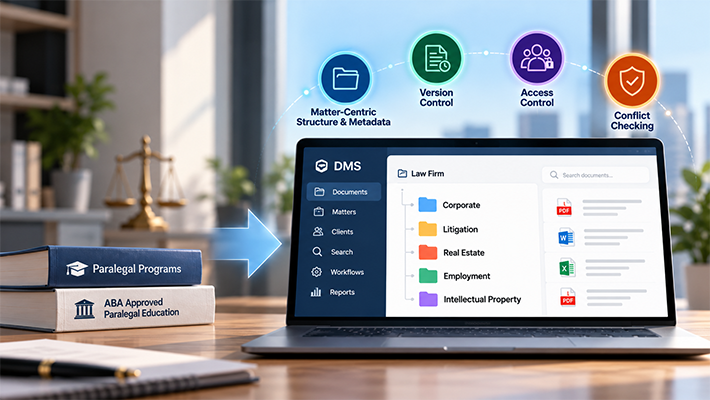
Matter-Centric On-Premise DMS for Secure Client & Legal Management

Introduction
Legal teams today handle more than just legal advice—they manage a flood of documents: client files, contracts, case notes, pleadings, and compliance paperwork. Without the right system in place, managing this information becomes chaotic, inefficient, and risky.
A matter-centric approach changes that. Instead of scattered folders and inconsistent naming, every document is anchored to a specific client and matter — making retrieval, compliance, and collaboration significantly more efficient.
That’s where a robust, matter-centric Document Management System (DMS) for law firms, like Docsvault, makes all the difference.
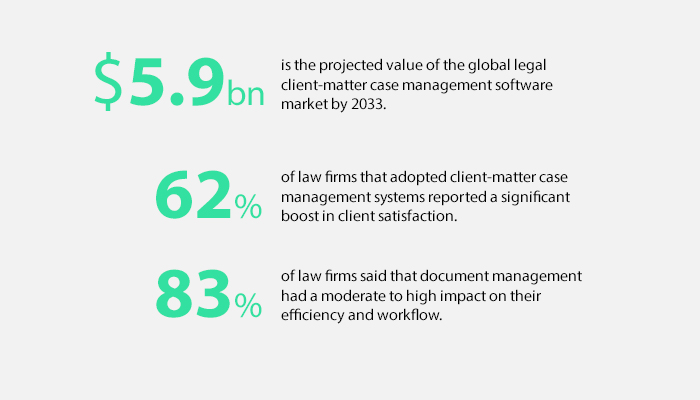
USD 5.9 billion is the projected value of the global legal client-matter case management software market by 2033 – highlighting the growing reliance on technology to streamline legal operations. Supporting this trend, 62% of law firms that adopted client-matter case management systems reported a significant boost in client satisfaction, while 83% confirmed that document management software had a moderate to high impact on their efficiency and workflow (Statista 2023).
The Real-World Challenges of Legal Document Management
Whether in a large legal department or a boutique firm, most legal professionals face the same pain points:
- Disorganized folder structures with no matter-level hierarchy
- Inconsistent file naming conventions across cases and clients
- Difficulty retrieving documents under tight deadlines
- Compliance gaps during audits or legal holds
- Sensitive documents scattered across drives, emails, and desktops
These challenges make the case for a structured, secure document management system for legal compliance especially one that supports document management for in-house legal teams with on-premise flexibility.
The Solution: A Matter-Centric Legal DMS for Law Firms & Legal Departments
Docsvault is a powerful, matter-centric document management platform designed specifically for regulated industries like law. Its on-premise deployment option provides full control over data and infrastructure, with the added benefit of structured, scalable matter organization.
What Is Matter-Centric Filing?
Matter-centric filing is a document organization method used by law firms and legal departments where all documents, emails, correspondence, contracts, pleadings, notes, and records are organized around a specific client and matter.
Rather than storing documents in disconnected folders or relying on individual filing habits, a matter-centric filing system creates a standardized framework that groups information according to the legal matter it belongs to. This ensures that everyone working on a case can quickly locate the latest documents, correspondence, and supporting records from a single location.
A modern matter-centric filing system combines metadata, standardized folder structures, naming conventions, security controls, and search capabilities to maintain consistency across the organization.
For example, documents related to a client’s estate planning matter can be organized under a structured hierarchy:
Legal Clients
└ Smith & Associates
└ Estate Planning
├ Contracts
├ Correspondence
├ Research
└ Invoices
This approach improves consistency, reduces filing errors, and makes document retrieval significantly faster.
Here’s how it transforms your client and matter management:
Metadata-Driven Matter Organization
While folder structures provide a familiar way to organize documents, metadata is what makes matter-centric filing truly effective.
Legal organizations commonly classify documents using profile fields such as:
- Client Name
- Matter Name
- Matter Number
- Document Type
- Author
- Status
Here’s how it transforms your client and matter management:
1. Standardizing Matter-Centric Filing with Filing Templates
A matter-centric filing strategy is only effective when documents are organized consistently across every client and matter. Without standardized filing rules, legal teams often end up with duplicate folders, inconsistent naming conventions, and documents stored in different locations for the same matter.
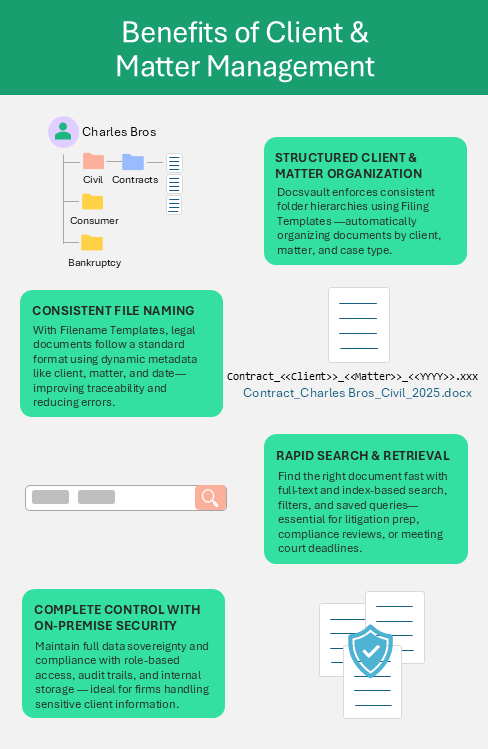
Docsvault’s Filing Templates help enforce a consistent client-matter structure by automatically organizing documents based on metadata such as Client Name, Matter Name, Matter Number, Case Type, or Department.
Key benefits include:
- Standardized Matter Structures: Every client and matter follows the same approved filing framework.
- Metadata-Driven Filing: Documents are automatically routed to the correct location based on profile information.
- Automated Folder Creation: Client and matter folders can be generated dynamically when new documents are imported.
- Enforced Consistency: Users cannot create unauthorized folder structures that deviate from established standards.
- Compliance-Friendly Organization: Consistent filing supports audits, eDiscovery, records retention, and legal hold requirements.
For example, a filing template can automatically create and maintain a structure such as:
Clients > [Client Name] > [Matter Name] > Contracts | Pleadings | Notes | Invoices
This approach ensures that documents related to a matter are stored consistently across the organization, making retrieval, collaboration, and governance significantly easier.
Read: Legal document indexing and filing system
This consistency becomes even more important in multi-practice firms, where each practice area may require different document categories, metadata fields, and filing workflows. Read more about document management for multi-practice law firms and how to build a structure that accommodates these differences.
2. Consistent Naming with Filename Templates
Reliable naming conventions are critical in a matter-centric system. Docsvault’s Filename Templates solve inconsistency with:
- Metadata-based Naming: Auto-populate filenames using client name, case number, document type, and date
- Custom Templates: Create naming formats tailored to different departments or matter types
- Static + Dynamic Elements: Include fixed prefixes (e.g., “Contract_”) alongside dynamic matter data
- Version Control: Easier chronological sorting and duplicate preventionFor Example: [Client] > [Matter]> [YYYY-MM-DD]
Consistent, matter-linked filenames make it easier for lawyers and support staff to locate and reference documents without confusion.
3. Powerful Search & Retrieval Capabilities
Speed matters when documents are tied to active cases. Docsvault provides advanced legal document search capabilities including:
- Index-based Search: Locate documents by client, matter ID, department, or date
- Full-Text Search: Search within the content of documents
- Search Filters: Narrow down results quickly by document type, folder, or tags
- Saved Search Profiles: Run repeat searches with one click
This becomes invaluable during litigation prep, discovery, or regulatory audits where response times are critical.
4. Built-in Compliance Support & Record Retention
Docsvault supports secure, matter-level compliance management with:
- Access logs: See who accessed which matter documents, when, and from where
- Permission controls: Limit document visibility by role, department, or matter
- Retention policies: Set automatic retention timelines for legal records
- Legal Holds: Preserve key documents for ongoing investigations or cases
These features make it easier to stay compliant with legal standards and industry regulations without needing third-party tools.
Read: Legal document compliance and version control
5. On-Premise Control for Sensitive Legal Data
Many legal organizations prioritize data sovereignty—the ability to maintain full control over sensitive client and case data. Docsvault’s on-premise legal document management system provides:
- Data Security: All matter files stored securely within your internal servers
- Granular Access Rights: Define who views or edits each type of file
- Role-Based Restrictions: Control what documents paralegals, attorneys, or finance staff can access
- Disaster Recovery Options: Ensure your data is protected, backed up, and restorable
Unlike cloud-only services, on-premise deployment gives IT departments and legal leadership full command over infrastructure, security protocols, and compliance policies.
6. Secure and Scalable Deployment Options
While on-premise remains the gold standard for sensitive data, Docsvault also supports:
- On-premise deployment with secure remote access, allowing teams to connect to in-house storage from any location
- Secure web access, providing browser-based connectivity to on-premise documents for authorized users
- Mobile access with full audit trails, supporting attorneys during travel, court appearances, or off-site meetings
This approach allows legal teams to maintain complete data ownership and compliance while supporting modern, distributed work patterns.
7. Document Import & Workflow Automation
Legal teams handle a wide variety of incoming documents—from scanned contracts to emailed pleadings. Docsvault helps you manage them all with:
- Bulk Import Tools: Apply filing and naming templates to route documents into the correct matter folders
- Workflow Automation: Route documents for reviews and approvals or trigger archive or deletion schedules
- Email Capture: Archive key client communications and attachments directly into the system
These automations save hours of manual work every week, especially in busy legal offices handling high volumes of paperwork.
Learn how this platform supports real legal workflows with this legal document management solution for law firms.
Matter-Centric Filing Best Practices
A matter-centric filing system is most effective when supported by clear standards and governance. Legal teams should establish consistent metadata fields, standardized naming conventions, and predefined matter structures that can be applied across all clients and practice areas.
Some recommended best practices include:
- Use unique Matter Numbers for every engagement or case.
- Standardize metadata fields such as Client Name, Matter Name, Document Type, Author, and Status.
- Apply consistent filename templates to improve retrieval and reduce duplication.
- Define matter folder structures that remain consistent across the firm.
- Implement retention policies and legal holds at the matter level.
- Use profile search and full-text search to locate documents quickly without relying solely on folder navigation.
By combining metadata, filing templates, search, and governance policies, legal organizations can create a scalable matter-centric filing framework that supports growth, compliance, and efficient document retrieval.
Who Benefits Most from a Matter-Centric Legal DMS?
- Law Firms – Standardize case folders, manage pleadings, contracts, and notes organized by matter
- In-House Legal Departments – Organize compliance documents, NDAs, and vendor contracts securely
- Legal Operations & Paralegals – Reduce file misplacement, speed up collaboration, and ensure naming accuracy
- Records & Risk Managers – Enable eDiscovery, maintain defensible audit trails, and enforce matter-based retention policies
Final Word: Matter-Centric Structure Is Power
A solid client and matter centric DMS isn’t optional — it’s a legal operations essential. When every document is tied to a matter, nothing falls through the cracks, every case is audit-ready from day one, and your team spends less time searching and more time practicing law.
With features like Filing Templates, Filename Standardization, Security and on-premise deployment, Docsvault delivers the matter-centric control that law firms and legal teams need to manage documents at scale — securely, efficiently, and compliantly.
Whether you’re managing 50 or 5,000 matters, this legal DMS for law firms offers the structure, security, flexibility, and compliance you need.
FAQs
Client matter management is the process of organizing, tracking, and collaborating on legal cases (or “matters”) within a document management system. A DMS helps firms group all related documents, communications, deadlines, and tasks under a specific matter for each client — improving efficiency, accuracy, and transparency.
Docsvault lets you create custom logical folder structures tailored to your business needs. The Profile Filing Template feature automatically places documents in the correct folders based on their metadata. This ensures that all files related to a particular client and matter are stored together in a single location. You can use the same profile to save emails, scanned files, images, and media files, keeping everything related to a matter in one place.
Customizing metadata fields in Docsvault allows law firms to add structured information to documents, making them easier to categorize, search, and manage. These fields—like client names, matter numbers, document types, or dates—are typically set up within document profiles, which act as templates for tagging documents consistently.
You can define different types of metadata (text, dropdowns, dates, etc.) based on your needs. Profiles can then be mapped to specific folders, so every document in that area automatically prompts for relevant metadata during upload or indexing.
For law firms, this means better control over document organization, easier compliance with retention and discovery rules, and faster access to case-critical information. It’s also a great way to streamline audits and improve collaboration across legal teams.
When a matter concludes, Docsvault allows firms to archive all documents and communications securely, restrict access to prevent accidental changes, retain records for compliance or future reference, and export matter data if needed for client delivery.
Yes. As a secure document management system for legal compliance, Docsvault offers role-based access controls, encryption in transit, secure audit logs to track who accessed or edited documents, and multi-factor authentication (MFA) with granular user permissions.