Document Management for Small and Mid-Size Law Firms: A Practical Guide (2026)

Most document management advice in the legal industry assumes a very specific kind of firm, one with a dedicated IT team, a long procurement cycle, and months to spare for software evaluation.
That’s not how decisions happen in most law firms.
In a 5- to 100-attorney firm, the person evaluating document management software is often doing three other jobs at the same time, supporting attorneys, managing operations, and keeping day-to-day work moving. There’s rarely time for a perfect evaluation process, and even less tolerance for getting the decision wrong.
This guide is written for that reality.
What Document Management Actually Means in a Law Firm
At a surface level, legal document management sounds simple – store files, organize them, retrieve them when needed. But in legal practice, it’s more nuanced than that.
But that’s not where most firms struggle.
The real issue is that documents are rarely the problem in isolation. The problem is everything around them, the way emails hold critical communication, the way different versions of the same file circulate without clarity, or how documents end up scattered across shared drives, desktops, and inboxes.
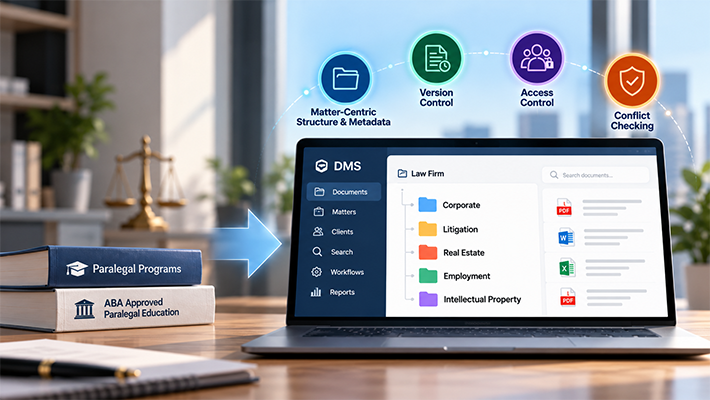
A legal document management system (DMS), when implemented properly, doesn’t just store documents. It imposes structure on how work is already happening. Instead of asking people to remember where things are saved, it ties documents to matters. Instead of relying on naming conventions, it makes search reliable by indexing content itself. Instead of trusting users to manage versions, it tracks changes automatically.
The question for most firms isn’t how the system works, it’s whether it actually reduces the friction they deal with every day.
Why Smaller Firms Often Feel the Pain More Sharply
There’s a common assumption that document management becomes more complex as firms grow. In reality, smaller firms often feel the impact more acutely, not because they have more documents, but because they have fewer safety nets.
In a large firm, if something is misfiled or overlooked, there are usually layers of review that catch it. In a smaller firm, that mistake sits quietly until it turns into a problem, often at the worst possible time.
You see it in small but telling ways: someone spends ten minutes looking for a document they’re sure exists; an outdated version gets sent to a client because no one realized a newer one was saved elsewhere; important email threads stay buried in personal inboxes instead of being tied to the matter.
Individually, these feel like minor inefficiencies. Over time, they compound missed deadlines, incomplete records, gaps in discovery. When this happens consistently, it’s usually not a discipline problem. It’s a structure problem. Understanding the common document management problems in law firms is the first step toward solving them.
What a 5–100 Attorney Firm Actually Needs
One of the easiest traps during evaluation is getting pulled into feature comparisons. On paper, most systems look similar. In practice, they behave very differently. Before diving into features, it helps to understand how these systems are evaluated in practice, covered in our document management for law firms guide.
For firms in this size range, what matters isn’t the number of features, it’s how naturally the system fits into daily work.
- Matter-centric organization
Legal work revolves around clients and cases. Any system that allows documents to exist outside that structure eventually creates confusion. Matter-centric organization isn’t a nice-to-have, it’s foundational. - Email integration
Most legal communication doesn’t happen inside a document system, it happens in Outlook. If saving emails into the DMS requires extra steps, people won’t do it consistently. That’s a structural gap, not a user behavior problem. Tight, low-friction email integration is essential. - Search that works like memory
People don’t remember exact file names. They remember fragments – a client name, a phrase, a rough timeframe. A system that can’t handle that kind of partial, contextual search quickly becomes frustrating and gets abandoned. Full-text indexing is the baseline. - Automatic version control
Version tracking that depends on users following a process will fail. It has to be automatic – the system should handle it without requiring anyone to remember. The same applies to access control and audit visibility.
The document management features that actually matter for smaller firms often come down to this: not more functionality, but better enforcement of consistency.
In practice, some systems are designed specifically around these constraints. Platforms built for smaller firms tend to prioritize structured document control, faster implementation, and minimal reliance on IT – aligning with existing workflows rather than asking firms to adapt to complex enterprise setups. For example, systems like Docsvault are often used in firms that need this balance, where the goal isn’t to add more layers, but to bring consistency into how documents, emails, and matter-related information are managed.
The measure of a good fit, however, isn’t the product name. It’s whether the system reduces friction in day-to-day work instead of introducing new complexity.
On-Premise vs. Cloud: What the Trade-Off Actually Looks Like
The deployment conversation is often framed as “modern cloud” vs. “legacy on-premise.” That framing misses the point.
For most small and mid-size firms, the decision isn’t about which is more modern. It’s about how much control you’re willing to give up and what that means over time. A closer look at on-premise vs. cloud document management for law firms shows that cloud systems reduce infrastructure burden, which is genuinely appealing, but they also centralize control with the vendor – your data, your access, and often your pricing flexibility.
On-premise or private cloud setups tend to suit firms that want predictability and long-term cost control, especially those already operating in a Windows-based environment. There isn’t a universal right answer. There is a right answer for your firm, based on how you think about risk, dependency, and long-term flexibility.
Choosing Between Platforms: What Actually Differentiates Them
By the time most firms reach this stage, the question shifts from “do we need a DMS?” to “which one actually fits?” This is where a structured legal DMS buyer’s guide becomes genuinely useful, not for feature checklists, but for the right evaluation questions.
The market isn’t uniform. Some platforms are designed to be cloud-first and quick to adopt. Others are built for large firms with complex workflows and dedicated support teams. Some focus on structured document control without adding unnecessary complexity.
The challenge is that all of them can look similar during a surface-level evaluation. Pricing pages, feature lists, and demos are designed to make each system look like the right fit. What actually differentiates them: how they handle email, how search works in practice, what implementation looks like without a full IT team, and how well the structure holds up when people are busy and not following best practices.
A useful evaluation focuses on those questions that run against your actual workflows, not hypothetical ones.
What to Be Careful About
In many cases, the biggest issues don’t come from choosing the wrong DMS. They come from trying to use tools that were never designed to be one.
Generic cloud storage platforms are the most common example. They’re easy to adopt, but they lack the structure and safeguards needed for legal work. Over time, they recreate exactly the problems they were meant to solve – documents scattered across folders with no consistent organization, no version history, and no audit trail.
Heavily customized systems carry their own risk. Without dedicated resources to maintain them, they drift. The structure that once made them useful starts to break down, and no one has time to fix it.
The goal isn’t just to store documents. It’s to ensure they remain organized, accessible, and reliable, regardless of who created them or when.
A Note on Timing: The Worldox Deadline
For firms currently using Worldox, there’s a practical urgency to this conversation. With the platform reaching end-of-life in December 2026, delaying the evaluation increases risk. The Worldox end-of-life migration guide walks through what firms need to consider – without vendor support, even routine issues become harder to resolve, and firms that start the evaluation early have more flexibility to assess options properly, test systems in their own environment, and plan migration without pressure or shortcuts.
How to Approach the Final Decision
By this stage, most firms already have a sense of what isn’t working. The decision becomes less about features and more about fit. It can help to compare legal document management systems side by side, not on feature counts, but on the questions that actually matter for your firm:
- Does this system match how we already work?
- How much control do we retain over data, pricing, and future flexibility?
- What does implementation actually look like without a dedicated IT team?
- What happens if we need to change systems again in five years?
If the vendor can’t answer those questions concretely, with examples from firms like yours – that’s useful information too.
Frequently Asked Questions
Yes, small law firms can manage on-premise document management systems, especially when they are designed for minimal IT involvement. Many modern systems align with existing Windows-based environments and require limited ongoing maintenance, making them practical even without a dedicated IT team.
In most cases, fully implementing a document management system in a law firm takes a few weeks, including document migration, folder structuring, and user adoption. The actual system setup can often be completed much faster, sometimes within hours, but organizing existing files and ensuring consistent usage across the firm is what takes time.
The biggest risk of using generic cloud storage for legal documents is gradual loss of control, not a single failure. Files become scattered, version history is inconsistent, and critical email communication remains disconnected from matters. Over time, this leads to gaps in records, compliance risks, and inefficiencies.
Yes, document management software is worth it for small law firms because it solves problems that already exist. A legal DMS doesn’t introduce structure; it formalizes and enforces the structure your firm already needs. The real question is whether your current system is intentional or accidental.
For a deeper breakdown, see our guide to legal document management.
When evaluating document management software, law firms should look for features such as:
- matter-centric document organization
- advanced document search and indexing capabilities
- email management
- version control and document history
- built-in PDF editing tools
- retention management and compliance controls
- security and role-based access control
- digital signatures
For a deeper explanation of these capabilities and how they support legal workflows, see Legal Document Management Software Explained.
Key Takeaways
A good document management system doesn’t feel like another tool to manage. It quietly removes friction.
For most small and mid-size firms, the priorities are consistent: keep documents tied to matters, reduce time spent searching, eliminate version confusion, and maintain control over sensitive information. The difference between a system that works and one that doesn’t is rarely technical. It comes down to whether it fits the way your firm already operates, and whether it enforces good structure even when people are too busy to think about it.
Explore More Legal DMS Resources
This article covers:
- What Document Management Actually Means in a Law Firm
- Why Smaller Firms Often Feel the Pain More Sharply
- What a 5–100 Attorney Firm Actually Needs
- On-Premise vs. Cloud: What the Trade-Off Actually Looks Like
- Choosing Between Platforms: What Actually Differentiates Them
- What to Be Careful About
- A Note on Timing: The Worldox Deadline
- How to Approach the Final Decision
- Frequently Asked Questions
- Key Takeaways