Leave Request eForms: Automating HR Leave Management with Docsvault
A leave request is a simple transaction on the surface — an employee asks for time off, a manager approves it. In practice, most organizations still run this process through paper forms, email chains, or a mix of both, which creates the same predictable problems: requests get lost in inboxes, approvals stall because a manager is traveling, and HR ends up reconstructing a paper trail after the fact instead of having one automatically.
A leave request eForm fixes the process itself — not just the paperwork. It replaces the paper application with a structured online form that routes automatically for approval, attaches supporting documentation, and files the completed record where HR can find it later without searching.
Key Takeaways
- Leave requests are one of the highest-volume, most repetitive HR transactions which makes them one of the easiest processes to automate first.
- A leave request eForm submits data in a structured format, routes it for approval automatically, and stores the completed record in the same system as the rest of an employee’s file.
- Unlike standalone leave-tracking software, an eForm built on a document management platform keeps the leave request itself supporting documents, approvals, and signatures as a permanent, auditable part of the employee record.
- Digital signature capture and automatic filing mean HR doesn’t need a separate step to reconcile the approved request with the employee’s file.
Why Paper Leave Requests Create Problems
Manual leave requests tend to break down in the same few places:
- Requests get lost. A paper form or a buried email doesn’t surface again until someone goes looking for it.
- Approvals stall. Without automatic routing, a request sits until someone remembers to forward it.
- There’s no reliable record. When HR needs to confirm how much leave an employee has taken, or produce documentation for a dispute, the paper trail is often incomplete.
- Supporting documents get separated from the request. A doctor’s note or supporting file submitted alongside a leave request frequently ends up in a different place than the original application.
None of these are leave-policy problems – they’re document-handling problems. That’s the part an eForm actually solves.
How a Leave Request eForm Works
A Docsvault web eForm replaces the paper leave application with an online form that can be embedded on an internal site or shared directly with employees.
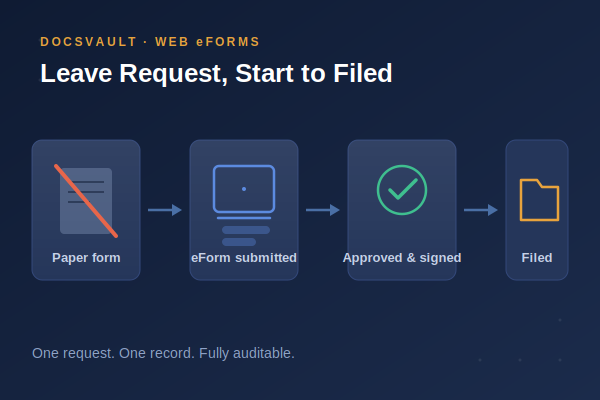
Submission. An employee fills out the leave request electronically — dates, leave type, and any notes — from any browser or device.
Beyond basic leave applications, web eForms can support more structured data collection through configurable field rules, formula fields, and dynamic form behavior. These capabilities can be useful when designing forms for different HR processes. Explore our guide to Web eForms features, formula fields, and cross-industry use cases to understand how these features work.

Docsvault’s Leave Application eForm – employees select absence type, enter dates, and submit directly from a browser.
Approval routing. The request routes automatically to the employee’s manager or team lead. Approvers can approve or deny with a single action, without needing to track down a paper form or forward an email.
Supporting documentation. Employees can attach supporting files — a medical note, for example — directly to the request. Everything travels together as one record instead of being submitted separately.
Digital signature. The completed form can be signed digitally as part of the approval, removing the need for a separate physical or scanned signature step.
Automatic filing. Once approved, the request — along with any attachments and the signature — is converted to PDF and filed automatically in the appropriate folder, accessible to the employee’s manager and HR.
What This Actually Solves
The value isn’t just “no more paper” — it’s what happens to the request after it’s submitted.
- Faster processing. Electronic submission and automated routing remove the delay of a form physically moving between desks.
- A real audit trail. Every submission, approval, and edit is tracked, so HR can reconstruct exactly what happened with any given request.
- One record, not several. The request, any attachments, and the approval signature stay together as a single filed document — nothing to reconcile later.
- Usage history on demand. Because every request is filed consistently, HR can pull a complete leave history for any employee without searching through separate systems.
Where This Fits Alongside Dedicated Leave Management Software
Purpose-built leave management platforms are strong at things a document-focused eForm isn’t trying to replace — real-time balance tracking, accrual calculations across leave types, and shared team calendars. If an organization’s leave process is genuinely complex — multiple leave types, accrual rules that vary by location, statutory tracking across jurisdictions — a dedicated leave management system may be the better fit for that layer of the problem.
What a leave request eForm inside a document management system adds is different: it treats the leave request as what it actually is — a document that needs to be submitted, approved, signed, and retained correctly. For organizations that already manage HR records inside a document management system, keeping the leave request in that same system means it’s covered by the same access controls, audit logging, and retention policy as every other employee record — rather than living in a separate tool with its own security model.
For a broader look at how leave requests fit into HR document workflows generally, see Workflow Automation for HR Approvals in the HR Document Management Best Practices guide.
Conclusion
A leave request doesn’t need a separate system to become faster and more reliable – it needs to stop being a piece of paper that has to physically move between people. A leave request eForm handles that directly: automated routing, attached documentation, a digital signature, and a record that files itself into the employee’s permanent file. For organizations already managing HR documents in a centralized system, that’s a meaningfully lower-friction fix than adopting a separate leave-tracking tool just to solve one process.