Web eForms: Formula Fields, Field Rules & Cross-Industry Use Cases
Gartner has estimated that roughly 85% of business processes still rely on forms in some way. That number hasn’t gone away with digitization — it’s just shifted what “filling out a form” actually looks like. The organizations still losing time to this are the ones where a form is still a static PDF or a piece of paper: printed, filled in by hand, walked to a desk, and manually re-typed into whatever system needs the data next.
A web eForm replaces that entire chain with a single online submission that can calculate its own totals, show or hide fields based on what the user selects, route itself to the right approver, and file itself as a completed record — without a developer building any of it from scratch.
It’s worth being clear about what this actually is: Docsvault’s eForms is an add-on module built into the Docsvault document management system, not a standalone form builder. A completed eForm doesn’t just get submitted — it becomes a document inside the same repository, subject to the same indexing, workflow, retention, and access control as everything else in the system. That’s the real difference from a general-purpose form tool: the form and the document management system it feeds into are the same product.
This guide covers two of the features that do most of that work — Formula Table calculations and Field Rules — and then walks through how they show up differently across HR, accounting, insurance, and government, since the same two features solve very different problems depending on the industry.
What a Web eForm Actually Does
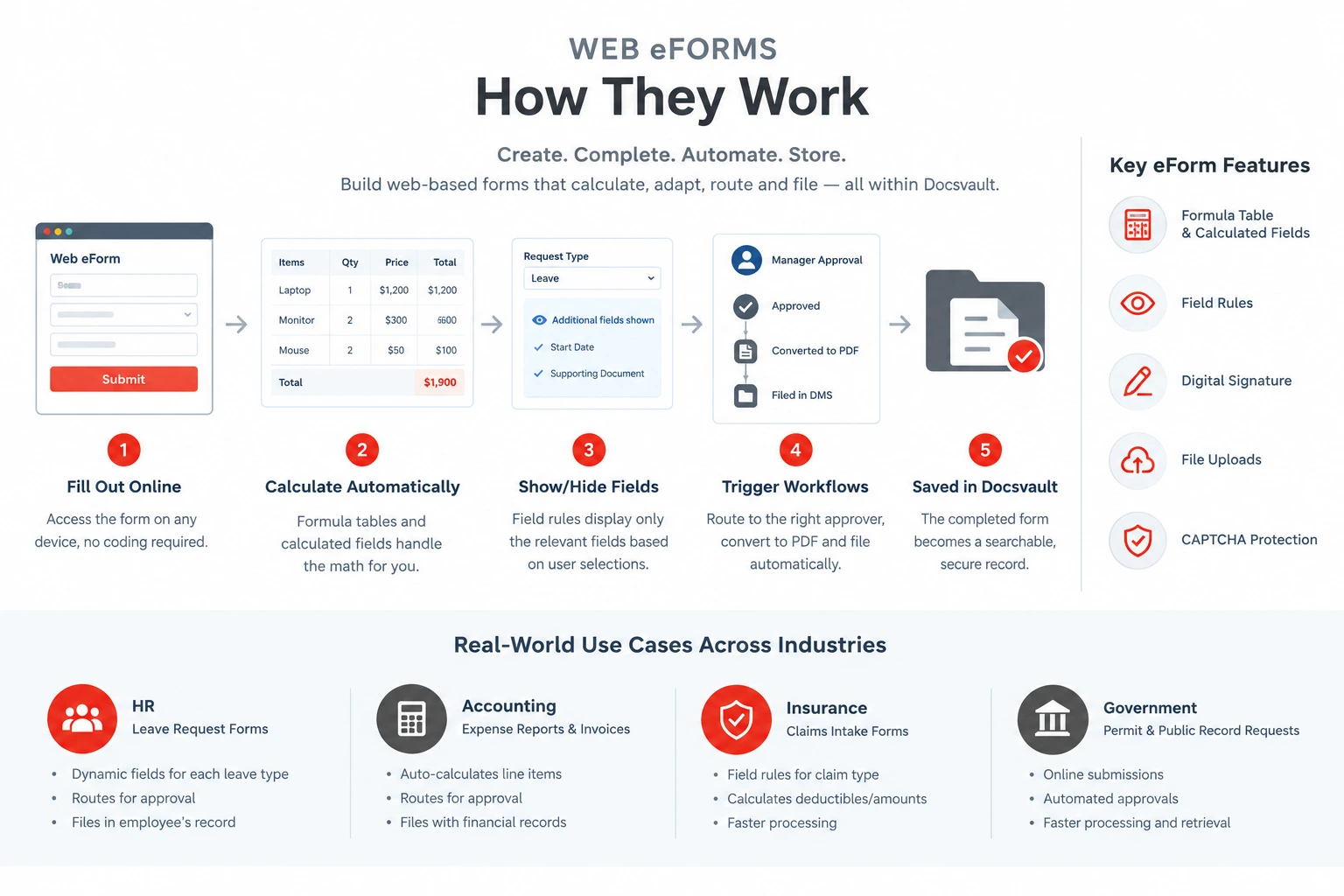
Docsvault’s eForms add-on builds browser-based forms without requiring any coding — forms that can be embedded on a public website or shared internally, and that work the same way on desktop, tablet, or phone. A submitted form can trigger a workflow immediately, get converted to PDF automatically, and file itself into the document management system using the data the submitter just entered.
Beyond basic text fields and dropdowns, the add-on includes a few capabilities that do most of the heavy lifting: self-calculating fields, dynamic field visibility, digital signature capture, file uploads, and CAPTCHA protection for publicly shared forms. The next two sections cover the first two in detail, since they’re the ones that most change what a form can actually do.
Formula Table & Calculated Fields
Most business forms involve at least one number that has to be added, multiplied, or otherwise calculated from other numbers on the same form — a total, a line-item cost, a days-until-due calculation. Handled manually, that’s a spot where data entry errors creep in even when everything else about the process is correct.
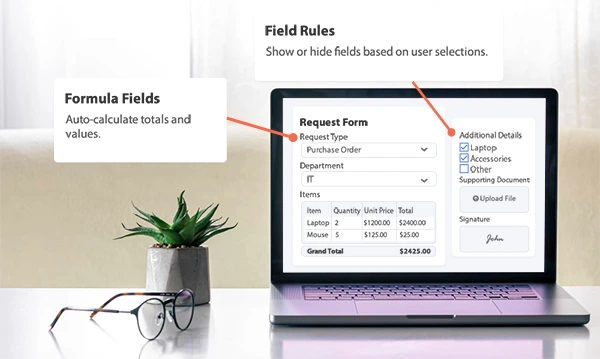
Formula Table is a form control built specifically for this. It supports self-calculating columns using standard arithmetic operators — addition, subtraction, multiplication, and division — and works equally well for two different jobs:
- Calculating a value, such as a purchase order, invoice, or expense report where line items need to sum into a total automatically.
- Collecting tabular data, such as an employee list or a multi-row data sheet, where the table format itself is the point, not just the math.
Beyond the table control, individual numeric and date fields can also be set to calculate automatically based on another field’s value — for example, multiplying two numbers together, or adding a number of days to a date field to calculate a due date or expiration date without the submitter doing the math themselves.
The practical effect is the same either way: whoever fills out the form doesn’t do the arithmetic, and whoever processes it afterward doesn’t have to double-check it by hand.
Field Rules: Making One Form Serve Many Purposes
Field Rules solves this by showing or hiding specific fields dynamically, based on a value selected elsewhere on the same form — configured without any coding.
Two examples illustrate how differently this can be used:
- On a property inquiry form, selecting “Residential” surfaces fields like number of residents, bedrooms, and pets — while selecting “Commercial” swaps in an entirely different set of relevant fields.
- On a job application form, selecting a specific job vacancy from a list can surface only the fields relevant to that role, instead of showing every applicant the same generic form regardless of position.
The result is a form that feels purpose-built for whoever’s filling it out, while still being a single form to build, maintain, and update.
Cross-Industry Examples
Formula Table and Field Rules solve genuinely different problems depending on what a given industry’s forms actually look like. A few examples:
HR: Leave Request Forms
HR leave requests are a natural fit for Field Rules — a request for sick leave needs different supporting fields than a request for bereavement leave or unpaid time off. A leave request eForm submits electronically, routes to a manager for approval, accepts a supporting document upload, and captures a digital signature — with the completed record filed automatically into the employee’s file.
See the full walkthrough: Leave Request eForms: Automating HR Leave Management
Accounting: Expense Reports & Invoice Approvals
Accounting and finance teams get the most value from Formula Table specifically — expense reports, purchase orders, and invoices all involve line-item totals that should never be calculated by hand. An expense report eForm can total line items automatically, route to a manager for approval, and file directly alongside the rest of an employee’s or vendor’s financial records — reducing both data-entry time and the reconciliation errors that come with manual arithmetic.
Related: Document Management Software for Accounting Firms and Accounting Document Management Solutions
Insurance: Claims Intake Forms
Insurance forms tend to need both features at once. A claims intake form can use Field Rules so that selecting “Auto,” “Property,” or “Health” surfaces only the fields relevant to that claim type — rather than showing every claimant the same generic intake form — while Formula Table handles any deductible or claim-amount calculations within the same submission. Faster, cleaner intake also means faster processing, which matters directly to customer satisfaction in a service where turnaround time is part of the product.
Related: Insurance Document Management and the Document Management for the Insurance Industry whitepaper
Government: Public Record & Permit Requests
Government agencies use web eForms to let citizens submit permit applications and public record requests online instead of in person or by mail — with the submission automatically triggering an internal approval workflow. In one documented case, a U.S. Supervisor of Elections office used Docsvault’s web eForms and automated workflows to modernize its permit request process for polling sites and election logistics: permits that once took hours to retrieve or verify became instantly searchable, approval times dropped from days to minutes, and the office digitized 95% of its permit backlog within a year while cutting retrieval and processing time by roughly half.
Frequently Asked Questions
Formula Table is a form control that performs self-calculating arithmetic — addition, subtraction, multiplication, and division — across form fields. It’s commonly used for purchase orders, invoices, and expense reports, and can also be used purely to collect structured, tabular data.
Field Rules is a no-code feature that dynamically shows or hides specific form fields based on a value the submitter selects elsewhere on the same form. It allows a single form to adapt to different use cases — such as different property types or job vacancies — without building separate forms for each.
Yes. Many real-world forms — insurance claims intake is a good example — benefit from both: Field Rules to surface only the relevant fields based on claim type, and Formula Table or calculated fields to handle any totals or deductible math within the same submission.
No. eForms is an add-on module within the Docsvault document management system, not a separate standalone tool. It requires a Docsvault DMS deployment — the value of the feature comes specifically from a submitted form being filed, indexed, and workflowed inside the same repository as the rest of an organization’s documents, rather than living in a separate system.
No. Both Formula Table and Field Rules are configured through Docsvault’s drag-and-drop form builder within the DMS, without requiring programming knowledge.
A completed eForm submission can be converted to PDF automatically, trigger a workflow, and be filed directly into the document management system using the submitted data for indexing — keeping the completed form, any attachments, and its approval history together as a single record.
Conclusion
Formula Table and Field Rules solve two different problems — one is about arithmetic, the other is about relevance — but they share the same underlying idea: a form should do more work than the person filling it out. Whether that means an accounting team that no longer double-checks expense math by hand, or a government office that cut permit processing from days to minutes, the specific win looks different by industry. The mechanism behind it is the same two features — and because eForms lives inside the Docsvault DMS rather than as a separate tool, every submission is automatically part of the same searchable, auditable document repository as everything else the organization manages.
For the full capabilities of Docsvault’s eForms add-on, see the eForms feature page, or watch it in context in the Document Automation & Business Process Automation video.