Why Multi-Practice Firms Need DMS Structures That Paralegal and ABA Templates Cannot Standardize
As a law firm grows and specializes in more areas, such as corporate mergers and acquisitions, commercial real estate, family law, and intellectual property litigation, it becomes much harder to run the business. Keeping track of numerous specialized filings, discovery binders, and regulatory compliance reports across many departments requires a level of structure and consistency that traditional document handling may not provide at scale.
One mistake that growing businesses often make is depending too much on standard document templates and basic filing rules to keep things in order. Standardized templates make writing easier for individuals, but they don’t fix the problems with taxonomy, permissions, and versioning that happen at the enterprise level.
Multi-practice firms need a legal document management system architecture that can handle the different workflows of each department.
The structural limits of human standardization in places with more than one practice
Law firm leaders often try to fix the messiness of documents by implementing strict rules for manually naming files and using static template libraries. Legal education programs teach students how to use standard legal documents, but when these methods are applied in groups that vary and perform different types of work, they can create gaps rather than solve system-level document governance problems.
Each legal department has its own set of metadata needs, compliance rules, and steps in the document lifecycle. A litigation team uses strict court-filing indexes, discovery Bates stamping, and evidentiary exhibit tags. A real estate team, on the other hand, uses closing binders, escrow tracking, and title search repositories.
If you don’t have system-enforced cross-departmental filing rules, it can lead to broken file paths, duplicate drafts, and lost billable hours for a member of your legal team or an assistant.
Why departmental silos break generic document templates
- To keep highly private client and matter records safe, corporate offices need strict role-based access control. Practice groups, such as estate planning, need collaborative client portals for regular updates.
- A static file folder structure may struggle to accommodate the complex document hierarchies real estate firms handle, such as deeds, surveys, and multi-party closing checklists.
- Intellectual property litigation often benefits from detailed, immutable audit trails, so evidence chains can be preserved and version histories checked during discovery disputes.
- When lawyers use manual file transfers instead of an integrated on-premise legal DMS, they can make mistakes when entering the same information twice for cross-departmental cases.
| MULTI-PRACTICE DOCUMENT TAXONOMY |
Corporate M&A
|
Real Estate
|
IP Litigation
|
↓
| ENTERPRISE DMS ARCHITECTURE
(Centralized Metadata, Automated Routing, Immutable Audit Logging) |
Architectural requirements: Moving beyond basic filing systems
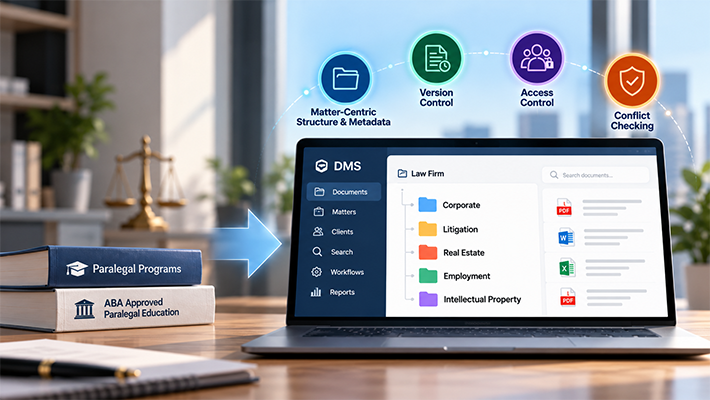
Multi-practice firms need to switch from standard folder trees to dynamic, matter-centered environments to overcome the limits of manual organization. A legal document management platform creates structured metadata environments for each case.
This allows different practice groups to use their own metadata schemas while keeping firm-wide governance centralized.
| MATTER-CENTRIC DMS FLOW
Incoming Unstructured File (Email Attachment, Portal Upload, Scan) |
↓
| STRUCTURED DOCUMENT INTAKE
– Metadata Tagging (Matter ID, Practice Area, Retention Rule) |
↓
| STRUCTURED WORKFLOW EXECUTION
– Auto-Routing to Specific Matter Directory |
For example, administrative support staff handling incoming documents can use structured filing and indexing processes to route files to the appropriate matter and capture information such as Client ID, Matter ID, Jurisdiction, and Retention Category.
According to the Legal Services Corporation’s 2024–2025 Technology Summit Report, legal-services organizations should support data-driven decision-making, responsible AI adoption, and broader technology modernization.
Key capabilities required for multi-practice document infrastructure
- Contract workflow automation to make review routing, approval triggers, and renewal notifications more consistent across the corporate governance and commercial law practice groups.
- Set up a matter-centered taxonomy that shows practice-specific metadata fields automatically every time a lawyer or paralegal adds a new file.
- Full-text optical character recognition (OCR) indexing can turn scanned PDFs and image-based discovery documents into assets that can be searched and read as text, depending on scan quality and OCR accuracy.
- Set up firm-wide search protocols to reduce data silos and make it easier for law firms to quickly find files across a wide range of client matters.
Overcoming the template trap with system-level governance
Templates provided by professional bar organizations, including ABA model rules, guidance, and paralegal-education standards, serve as useful starting points for legal training and ethical practice. However, standardized legal text or professional guidance does not address every operational detail of administrative document governance. A drafted contract template still requires version control, secure external sharing, retention-schedule tracking, and ethical-wall enforcement.
When multiple attorneys collaborate on a cross-practice matter—such as a corporate restructuring involving tax, employment, and environmental law—relying on manual file naming can lead to conflicting versions of documents.
Modern legal document management can reduce this friction through check-in/check-out mechanics, automatic major- and minor-version tagging, and real-time audit logging.
| MANUAL TEMPLATE vs. DMS GOVERNANCE |
| Attribute | Manual Templates | DMS Structure |
| Metadata Tagging | Manual/Inconsistent | Structured / Standardized Metadata |
| Version Control | Filename Hacks (v1, v2) | Built-in Version Control |
| Ethical Wall Security | Folder-level Lockouts | Role-Based Access Controls |
| Access & Retrieval | Manual Directory Search | Full-text & Metadata Search |
Actionable strategies for managing cross-practice document workflows
- Integrate ethical wall permissions into your document system so that when there are confidential conflicts in one area, document access controls limit access across unrelated practice groups.
- Give your staff clear educational resources, such as the Research.com list of low-cost ABA-approved paralegal degrees, to help legal support professionals learn both the basics of how the legal system works and how to use enterprise software. Before relying on any ranking, confirm the program’s current ABA approval status directly with the ABA directory and the school.
- Set up automatic document retention policies that are in line with the firm’s records policy, client obligations, applicable court rules, and state professional-conduct requirements. ABA Model Rule 1.6(c) requires lawyers to make reasonable efforts to prevent unauthorized access to client information, but retention duties vary by jurisdiction and matter type.
- Email management should be built directly into the matter workspace so that all client messages and attachments can be filed to the main matter thread, reducing the need to forward them individually. Microsoft Outlook integration can make it easier to file emails and attachments directly from Outlook.
- Microsoft Office integration allows Word, Excel, and PowerPoint files to be managed alongside other matter documents, keeping related working documents together.
Final Thoughts
Standardized legal templates and manual naming rules are useful for individual writing, but they can’t fix the fact that a multi-practice law firm can become disorganized at the system level. As law firms expand into additional areas, they need a system-level solution to handle diverse metadata types, security levels, and compliance requirements.
Implementing a matter-centric, dedicated DMS bridges the gap between individual productivity and firm-wide governance. It can help ensure that all documents, regardless of practice area, are kept safe, searchable, and managed according to firm policy and applicable legal obligations.
Frequently Asked Questions
A matter-centric structure brings together all related emails, pleadings, contracts, and proofs into a single workspace organized by client and matter ID. This makes it easier for people from different departments to work together.
Standard templates only make the text in a document look the same. In different practice groups, they don’t say how files should be indexed, saved, protected, or retrieved.
Yes, when they are configured and supervised correctly. Automated workflows can use role-based permissions and ethical walls to limit access to files, maintain version control, and support required retention schedules.