What Is OCR in Document Management? Benefits, Use Cases, and How It Works

OCR stands for Optical Character Recognition. It is a technology to convert text from scanned documents into searchable and editable digital files. How does OCR do this? OCR software reads the scanned images and creates a layer of hidden text below the image so that your computer can read, identify, and search this text. Let’s go through the details below.
Why is OCR important?
According to Gartner, by end of 2022, 90% of large organizations will have implemented some form of robotic process automation (RPA). The rising use of RPA highlights the importance of OCR technology, which converts typed or printed text into a machine-readable format.
Many organizations still receive information in paper format. Business processes include paper forms, invoices, legal documents, and printed contracts. It takes a lot of time, space, and effort to store and manage these large volumes of paper documents.
The solution to this is using document management software with OCR. Optical character recognition is the most important feature of any paperless document management system. The OCR software recognizes printed text, and you can search by the content within. You can also make changes to the scanned document, just like you can do with any other text document.
How does Optical Character Recognition work?
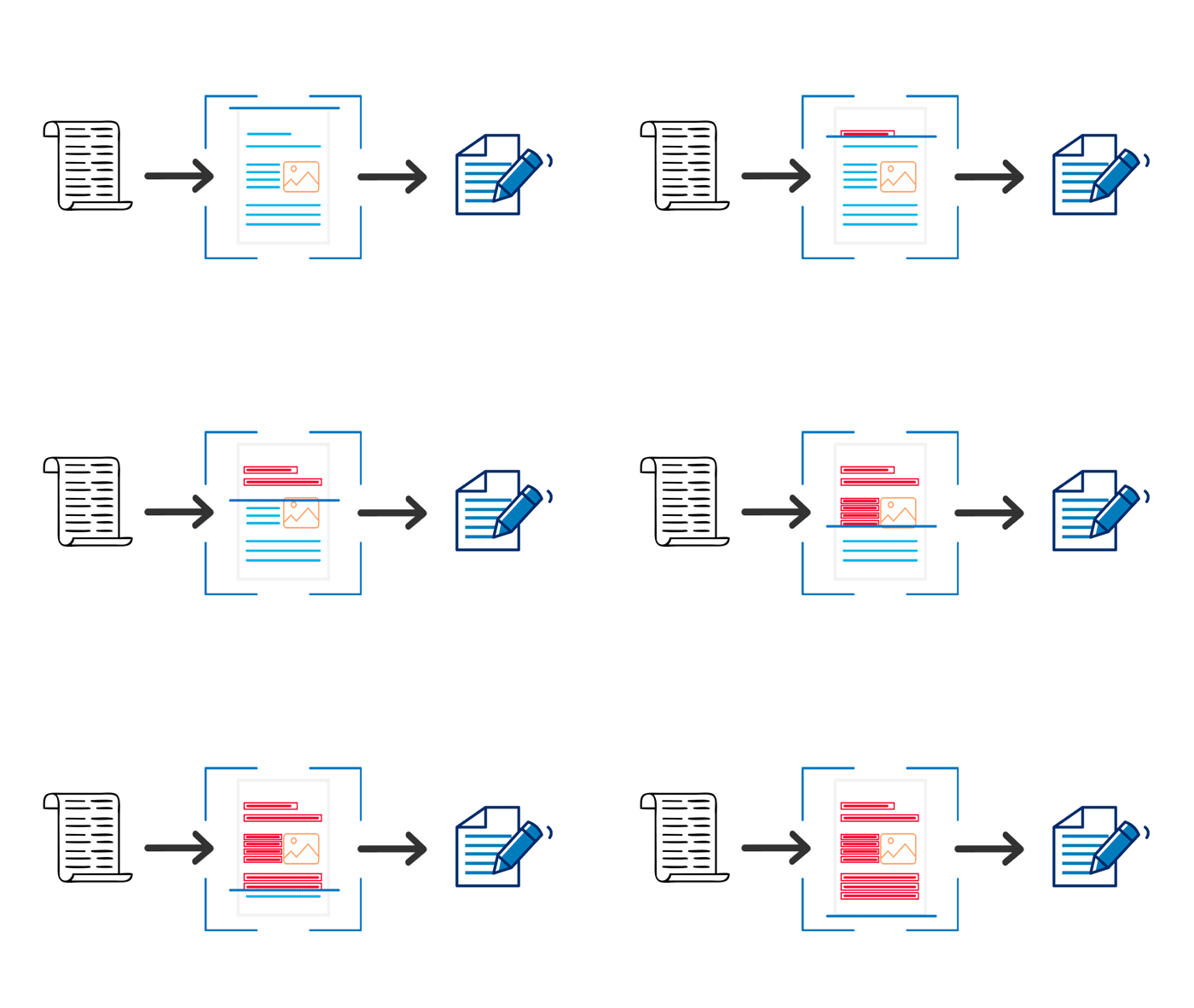
The optical character recognition software operates in the following way:
Scanning Document
The primary step for digitization is to OCR scanned documents. The OCR software considers the light regions of the scanned images as backgrounds and the dark areas as text.
Preprocessing
The OCR software first cleans the images by deskewing or tilting the scanned documents to fix the alignment issue during scanning, despeckling or removing any digital image spots, smoothing the edges of text images, etc.
Text recognition
The OCR software further processes the scans to identify alphabetic letters or numeric digits from printed text.
Postprocessing
The OCR system converts the unstructured data into usable information that can be searched and edited for further processing.
What are the types of OCR?
OCR technology can be categorized based on its use and application. The following are a few examples:
- Optical character recognition (OCR) – captures typewritten text, one glyph or character at a time.
- Optical word recognition – captures typewritten text, one word at a time, and is usually just known as OCR.
- Intelligent character recognition (ICR) – targets handwritten or cursive text, one glyph or character at a time, usually involves machine learning.
- Intelligent word recognition (IWR) – captures handwritten or cursive text, one word at a time.
What are the benefits of Optical Character Recognition (OCR)?
Although the technology behind OCR is slightly complex, its benefits are straightforward. OCR transforms scanned documents and images into machine-readable text, making information searchable, accessible, and easier to manage. Instead of manually reviewing paper documents or image-based PDFs, users can quickly locate information using keywords, phrases, or document content.
OCR also improves accessibility by enabling screen readers and assistive technologies to interpret document content, making information more accessible to people with visual impairments.
Key benefits of OCR include:
- Reduce physical storage requirements by digitizing paper documents.
- Eliminate repetitive manual data entry tasks.
- Improve access to information across the organization.
- Enable full-text search within scanned documents and PDFs.
- Accelerate document processing and workflow efficiency.
- Improve document retrieval and knowledge sharing.
- Support compliance and records management initiatives.
- Create a foundation for further automation and intelligent document processing.
OCR vs AI Capture: What’s the Difference?
OCR and AI Capture are often mentioned together, but they serve different purposes within a document management strategy.
OCR focuses on converting printed or handwritten text from scanned documents into machine-readable text. Once processed, documents become searchable, editable, and easier to organize.
AI Capture builds upon OCR by understanding the context of information within a document. Rather than simply recognizing text, AI Capture can identify, classify, and extract meaningful business information for use in workflows and business processes.
For example, when processing an invoice:
OCR converts the invoice into searchable text.
AI Capture can automatically identify and extract the invoice number, vendor name, invoice date, due date, and total amount.
Similarly, in legal, healthcare, and administrative environments, AI Capture can help identify and extract important metadata from large volumes of documents, reducing manual indexing and improving processing speed.
OCR vs AI Capture Comparison
| Capability | OCR | AI Capture |
|---|---|---|
| Converts scanned images into searchable text | ✓ | ✓ |
| Creates searchable PDFs | ✓ | ✓ |
| Supports full-text search | ✓ | ✓ |
| Extracts key business data | Limited | ✓ |
| Understands document context | ✗ | ✓ |
| Automatically classifies documents | ✗ | ✓ |
| Reduces manual indexing | Limited | ✓ |
| Supports intelligent workflow automation | Limited | ✓ |
Do You Need OCR or AI Capture?
The answer depends on your business requirements.
If your primary goal is to convert paper documents into searchable digital files, OCR may be all you need. OCR is ideal for organizations looking to digitize records, improve document retrieval, and enable full-text search across scanned documents.
However, if you need to automatically extract information such as invoice numbers, vendor names, dates, amounts, client information, or other business-critical data, AI Capture can provide additional value. AI Capture reduces manual indexing, supports workflow automation, and helps organizations process large volumes of documents more efficiently.
In modern document management systems, OCR and AI Capture work together. OCR provides the searchable text foundation, while AI Capture transforms that information into structured data that can drive business processes and automation.
Who Can Benefit from OCR and AI Capture?
Any organization seeking to reduce paper-based processes can benefit from OCR. Businesses looking to further automate document-intensive operations can also leverage AI Capture to extract and process information more efficiently.
Common use cases include:
Healthcare
Healthcare providers can digitize patient records, lab reports, treatment histories, and physician notes. OCR makes records searchable, while AI Capture can help identify and extract patient information and document metadata.
Government and Public Sector
Government agencies can convert decades of public records into searchable digital archives, improving information access and reducing reliance on paper-based storage.
Legal Services
Law firms and legal departments can digitize case files, contracts, pleadings, correspondence, and matter-related documents. OCR enables fast content searches, while AI-powered extraction can assist with document organization and metadata capture.
Education
Universities and educational institutions can process student records, admissions documents, employee files, and administrative paperwork more efficiently.
Finance and Accounts Payable
Organizations can automate the processing of invoices, receipts, and financial documents. OCR converts documents into searchable records, while AI Capture can automatically identify important fields such as invoice numbers, vendor names, dates, and amounts.
How can Docsvault help with OCR and AI Capture?
As organizations continue their digital transformation initiatives, document management systems play an increasingly important role in organizing, searching, and automating information.
Docsvault offers both OCR and AI-powered document capture capabilities to help businesses eliminate paper-based processes and improve productivity.
Simple Optical Character Recognition (OCR) Software
The Optical Character Recognition (OCR) add-on recognizes text in scanned or imported documents and converts them into searchable PDFs. The extracted text is indexed by Docsvault’s search engine, allowing users to quickly locate documents based on words, phrases, numbers, or content contained within the files.
Benefits include:
- Searchable scanned documents
- Full-text search capabilities
- Improved document retrieval
- Reduced manual filing effort
- Better knowledge accessibility
AI-Powered Intelligent Data Capture
Docsvault’s AI-Powered Advanced Capture Solution extends traditional OCR capabilities by automatically identifying, classifying, and extracting important business information from documents.
Using artificial intelligence, organizations can streamline document-intensive processes by reducing manual data entry and improving information accuracy.
Typical use cases include:
- Invoice processing
- Vendor information extraction
- Automated metadata creation
- Document classification
- Workflow automation
By combining OCR and AI Capture technologies, organizations can move beyond document digitization and toward intelligent document processing and business automation.
FAQs
OCR converts scanned documents into machine-readable text, making them searchable and editable. AI Capture builds on OCR by understanding document content and automatically extracting important business information such as invoice numbers, vendor names, dates, and amounts. OCR focuses on text recognition, while AI Capture focuses on information extraction and automation.
The most common use is for simple document scanning – converting printed text documents into editable and searchable text documents. Increasing use of optical character recognition (OCR) systems has been seen in the sector of retail, government, transport & logistics, healthcare, accounting, insurance, finance, IT & telecom, manufacturing, and others.
According to TMR, the optical character recognition market was valued at US$ 70 million in 2019 and had a volume of 15,457 thousand units. It is predicted to grow at a CAGR of 15% from 2020 to 2030.
In general, 300 dpi will be a good resolution for OCR accuracy. 400 dpi may be better for a very small print.