AI Document Capture: A Practical Guide for Business Teams

Businesses have spent years digitizing paper records, yet many still struggle with one persistent challenge: getting documents into their document management system accurately and efficiently.
Document Scanning is easy. Finding the right document six months later is not.
Invoices arrive as PDFs, contracts come through email, HR forms are scanned from paper, and supplier documents arrive in dozens of different layouts. Someone still has to identify each document, determine its type, and manually enter metadata before it becomes searchable.
This is where AI document capture changes the workflow.
Unlike traditional document capture methods that depend on rigid templates or manual indexing, AI-powered capture analyzes document content, identifies important information, and extracts metadata automatically. The result is faster filing, improved consistency, and significantly less manual effort.
However, successful implementation requires more than simply enabling AI. Organizations need clear objectives, document standards, governance, and realistic expectations.
This guide explains how business teams can successfully implement AI document capture while avoiding common deployment mistakes.
What Is AI Document Capture?
AI document capture is the process of using artificial intelligence to understand business documents and extract meaningful metadata during document import.
Instead of asking users to manually complete multiple index fields, AI analyzes the document and recommends values such as:
- Document type
- Customer or client name
- Vendor information
- Invoice number
- Contract title
- Purchase order number
- Dates
- Reference numbers
- Other business-specific metadata
The extracted information becomes searchable metadata inside a document management system, making documents easier to organize and retrieve.
Unlike simple OCR, AI document capture attempts to understand the document’s context rather than merely converting images into searchable text.
AI Document Capture vs. OCR:
Understanding the Difference
Many organizations assume OCR and AI capture are interchangeable, but they solve different problems.
OCR (Optical Character Recognition) converts printed or handwritten text into machine-readable text.
AI document capture (often referred to as intelligent document capture) goes further by interpreting document content and identifying information that should populate metadata fields.
For example:
A scanned invoice may contain hundreds of words.
- OCR simply converts those words into searchable text.
- AI document capture can recognize:
- Supplier name
- Invoice number
- Invoice date
- Purchase order
- Total amount
- Customer account
and place those values into the appropriate metadata fields.
In practice, OCR and AI often complement each other rather than compete.
Why Businesses Are Moving Beyond Manual Indexing
Manual document indexing creates several operational problems:
- Inconsistent naming conventions
- Typing errors
- Missing metadata
- Slow document processing
- Reduced search accuracy
- Higher labor costs
These problems become more significant as document volumes grow.
AI-assisted metadata extraction helps standardize document classification while reducing repetitive work for employees.
Business users can spend less time entering data and more time reviewing exceptions or handling higher-value tasks.
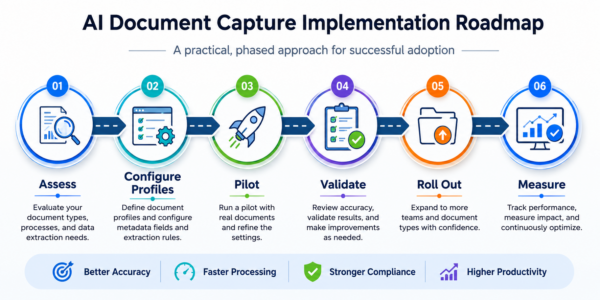
Step 1: Identify High-Volume Document Types
The first implementation step is understanding which documents consume the most indexing effort.
Typical candidates include:
- Accounts payable invoices
- Purchase orders
- Contracts
- HR forms
- Vendor documents
- Customer correspondence
- Delivery notes
- Compliance records
- Reports
Rather than attempting every document type simultaneously, begin with one or two categories where manual indexing consumes the most time.
Early success builds confidence and helps refine implementation practices before expanding.
Step 2: Define Your Metadata Strategy
AI can only provide value when metadata supports business processes.
Before implementation, determine:
- Which metadata fields are required?
- Which fields are optional?
- Which values should come from AI?
- Which values should come from users?
- Which values should remain system-generated?
Examples include:
| Document | Typical Metadata |
| Invoice | Vendor, Invoice Number, Date, Total |
| Contract | Customer, Contract Type, Effective Date |
| HR Form | Employee, Department, Document Type |
| Purchase Order | Supplier, PO Number, Date |
Well-designed metadata structures improve search quality and reporting long after documents are imported.
Step 3: Standardize Import Workflows
AI document capture works best when import workflows are consistent.
Consider:
- Email imports
- Scanner imports
- Drag-and-drop uploads
- Network folder imports
- Bulk document imports
Every workflow should apply the same metadata standards and validation rules whenever possible.
Consistency improves indexing quality while simplifying user training.
Step 4: Configure AI Capture Profiles
A successful implementation depends on well-designed Document Profiles.
A Document Profile defines the metadata (index fields) required for a specific document type.
Instead of using one generic profile for every file, organizations can create profiles tailored to different departments and document categories.
For example:
Invoices require financial metadata.
Contracts require legal metadata.
HR documents require employee information.
Creating dedicated AI capture profiles allows organizations to tailor extraction behavior for different document classes without requiring users to manually configure settings for every import. For each profile, organizations define the metadata that should be extracted, enabling the AI to consistently capture the information needed for indexing and document retrieval.
Step 5: Validate Before Filing
AI should accelerate document processing, not eliminate quality control.
Organizations should determine which fields require user verification before filing.
Examples include:
- Invoice Amount
- Matter Number
- Policy Number
- Contract Effective Date
Validation helps ensure documents are indexed accurately and supports downstream business processes.
Step 6: Train Employees on Exception Handling
No AI system correctly interprets every document.
Employees should understand:
- How to review extracted metadata
- How to correct mistakes
- When manual entry is appropriate
- Which documents require additional review
The objective is not eliminating human involvement but reducing repetitive work.
Step 7: Measure Success
Organizations often measure implementation success using metrics such as:
- Average indexing time
- Manual corrections required
- Metadata accuracy
- Search success rate
- User adoption
- Documents processed per day
Tracking these metrics provides evidence of operational improvements while identifying opportunities for refinement.
Common Implementation Challenges
Poor Metadata Design
AI cannot compensate for poorly designed metadata fields.
Organizations should simplify indexing wherever possible.
Trying to Automate Everything
Start small.
A phased rollout produces better results than attempting every document category simultaneously.
Lack of User Training
Employees should understand why AI suggestions appear and how to verify them.
Training builds confidence and improves consistency.
Inconsistent Document Quality
Low-resolution scans, incomplete documents, and poorly formatted PDFs may reduce extraction quality.
Improving scan quality often improves AI performance.
Governance Matters
AI document capture should operate within established document governance policies.
Organizations should define:
- Approved document types
- Required metadata
- User permissions
- Retention policies
- Audit requirements
- Version control procedures
Good governance ensures that improved capture also leads to better long-term document management. These practices also align with broader AI governance principles such as those described in the NIST AI Risk Management Framework, which encourages organizations to manage AI systems responsibly while maintaining oversight, accountability, and trust.
Where AI Document Capture Delivers the Most Value
Organizations frequently benefit in areas such as:
Finance
- Invoice processing
- Accounts payable
- Vendor documentation
Human Resources
- Employee onboarding
- Personnel records
- Compliance documentation
Legal
- Contracts
- Client files
- Matter documentation
Operations
- Purchase orders
- Shipping documentation
- Quality records
Professional Services
- Customer documentation
- Project files
- Engagement records
The greatest return typically comes from repetitive document-intensive processes where employees spend significant time entering metadata manually.
How DocAI Supports AI Document Capture
Many organizations evaluate AI document capture as a standalone technology. However, the greatest value is often realized when AI operates as part of an integrated document management system. This aligns with guidance from AIIM on integrating AI into information management strategies, which emphasizes embedding AI within established information management practices rather than treating it as an isolated technology.
DocAI is an AI-powered add-on for Docsvault that extends the platform with AI capabilities while preserving the governance, security, and structured document management organizations expect from an on-premise document management system.
AI Capture within DocAI is Docsvault’s implementation of AI document capture, designed to simplify document indexing through AI-powered metadata extraction. Organizations can configure AI Capture settings for different document profiles, defining the metadata to be extracted for each document category. Based on these settings, AI Capture analyzes documents, extracts the requested metadata, and presents the results for review before filing.
This approach helps reduce manual indexing while maintaining control over document organization and quality.
Organizations using Docsvault can combine DocAI with existing document management capabilities such as version control, security, full-text search, audit trails, workflow automation, and structured metadata to create more efficient document intake processes.
Today, AI Capture is the first capability within DocAI, helping automate metadata extraction and document indexing. As the DocAI platform evolves, additional AI-powered capabilities can build on the same document repository and metadata foundation.
Best Practices for Long-Term Success
Organizations that achieve the best results typically:
• Begin with one department
• Standardize metadata before implementation automated document indexing
• Define document categories clearly
• Review AI-extracted values where business accuracy is critical.
• Monitor search quality and adjust profiles as requirements evolve.
• Expand gradually to additional document types
• Update capture profiles as business processes evolve
AI document capture should be viewed as an ongoing improvement initiative rather than a one-time deployment.
Why On-Premise AI Still Matters
As organizations adopt AI document capture, deployment is becoming just as important as the AI itself. For many law firms, accounting practices, healthcare providers, government agencies, and other regulated organizations, maintaining control over business documents remains a key requirement for security, privacy, compliance, and data governance.
Docsvault is an on-premise document management system, and DocAI extends it with AI-powered document capture capabilities. This allows organizations to adopt AI-assisted metadata extraction while continuing to manage documents within their existing repository, security model, and governance framework.
For organizations that prefer to keep sensitive business information under their own control, an on-premise approach provides a practical path to modernizing document capture without fundamentally changing how documents are stored, managed, or governed.
Frequently Asked Questions
AI document capture uses artificial intelligence to identify and extract relevant business information from documents and populate searchable metadata fields, reducing manual indexing.
OCR converts scanned documents into machine-readable text, making them searchable and editable. AI Capture builds on OCR by understanding document content and automatically extracting important business information such as invoice numbers, vendor names, dates, and amounts. OCR focuses on text recognition, while AI Capture focuses on information extraction and automation.
Yes. OCR converts printed or handwritten text into machine-readable text. AI document capture goes further by understanding document context and extracting meaningful business information.
AI document capture helps organizations automate metadata extraction from business documents, reducing the need for manual data entry and document indexing. By capturing information consistently, it improves document organization, search accuracy, and overall information governance.
Key benefits of AI document capture include:
- Reduced manual indexing and data entry
- Faster document processing and filing
- More consistent metadata across documents
- Improved document search and retrieval
- Reduced indexing errors and greater accuracy
- Increased productivity for document-intensive business processes
- Better support for workflows, compliance, and records management
When integrated with a document management system, AI document capture can further streamline document intake, automate filing processes, and ensure documents are organized consistently throughout their lifecycle.
Document profiles define the metadata fields required for different document types. When used with AI Capture, they also determine which metadata should be extracted, helping maintain consistent indexing, document organization, and search accuracy.
DocAI is Docsvault’s AI-powered document management add-on, a set of AI capabilities built into the Docsvault platform to help organizations automate document processing, improve metadata quality, and unlock greater value from their document repository.
AI Capture within DocAI extracts metadata during document import and scanning to help automate document indexing, filing, and document management workflows.
Conclusion
AI document capture is changing how organizations process business documents by reducing repetitive indexing tasks and improving metadata quality. When combined with thoughtful planning, standardized workflows, and strong governance, it can help teams process documents more efficiently while making information easier to find.
Successful AI document capture implementation is not about automating every document on day one. Instead, organizations should begin with high-volume document types, establish consistent metadata standards, and expand AI document processing as business processes mature.
Whether deployed in cloud or on-premise environments, the most effective AI document capture solutions are those that integrate seamlessly with an organization’s document management strategy. Combining AI-powered metadata extraction with sound records management practices—including structured metadata, retention policies, and information governance consistent with principles outlined in ISO 15489 Records Management—helps organizations improve productivity while maintaining long-term control over business information.
Additional Resources
For readers interested in learning more about AI governance, information management, and records management best practices, the following industry resources provide valuable guidance:
This article covers:
- What Is AI Document Capture?
- AI Document Capture vs. OCR:
Understanding the Difference - Why Businesses Are Moving Beyond Manual Indexing
- Common Implementation Challenges
- Where AI Document Capture Delivers the Most Value
- How DocAI Supports AI Document Capture
- Best Practices for Long-Term Success
- Why On-Premise AI Still Matters
- Conclusion