How to Ensure HIPAA Compliance with Docsvault?
Introduction
Ensuring compliance with HIPAA (Health Insurance Portability and Accountability Act) is a fundamental obligation for healthcare organizations, as it mandates strict measures to safeguard the privacy and security of patient records, particularly Protected Health Information (PHI). One of the most effective ways to achieve this is by utilizing robust document management software, which simplifies the management and protection of sensitive patient data, ensuring compliance with HIPAA’s stringent requirements regarding PHI.
How DMS Assists with HIPAA Compliance
Ensuring compliance with HIPAA (Health Insurance Portability and Accountability Act) is a fundamental obligation for healthcare organizations, as it mandates strict measures to safeguard the privacy and security of patient records, particularly Protected Health Information (PHI). One of the most effective ways to achieve this is by using HIPAA compliant document management software, which simplifies the management and protection of sensitive patient data. Modern healthcare document management software helps organizations centralize records, control access, and maintain auditability while meeting HIPAA’s stringent requirements for PHI.
Here are some of the ways Docsvault can support HIPAA compliance:
1) Securing Patient Records with Permission-Based Access Control
One of the primary requirements under HIPAA is the complete protection of Protected Health Information (PHI). This involves implementing rigorous security measures to prevent unauthorized access. Docsvault ensures this by offering permission-based security, allowing healthcare providers to control who can access specific patient information.
The system’s user and group-based security features allow administrators to assign access rights only to authorized personnel. This means sensitive patient data is shielded from unauthorized access, reducing the risk of accidental exposure or intentional data breaches. For instance, a doctor may have full access to patient records, while a front-desk employee may only view non-sensitive information.
Additionally, Docsvault provides an audit trail feature, which tracks all user activities, including who accessed, modified, or shared specific records. This ensures accountability and helps organizations identify potential security risks, further fortifying patient data against breaches.
This level of control helps organizations implement a secure document management system designed to protect sensitive healthcare records
2) Employee Training on Privacy Regulations and Procedures
Another crucial component of HIPAA compliance is ensuring all employees are well-versed in privacy regulations and the necessary procedures for safeguarding patient information. The success of any data protection program hinges on the competence of the staff in handling sensitive data responsibly.
Docsvault makes employee training more manageable by providing a platform that is easy to use and understand. The system’s intuitive interface and clear security protocols ensure that even non-technical employees can quickly grasp how to maintain HIPAA standards. This streamlines the training process, enabling staff to consistently apply the best practices for data protection, reduce errors, and limit the likelihood of HIPAA violations.
3) Establishing Procedures for Information Disclosure and Access Control
HIPAA also requires healthcare organizations to establish strict procedures for the disclosure of patient information. This includes controlling how information is shared with patients, healthcare providers, or third parties and ensuring that only authorized personnel can access or edit this information.
Docsvault allows healthcare firms to create and enforce these procedures using access-based rights management. With Docsvault, administrators can assign specific permissions to users based on their roles. For instance, permissions can be configured to allow certain users to view, edit, export, or delete records, while others may only have limited access to non-sensitive parts of the file.
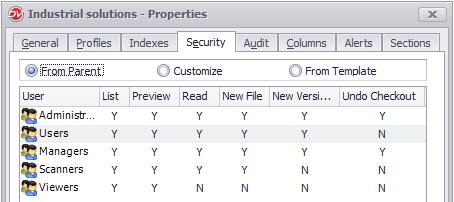
This flexibility ensures that patient data is only shared with those who have the appropriate authorization. It also helps healthcare firms manage requests for information efficiently, whether they come from patients requesting their medical records, staff needing to update patient information, or third-party entities seeking access to specific data.
Additionally, Docsvault’s version control and document retention policies ensure that patient records are handled according to HIPAA’s guidelines on data storage, updates, and disposal. This ensures that healthcare providers can manage patient information responsibly from creation to archiving or deletion. Maintaining history also supports document version control for compliance, ensuring changes to PHI remain traceable.
4) Implementing Regular Audits and Monitoring for Compliance
HIPAA requires that healthcare organizations regularly review and monitor their data management practices to ensure ongoing compliance. Docsvault makes this process seamless by offering built-in audit trails that track user activity, file access, and document changes.
These logs provide audit trails for HIPAA compliance, helping organizations to perform regular checks on who has accessed specific files, what changes were made, and if any unauthorized attempts were made to view or alter patient records. This capability helps organizations identify potential security threats early and take corrective actions before a breach occurs.
Regular auditing also helps firms stay prepared for potential HIPAA compliance reviews or inspections by providing detailed reports on how patient information has been handled over time.
5) Simplifying HIPAA Compliance with Automated Workflows
In addition to managing data security, healthcare organizations must also ensure that their workflows and processes comply with HIPAA regulations. Docsvault enables organizations to automate their document workflows, ensuring that processes like patient record updates, information requests, and data sharing are handled consistently and according to established procedures.
Automated workflows help eliminate manual errors, ensure timeliness in handling requests, and maintain a clear record of all actions taken within the system. By streamlining these processes, healthcare providers can reduce the administrative burden of HIPAA compliance and improve their overall efficiency.
6. Multi-Factor Authentication for Secure Access
HIPAA requires strong access controls to protect Protected Health Information (PHI). Docsvault supports multi-factor authentication (2FA), adding an extra layer of security beyond passwords. Administrators can enforce 2FA for all users, helping prevent unauthorized access even if login credentials are compromised. This strengthens identity verification and supports HIPAA security requirements for controlled system access. This additional layer of protection strengthens identity verification and supports multi-factor authentication for HIPAA compliance requirements.
7) Automated Backup and Disaster Recovery
HIPAA requires organizations to maintain contingency plans to ensure PHI can be restored in the event of system failure or disaster. Docsvault supports automated backups and reliable restoration, helping organizations recover documents quickly and maintain business continuity. Backup scheduling, restore procedures, and activity logging help support documentation requirements for HIPAA administrative safeguards. This additional layer of protection strengthens identity verification and supports multi-factor authentication for HIPAA compliance requirements. This approach also aligns with automated records retention for compliance, ensuring documents are preserved according to policy.
8) Email Notifications and Unauthorized Access Alerts
HIPAA requires technical safeguards to prevent unauthorized access or modification of PHI. Docsvault provides real-time email notifications for document access, changes, deletions, and unauthorized attempts. These alerts help administrators quickly identify potential risks and take action before issues escalate into reportable breaches.
These controls align with best practices outlined in this document compliance guide for managing sensitive information.
Read Case Studies:
AllPoint Home Health
Marion County Public Health
Conclusion: Ensuring HIPAA Compliance with Docsvault
In today’s healthcare environment, ensuring the privacy and security of Protected Health Information (PHI) is not just a legal obligation but also a critical component of maintaining patient trust. With Docsvault, healthcare organizations can implement comprehensive security measures, establish clear access control protocols, and streamline their processes to meet the rigorous requirements of HIPAA regarding PHI.
Docsvault supports HIPAA compliance through features such as permission-based security, multi-factor authentication, audit trails, encryption, automated backups, and real-time activity alerts. These capabilities help prevent unauthorized access, protect sensitive records, and ensure accountability across document handling processes. Automated workflows and structured access controls further help organizations manage information disclosure and maintain consistent compliance practices.
By combining secure access, monitoring, and recovery capabilities, Docsvault provides a robust solution for providers evaluating the benefits of healthcare document management software for protecting PHI and ensure ongoing HIPAA compliance. Whether it’s securing records, enforcing authentication, monitoring activity, or maintaining backup and recovery procedures, Docsvault offers the tools necessary for a compliant and efficient healthcare operation. Furthermore, while there is no official HIPAA certification for Business Associates, Docsvault has implemented strict internal procedures and trained its employees on HIPAA policies to support covered entities in meeting their compliance obligations.